6
Radio Control
Setting Up a Duplicate Wall Switch
If you want a backup for your primary wireless wall switch or
remote, you can quickly duplicate the current transmitter. When
this procedure is complete, any change made with any of the
transmitters also affects the operation of the other wireless wall
switches and remotes. Follow this procedure:
1. Mark the original transmitter.
2. Remove the back cover from the duplicate wall switch.
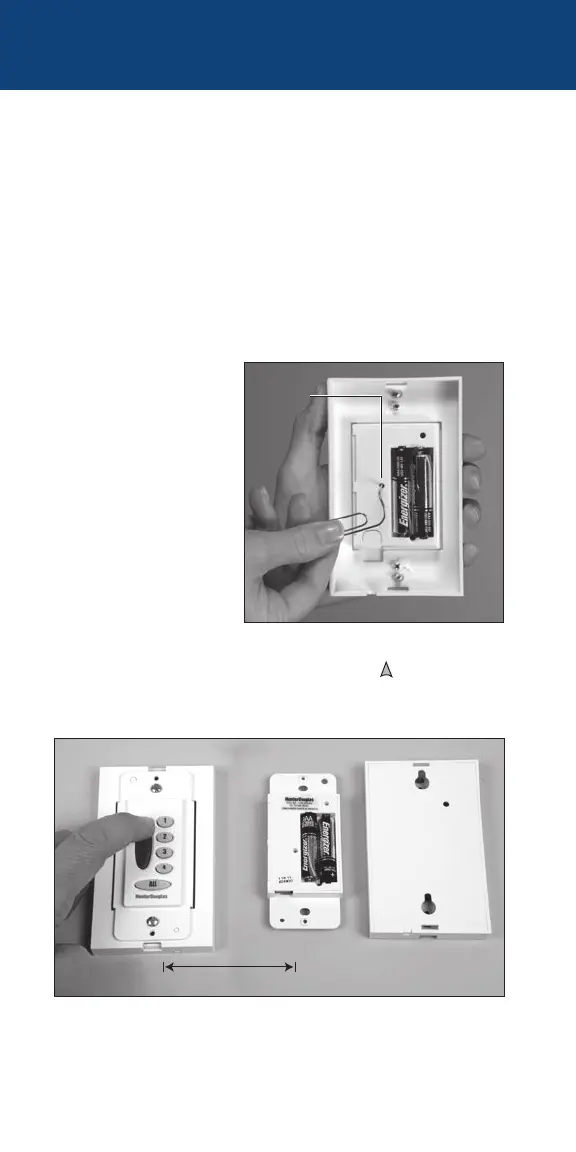
3. With a paperclip,
press and hold the
recessed MASTER
RESET button on the
backup wall switch
for approximately
10 seconds. All of
the group buttons
on the front of the
wall switch start
flashinggreen.
4. Place the marked original wall switch (or remote) within 18"
of the backup wall switch and press the UP
button on the
marked original. The group buttons on the backup wall switch
stop flashing.
5. Replace the back cover on the duplicate wall switch. It is now
ready for use.
18" or Less
Original Wall Switch Backup Transmitter
MASTER
RESET


 To Next Page