Helpline: UK - 0845 340 3880 IRE - 1890 944 542 Email: support@myhush.co.uk 9
General Information
IREGB
PLEASE NOTE: if you are accessing via
cellular data you may be charged by your
Mobile Network provider.
Technical Specication
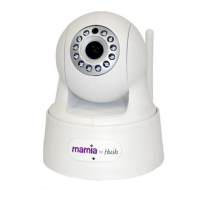
Colour: White
Image: Video (H264)
Lens: 3.6mm F1.2 IRIS
Pixels: 1MP (1280x720)
Camera Movement: Left/Right (355°)
Up/Down (170°)
Network (Wired): 1x RJ45 10/100Mbps
Network (Wireless): WEP/WPA/WPA2
(TKIP & AES)
Connectivity: Universal
Remote Access: Yes
Audio: Two-Way
Night IR: 10m (IR LEDs)
Power: Mains 5V DC (2A)
• My Baby Monitor is listed as
Ofine: If the camera is listed as
beingOfine,usetheAppandgo
toEditCamera→Reconnectas
this should refresh the camera, and
change the status to Online.
If you are experiencing any
difculty after making these checks,
please nd further information at
www.myhush.co.uk or call the
helpdesk for further assistance.
Helpdesk
The helpdesk is open from:
UK 8am to 9pm, Monday to Saturday
(excluding bank holidays), 9am to 7pm
Sundays. and can be contacted on
0845 340 3880
(local call rate)
IRELAND 8am to 9pm, Monday to
Saturday (excluding bank holidays),
9am to 7pm Sundays. and can be
contacted on 1890 944 542 (local call
rate) or email support@myhush.co.uk.
External Access
• External Access allows you to connect
to your Mamia by Hush Baby Monitor
from outside your home network. For
convenience, once your camera has
been added to your Camera List within
your App you should theoretically be able
to access your camera from anywhere in
the world via that App.


 To Next Page