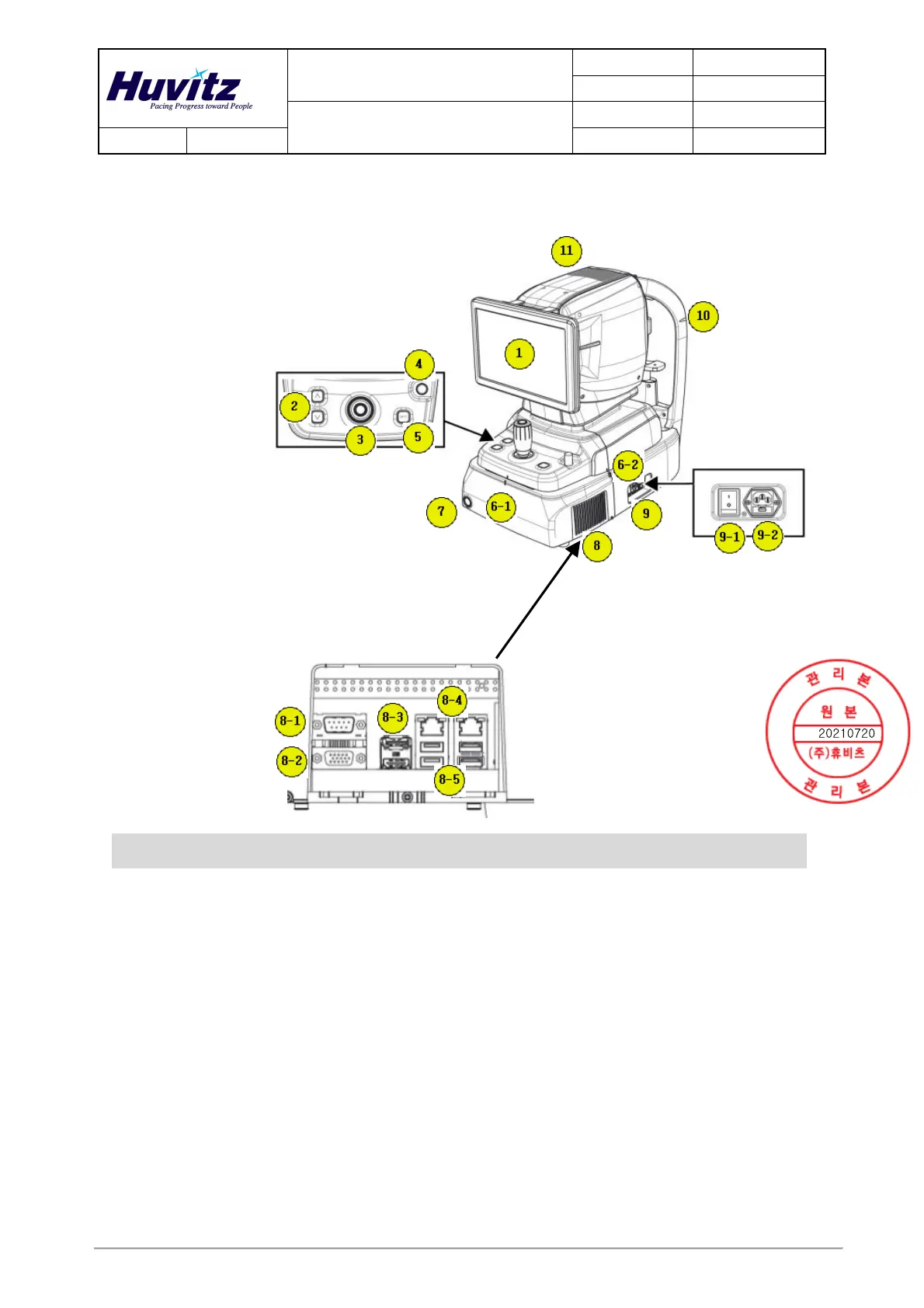
Product Description
DOCUMENT HQI-J-OT1-001
ES_DATE 2017-11-01
Optical Coherence Tomography
HOCT-1F, HOCT-1
RE_DATE 2020-01-30
REV R-3 PAGE 6 / 52
Q-I-300-02(R1):2018/06/04 Huvitz Co.,Ltd
(2) External Description
1) Front View
Part Name Description
1 Display LCD Monitor for displaying captured image and user interface icon.
2
Body
Chin rest
button
Button for moving chin rest up and down.
3 Joystick
Joystick for aligning body to patient’s eye.
Button for capturing image.
4 User Lock Lock for fixing body to base frame.
5 OPT Button for optimizing OCT signal
6-1
6-2
Align index
mark
Mark for indicating center of body and base.
7
Base
Power button
Button for turning power of internal PC on/off.
When the power is on, white light is lit.
8 External port Port for communicating internal or external device.
8-1 RS-232 port Port for communicating internal PC board and main board.



 To Next Page