G. STATION PROGRAMMING
30
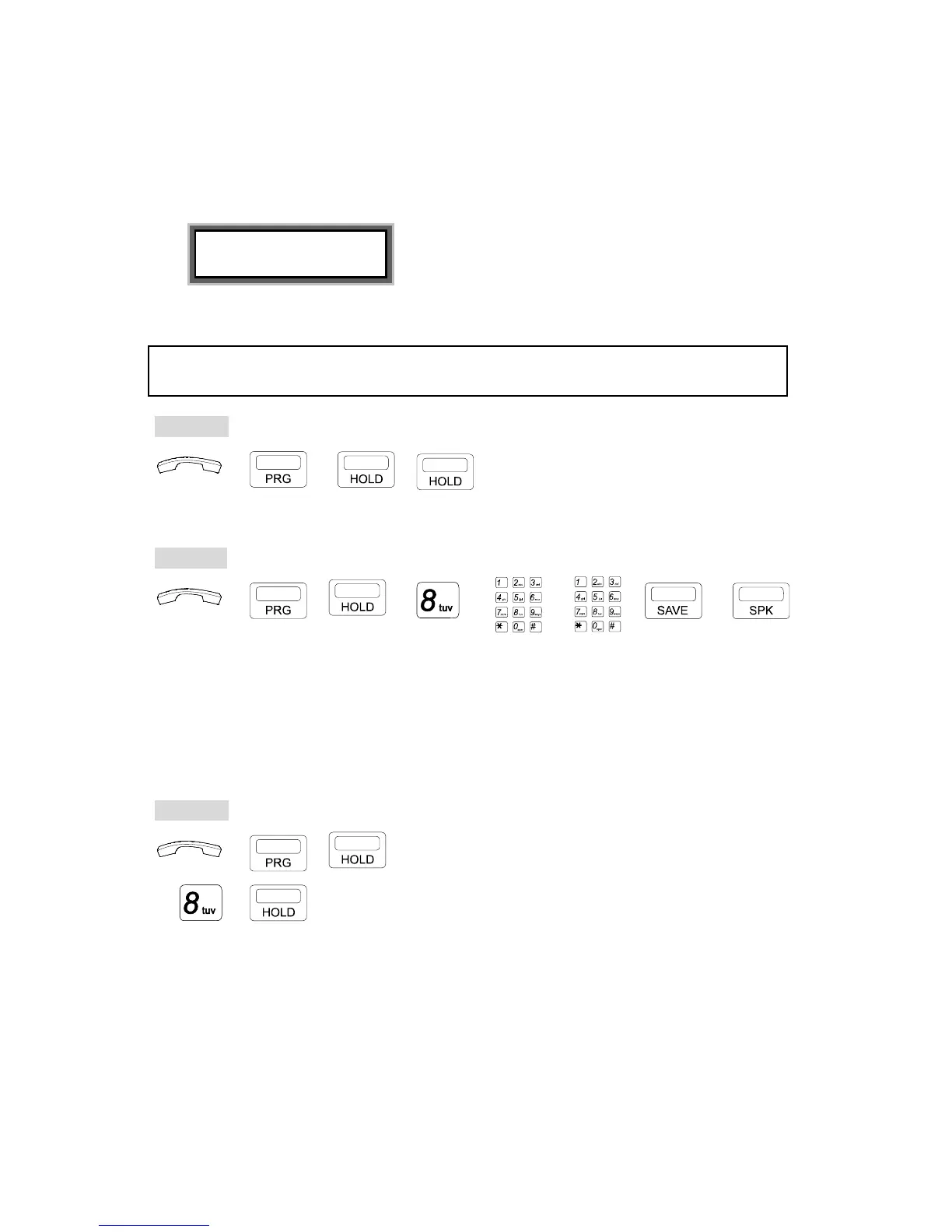
. Insert the Alarm-Time HH:MM (24-hour) format.
. Insert the duration (00-98 minutes).
For instance, 01 means 1 minute's duration.
EXAMPLE:
User Alarm 07
15:30 01
The music plays at 15:30, for one minute.
. Press [SAVE] key.
. Press [SPK] key to exit.
NOTE: If the time is not correctly set in HH:MM format, the LCD will show "Access Denied," and a
Busy tone will be heard.
To cancel:
→ → , . Handset on hook / [SPK] key off.
. Press [PRG].
. Press [HOLD] twice.
2. For Attendant Console :
To define: HH:MM Duration
→ , → → → → →
. Handset on hook / [SPK] key off.
. Press [PRG] key.
. Press [HOLD] then [8] key.
. Insert the Alarm-Time.
. Insert the duration (00-98 minutes).
. Press [SAVE] key.
. Press [SPK] key to exit.
To cancel:
→ , . Handset on hook / [SPK] key off.
. Press [PRG] then [HOLD] key.
→ → . Press [8] then [HOLD] key.


 To Next Page