G. STATION PROGRAMMING 35
G.12 Function Key Assignment (Macro Key)
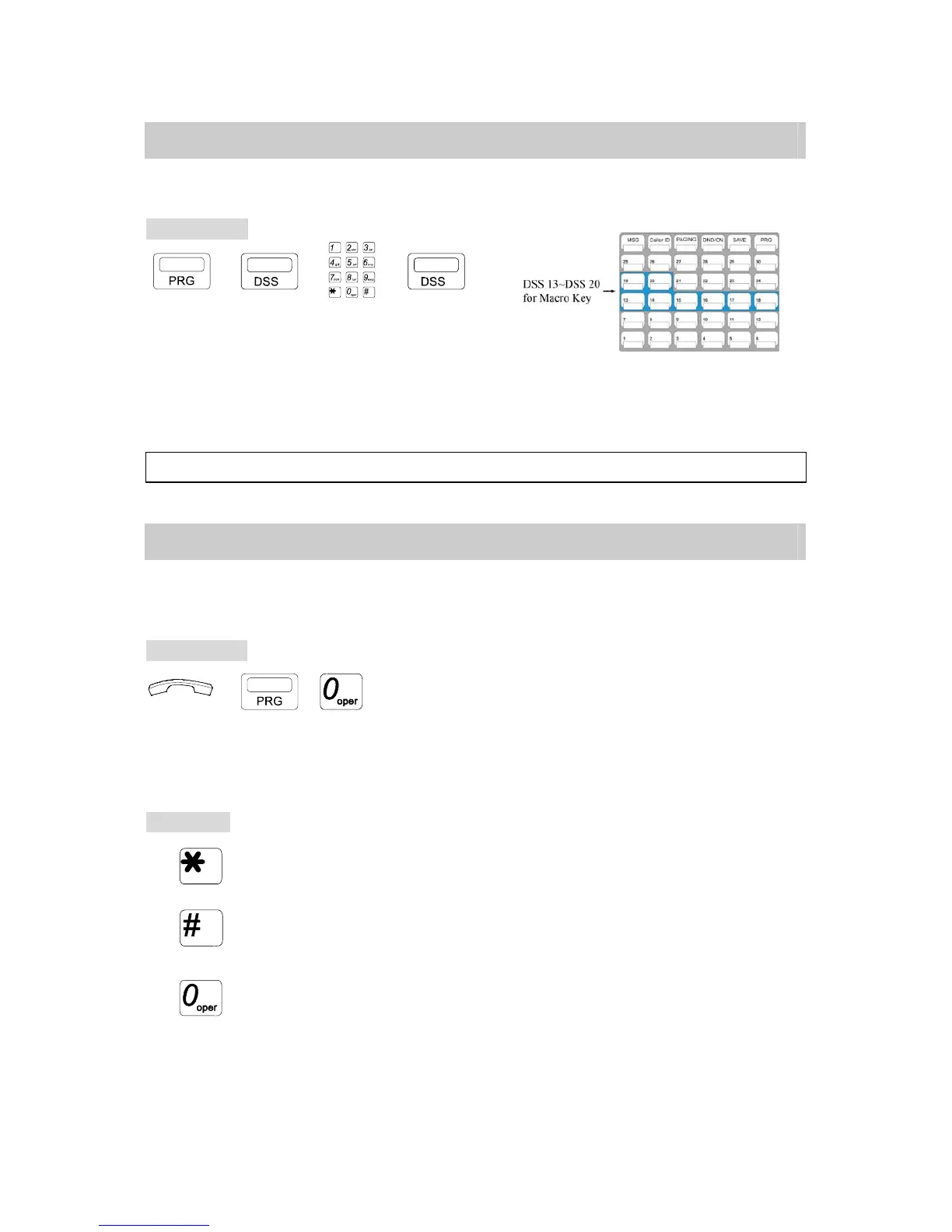
This program allows a user to store a special functions into an assigned DSS key.
Programming:
→ → →
. Press [PRG] key.
. Press DSS13~DSS20 key.
. Insert the operation steps of a special function that you would
like to store. (For example, # 0 for All Paging.)
. Press the programmed [DSS] key again to store the function.
Note: To use Macro Key function the DSS key must be assigned to CO or Extension.
G.13 User Programming Help (For G1E system only)
This Program assists users to perform station programming by LCD help information, if the
user has no operation manual available.
Programming:
→ , . Handset on hook / [SPK] key off.
. Press [PRG] key then Dial [0]
* The LCD of the telephone will display help information.
Each Help Information example will be held for two seconds and the screen will go on the
next example.
To Operate:
. Press [*] key to Scroll the Screen Up.
. Press [#] key to Scroll the Screen Down.
. Press [0] to select and execute this function.



 To Next Page