EasyManua.ls Logo

Hydro-Pro P12/32 - Wire Controller Operation; Controller Functionality

Default Icon
41 pages
Print Icon
To Next Page IconTo Next Page
To Previous Page IconTo Previous Page
Loading...
14
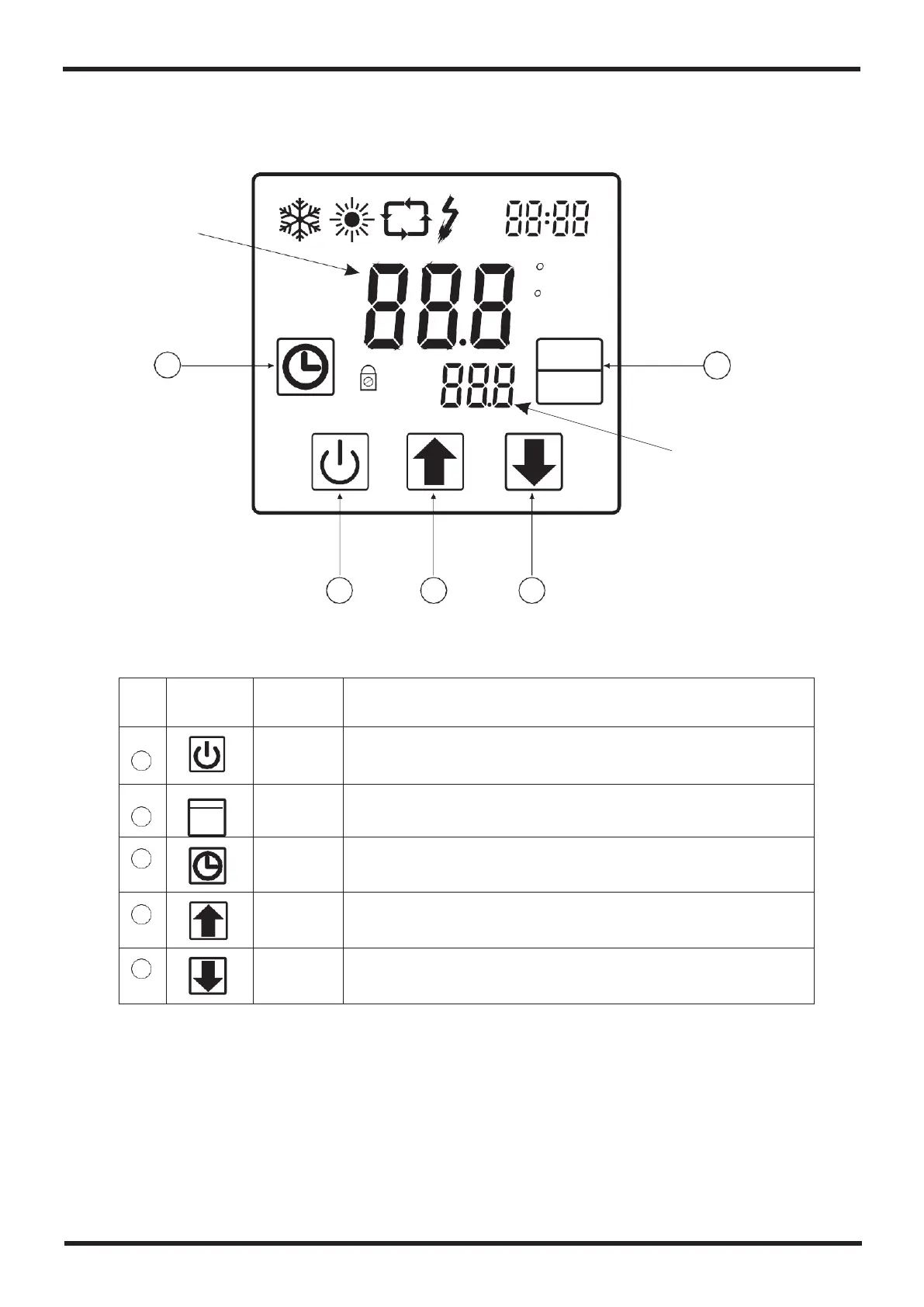
4.Use and Operation Instruction of Wire Controller
4.1. Function of controller
Main display area
OFF
ON
F
min
SET
TEMP
IN
3
TEMP
OUT
MODE
2
SET
Aux. Display area
1 4 5
1Button function
NO
Symbol
Name
Function
1
On/off
Press this button can start up or shut down the unit,
cancel the current operation or back to the upper
interface
2
MODE
SET
Mode
Press this button can switch modes or save
parameter setting.
3
Clock
Press this button can set the clock and timer
4
Up
Press this button can move up or increase
parameter value.
5
Down
Press this button can move down or decrease the
parameter value.
VOL
C
A

Related product manuals