4.Use and Operation Instruction of Wire Controller
4.2. The controller usage
2.1
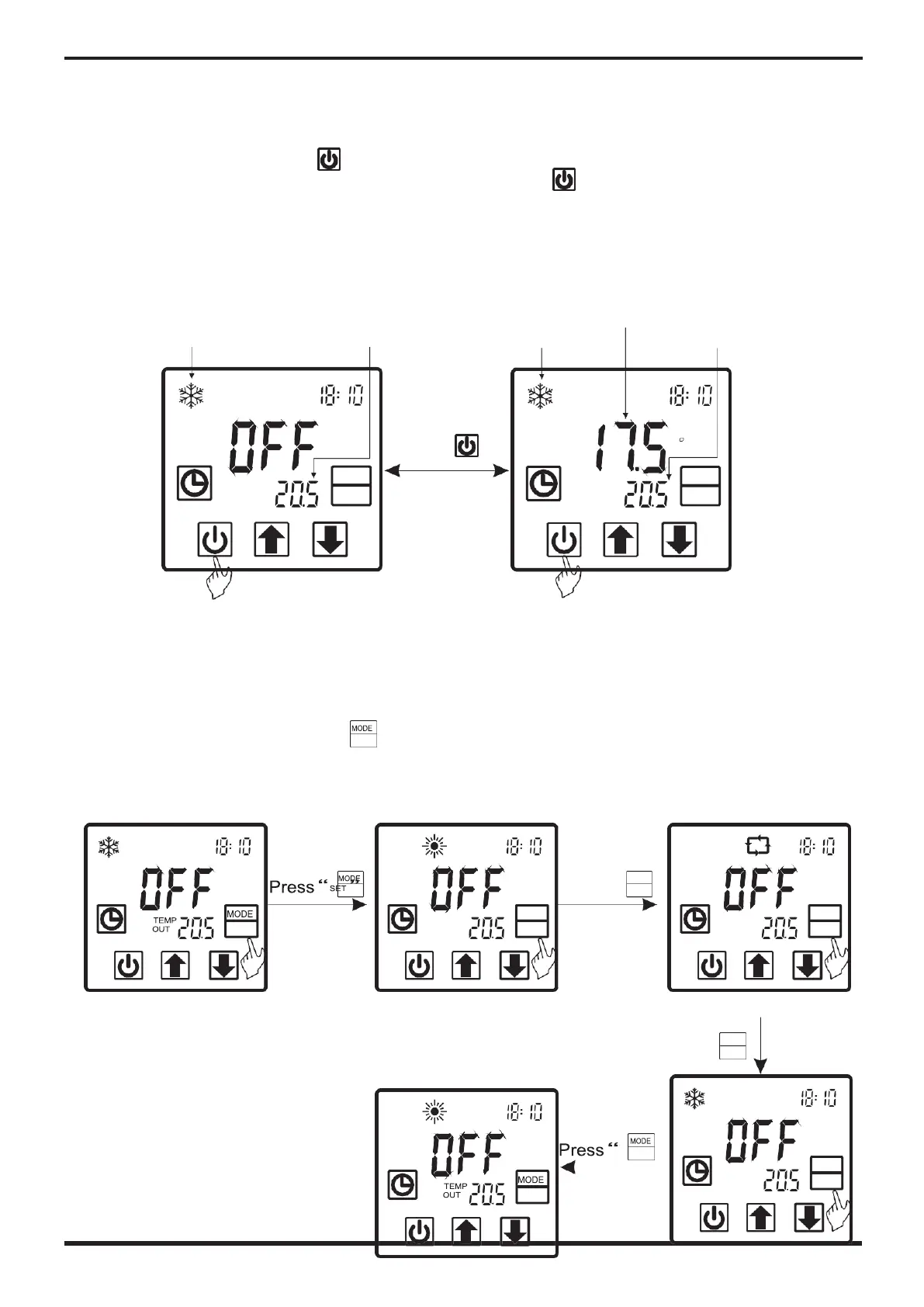
Starting up and shutting down
In the off interface, press"
" for 0.5s can start up the unit, and aux. display-area shows
water outlet temperature; In the running interface, press"
" for 0.5s can shut down the unit
and aux. display-area shows
“
OFF
”
.
Attention: the operation of Starting up and shutting down can only be done in the main interface. For
example:
Water outlet
Water inlet
temperature Water outlet
Actual Mode display
temperature
Actual Mode display
temperature
TEMP
OUT
Off unit
2.2 Modes switching
MODE
SET
Press
“
”
for 0.5 second
can switch
between unit
on and unit off
TEMP
IN
TEMP
OUT
On unit
C
MODE
SET
If it is cold/ heat unit, in the main interface, you can switch different modes of cooling,
heating, auto mode by pressing
“
”
.
Attention:The modes switching is useless if the unit you buy is single-cold/ single-heat unit.
For example:
A
TEMP
OUT
MODE
SET
Press
“
SET
”
TEMP
OUT
MODE
SET
Press
“
MODE
SET
”
TEMP
OUT
MODE
SET



 To Next Page