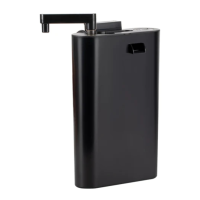
The Hygger Automatic Feeder HG-967 is a weather-proof device designed for feeding pond fish, suitable for outdoor use. It is an ideal solution for automated feeding, especially when the user is away.
Function Description:
The primary function of the Hygger HG-967 is to automatically dispense fish food at programmed times and in specified portions. It features an easy-to-read LCD display with a clock for timekeeping and programming. The feeder can be programmed for up to 6 feeding times per day, with each feeding portion lasting 8 seconds. Users can set programmable feeding portions up to 9. A manual button is also available for instant feeding, allowing for flexible feeding outside of the programmed schedule. The device is designed to be weather-proof, making it suitable for outdoor environments, but it should not be dropped or immersed in water.
Important Technical Specifications:
- Food Container Capacity: The fish food container can hold up to 5.5 liters, accommodating approximately 2.3 kg of fish food.
- Feeding Screw Slots: The feeder includes two different size feeding screw slots, allowing for adjustment based on the specific feeding demand and type of food.
- Power: The device operates with an adapter providing 110V.
- Feeding Duration per Portion: Each programmed feeding portion lasts for 8 seconds. For example, two portions will feed for 16 seconds, and three portions for 24 seconds.
- Indicator Light: An LED indicator light turns blue during manual or automatic feeding and flashes when the device stops.
Usage Features:
- Programming Feeding Times:
- Press the "TIMING" button to view current feeding times.
- Press "TIMING" again, then "SET UP" to enter the feeding time setting page.
- Press "TIMING" to program the first meal. "-- --" indicates no feeding.
- After setting the first meal, press "SET UP" to set the next feed time.
- Once all feeding times are set, press "OK" to save and return to the main interface.
Note: Feeding times can only be programmed to the hour, not the minute.
- Programming Feeding Portions:
- Press the "QUANTITY" button to view the current feeding portion.
- Press "QUANTITY" again, then "SET UP" to enter the size setting for each meal.
- Press "QUANTITY" to adjust the feeding quantity, up to a maximum of 9 settings. ("-" indicates zero feeding quantity).
- Press "SET UP" again to proceed to the next feeding portion setting.
- After finishing the settings, press "OK" to save and return to the main interface.
- Clock Setting:
- Press "CLOCK" to view the current time.
- Press "CLOCK", then "SET UP" to enter the time setting interface.
- Press "CLOCK" to set the desired hours.
- Press "TIMING" to set the minutes.
- After setting, press "OK" to save and return to the main interface.
- Manual Feeding: Press the "HAND FEED" button for instant feeding at any time.
- Automatic Feeding Pause Function: Press the "OK" button to pause automatic feeding when it is running. The indicator light will flash. Press "OK" again to cancel the pause. If only one meal is programmed per day, the interface will display "-- --" for one hour after feeding, indicating that the day's feeding is complete.
- Installation:
- Fix the base to a wooden/stone floor or ceramic tile using screws.
- Connect the base with the fixed tube.
- Screw the fixed tube with the bracket.
- Connect the bracket with the food container.
- Tighten the feeder cover and feed nozzle.
- Connect the entire assembly with the controller.
- Memory Function: The device has a memory function that restores previous settings in case of power interruption.
Maintenance Features:
- Cleaning: It is recommended to clean the food container once it is empty to ensure hygiene and proper operation.
- Food Type: Do not put flake or powder food into the container, as this may cause blockages or malfunction.
- Screw Slots: The feeder has two screw slots for different feeding demands. The food container should be emptied before replacing the screw slot.
- Safety: Do not put your hand into the feed cylinder when it is running. The feeder should not be mounted on earth floor.
- Troubleshooting: If an error code appears, unplug the feeder, remove the screw slot, and restart the device.
The Hygger Automatic Feeder HG-967 comes with a 1-year warranty, a 1-month free return policy, and free replacement for 3 months.
For contact, the brand owner is Shenzhen Mago Trading Co., Ltd.
Address: Bantian Group Business Central, Longgang District, Shenzhen City, Guangdong Province, China.
E-mail: mago@hygger-online.com
Website: http://www.hygger-online.com
Facebook: https://www.facebook.com/shenzhenmago or @shenzhenmago

 Need help?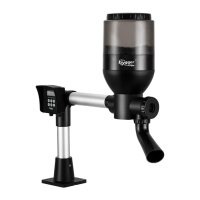

 To Next Page
 General