
 Need help?
Do you have a question about the HYPERICE Venom Go and is the answer not in the manual?
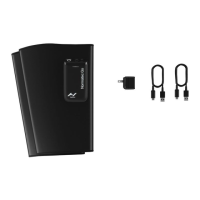
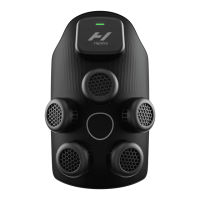
Identifies and labels the various components visible on the front of the Venom Go device.
Illustrates and labels the components visible on the back of the Venom Go device, including the magnetic connection.
Instructions on downloading the Hyperice App to maximize Venom Go functionality and remotely control sessions.
Guidance on registering the device to activate warranty and ensure smooth returns or repairs.
Procedure for charging the Venom Go device using the provided Hyperice USB-C cable until fully charged.
Steps to power on the Venom Go and connect the pod using the magnetic connection for heat and vibration.
Instructions on how to select desired heat levels and vibration patterns using the device buttons.
Information on the automatic session shut-off after 10 minutes and restarting as needed.
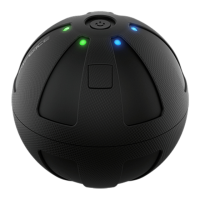
Details on how to identify a full charge via the battery indicator light on the pod.
Guidelines for cleaning, storing, and maintaining the Venom Go pod and pad for optimal performance.
Contact details and resources for award-winning support from the HyperCare team for Hyperice products.
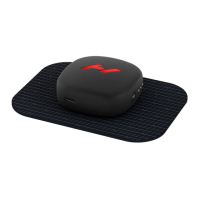
The Hyperice Venom Go is a portable device designed to provide targeted heat and vibration therapy for muscle relief. It consists of a Venom Go pod and a Venom Go pad, which work together to deliver soothing relief to various parts of the body. The device is designed for ease of use, with intuitive controls and a magnetic connection system.
The Venom Go combines heat and vibration to help alleviate muscle soreness and stiffness. The device offers multiple heat levels and vibration patterns, allowing users to customize their therapy experience to suit their needs. The heat helps to warm the muscles, increasing blood flow and promoting relaxation, while the vibration helps to soothe discomfort and improve flexibility. The device is intended for personal use and is designed to be applied directly to the skin.
Before using the Venom Go, it is recommended to download the Hyperice App. This app allows users to get the most out of their device by automatically stopping and starting sessions, as well as remotely controlling the heat and vibration settings. Users can also register their device on hyperice.com/register-product to activate their warranty and facilitate returns, repairs, or refunds.
The Venom Go must be fully charged before its first use. To charge the device, plug it in using the provided Hyperice USB-C cable. A full charge is indicated when the battery indicator light on the pod remains green and fully illuminated.
To turn on the Venom Go, press the power button located on the top of the pod once.
The Venom Go pad is designed to adhere to the skin. To use, peel the pad from its liner and apply it to clean, dry skin. It is crucial to only use the device on clean, dry skin and not while perspiring. Once the pad is applied, connect the Venom Go pod to the pad using the magnetic connection. Heat and vibration will not be felt until the pod is securely connected to the pad.
The Venom Go offers adjustable heat levels. To select the desired temperature, press the heat level button, located on the right side of the pod, once per level. White lights on the pod will illuminate to indicate the selected temperature setting.
In addition to heat, the Venom Go provides various vibration patterns. To choose a vibration pattern, press the vibration pattern button, located on the left side of the pod, once per pattern. White lights will indicate the selected vibration pattern.
Each session with the Venom Go automatically shuts off after 10 minutes. Users can restart a session as needed if further therapy is desired.
The Venom Go pod features several indicators to keep users informed about the device's status:
To maintain the Venom Go, ensure the power is OFF and the battery charger is not attached before cleaning. Use a damp, clean cloth to gently wipe both the pod and the pad. This helps to keep the device hygienic and in good working condition.
After each use, reapply the Venom Go pad to its liner. It is important not to dispose of the pad liner, as it is essential for protecting the adhesive surface of the pad. Store the device in a cool, dry area, away from direct sunlight, when not in use.
The adhesive quality of the Venom Go pad may diminish over time with repeated use. When the pad no longer adheres effectively to the skin, it should be discarded. Additional pads can be purchased from hyperice.com to ensure continuous use of the device.
Hyperice offers dedicated customer support through their HyperCare® team. Users can contact them for assistance with their products, including expert guidance and support for any issues that may arise. Contact options include phone at 1.855.734.7224, email at customersupport@hyperice.com, or by visiting hyperice.com for general inquiries or hyperice.com/contact if outside the United States.
 General
| Heat Levels | 3 |
|---|---|
| Vibration Levels | 3 |
| Battery Life | Up to 3 hours |
| Connectivity | Bluetooth |
| Power Source | Rechargeable Lithium-Ion Battery |
| Charging Time | 2 hours |
| Warranty | 1 year |
| Type | Wearable Massager |
| Control | Mobile app |
| Material | Silicone |

 To Next Page