EasyManua.ls Logo

Hyperion EOS0606iAD-A - User Manual

Hyperion EOS0606iAD-A
7 pages
Print Icon
To Next Page IconTo Next Page
Loading...
HYPERION AC/DC EOS0606iAD-A USER’S MANUAL
Visit http://media.hyperion.hk/dn/eos for the newest manuals and news
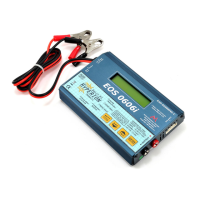
EOS 0606i AC/DC Special Features
*Two INPUT power choices:
Use AC 100V~240V at home OR DC 11V~15V anywhere
*Powerful, yet compact and portable with wide support for battery types
*Integrated Hyperion LBA Balancer for LiPo (3.7v) and LiFe (3.3v) based cells
*Balance Multi-Adapter for 2S to 6S packs included (Hyperion Type)
*Charge and Discharge Modes (and Cycling for NiMh and NiCd)
*Clear and easy-to-read LCD Screen with Warnings common setup errors
*Packaged in a rugged aluminum case - Long Input leads
*Hyperion Balance Multi-Connector Included. Option multi-connectors for
most common brands are also available (see details end of document)
Specifications
Input voltage range
11.0-15.0V DC OR
100~240V AC at 50~60 Hz
Only ONE source may be connected at a time!
1-14 NiCd – Nickel-Cadmium cells
1-14 NiMH – Nickel-Metal Hydride cells
1-6 LiPo – Lithium Polymer cells, 100~20,000mAh (3.7V/cell type only)
1-6 LiFe – Lithium Iron (3.3V/cell types, inc. A123 brand cells / LiFePO4 cells)
Appropriate battery types and
range of series-connected cells
1-6 Lead-Acid cells (2V per cell nominal)
Charge current 0.1A ~ 6.0A MAX, by 100mA steps (50W limit)
Discharge current 0.1A ~ 1.0A MAX, by 10mA steps (5W limit)
Trickle charge current (NiCd, NiMH) 0 ~ 200mA
“Delta V” peak detection for NiCd/NiMH
Charge termination
“CV/CC” for Lithium and Lead-Acid Batteries
Cycling Modes (NiCd, NiMH) Charge>Discharge or Discharge>Charge
Display type 2-line, 16 character Yellow backlit LCD
Safety precautions
KEEP CHARGER and BATTERIES AWAY FROM CHILDREN AND PETS AT ALL TIMES!
This charger is ONLY for NiCd/NiMH, Lithium (3.7V/cell), A123 (3.3V/cell), and Lead-Acid (2.0V/cell)
type cells. DO NOT connect others, such as 3.6V/cell Lithium-Ion, or non-rechargeable batteries!
Always place the charger on a firm, level, and fireproof surface for charging
Do not place the battery or charger on or near flammable materials while in use:
Keep away from carpets, cluttered workbenches, etc
Do not exceed cell manufacturer’s suggested max charge rates
Do not use automotive type battery chargers to power the charger
Do not leave the charger unattended while charging
Do not allow water, moisture or foreign objects into the charger
Do not open the charger, nor attempt any repair as it is dangerous and will void your warranty
Do not obstruct the air intake or outlet holes on the charger
ALWAYS follow correct connection sequence, as given below
CAREFULLY FOLLOW THE BATTERY PACK MAKER’S RECOMMENDATIONS AND SAFETY ADVICE!
HIGH RISK CHARGING ADVISORY
Avoid charging batteries indoors. If you must charge indoors – or any place injury to persons or damage could result in the event of fire – then be sure to:
* Keep battery well away from flammables (2 meters or more)
* Contain battery in a heavy fireproof container (such as a brick box)
* Always monitor the charge
HYPERION ACCEPTS NO RESPONSIBILITY FOR DAMAGE OR INJURY FOR INDOOR or other HIGH RISK CHARGING ACTIVITY
Initial Setup
The EOS 0606i requires 4mm Bullet Connectors (aka Banana Plugs) on 12awg wire leads for output harness between charger
and battery main wires. Harness wire leads should never exceed 20cm in length. Pre-assembled output harnesses are
available under Hyperion Part #HP-EOSOUTCORD, and one harness is included with each charger. Solder your chosen
battery-side connector to the bare wire ends of the harness, taking great care to observe proper polarity.


Questions and Answers

  • M
    mtapiaAug 15, 2025
    What to do if Hyperion EOS0606iAD-A Battery Charger shows INPUT VOLTAGE ERROR?
    • A
      Anthony SmithAug 15, 2025
      If your Hyperion Battery Charger displays an 'INPUT VOLTAGE ERROR', it means the input voltage is either below 11.0V or exceeds 15.0V. You should check the input voltage to ensure it is within the appropriate range.
  • K
    Kari PhillipsAug 19, 2025
    Why does my Hyperion Battery Charger say NO BATTERY?
    • T
      torresjeffreyAug 19, 2025
      If your Hyperion Battery Charger indicates 'NO BATTERY', it means the charger isn't detecting a battery. Make sure the battery is properly connected to the charger.
  • C
    Cindy SimmonsAug 21, 2025
    What does OUTPUT BATT REVERSE POLARITY mean on my Hyperion EOS0606iAD-A?
    • S
      Sandra CummingsAug 21, 2025
      The 'OUTPUT BATT REVERSE POLARITY' message on your Hyperion Battery Charger means the battery is connected with reverse polarity. Recheck the battery connections to ensure they are correct.
  • M
    Mr. James JensenAug 25, 2025
    What to do if Hyperion Battery Charger displays CHECK BATT OPEN CIRCUIT?
    • L
      Lindsey BlackAug 25, 2025
      If your Hyperion Battery Charger shows 'CHECK BATT OPEN CIRCUIT', it indicates that the battery was disconnected during charging. Reconnect the battery to resolve the issue.
  • D
    Danielle FordAug 27, 2025
    Why is my Hyperion Battery Charger showing CHECK BATT OVER VOLTAGE?
    • R
      rodriguezryanAug 28, 2025
      If your Hyperion Battery Charger displays 'CHECK BATT OVER VOLTAGE', it means the battery voltage is too high for the current charger settings. You should verify and adjust the battery voltage settings to match.
  • C
    Cynthia KelleyAug 30, 2025
    How to fix CHECK BATT LOW VOLTAGE on Hyperion EOS0606iAD-A?
    • C
      Connor HillAug 30, 2025
      If your Hyperion Battery Charger shows 'CHECK BATT LOW VOLTAGE', the battery voltage is too low for the charger settings. Verify and adjust the battery voltage settings accordingly.
  • M
    michellepatrickSep 2, 2025
    What does OUTPUT CIRCUIT PROBLEM mean on Hyperion EOS0606iAD-A Battery Charger?
    • B
      Beth HallSep 2, 2025
      If your Hyperion Battery Charger displays 'OUTPUT CIRCUIT PROBLEM', this indicates a non-specific circuit error. Check the battery condition.
  • M
    Maria OneillSep 5, 2025
    Why does my Hyperion EOS0606iAD-A say DON’T CHARGE Lixx WITH THIS MODE?
    • K
      Kim EvansSep 6, 2025
      If your Hyperion Battery Charger displays 'DON’T CHARGE Lixx WITH THIS MODE', it means a Lithium pack is connected via the balancer, but a NiCd/NiMH/Pb mode is selected. Select the correct charging mode for your battery type.
  • T
    Tyler WestSep 8, 2025
    What to do if Hyperion Battery Charger shows BALANCER VOLTAGE TOO HIGH?
    • A
      Antonio RodriguezSep 8, 2025
      If your Hyperion Battery Charger displays 'BALANCER VOLTAGE TOO HIGH', it means the voltage per cell is too high during balancing. You should monitor cell voltages during the balancing process.
  • R
    Richard WilliamsSep 12, 2025
    What does BALANCER VOLTAGE TOO LOW mean on Hyperion Battery Charger?
    • L
      lcalderonSep 12, 2025
      If your Hyperion Battery Charger displays 'BALANCER VOLTAGE TOO LOW', it means a cell’s voltage has fallen too low during balancing. Monitor cell voltages during balancing.

Summary

EOS 0606 i AC;DC Special Features

Specifications

Safety Precautions

High Risk Charging Advisory

Advisory for charging batteries indoors or in high-risk situations.

Initial Setup

Setting Battery Type and Modes

Changing Between Lithium Types (LiPo vs LiFe)

Instructions for switching between LiPo and LiFe battery types in a sub menu.

Lithium Polymer;Ion Mode

Setting LiPo Battery Capacity

Adjust and set the correct battery capacity for LiPo packs, from 100mAh to 20000mAh.

Setting Battery Voltage; Number of Cells in Series for LiPo Battery Packs

Select total battery voltage and number of cells for LiPo packs.

Setting Discharge Parameters

Adjust discharge current from 0.10A to 1.00A and set pack voltage.

LiFe Mode [LiFePO4, A123]

LiFe Mode Continued

Setting Charge Current

Charge at a 1C rate from the selected capacity.

Setting Battery Charge Voltages for A123;LiFe Battery Pack

Set the number of cells in series for A123/LiFe packs.

Setting Discharge Current

Adjust desired discharge current from 0.10A to 1.00A.

NiCd; NiMH Operation Modes

NiCd; NiMH Operation Modes Continued

Setting Charge Current

Adjust desired charge current from 0.1A to 6.0A.

Setting Discharge Current

Adjust desired discharge current from 0.1A to 1A.

Setting Discharge Cutoff Voltage

Set total discharge cutoff voltage from 0.1V to 16.8V.

Setting Cycle

Set cycling between Charge to Discharge or Discharge to Charge.

Setting Delta-V and Trickle Options for NiCd;NiMH

Pb Mode (Lead-Acid Battery)

Setting Charge Current

Adjust desired charge current from 0.1A to 6.0A.

Setting Total Battery Voltage for Lead-Acid Battery

Select total battery voltage for Lead-Acid batteries.

Setting Discharge Current

Adjust desired discharge current from 0.10A to 1.00A.

Displays During Charge, Discharge, and Cycle

Completion Display

Displays after charge or discharge is stopped.

Data Display - Keys

Instructions on how to view data display menus.

Data Display Screens (Example: During a Balancer-Connected Lithium Charge)

Example screens showing data during balanced lithium charging.

Troubleshooting

Error Messages

List of error messages and their meanings.

Warranty

Hyperion EOS0606iAD-A Specifications

General IconGeneral
Output CurrentUp to 6A
Charge Current0.1-6.0A
Charge Power50W
Discharge Power5W
LiPo/LiIo/LiFe Cells1-6 cells
Pb Battery Voltage2-24V
DisplayLCD
Balance Port Current300mA
Battery ChemistryLiPo, LiIo, LiFe, NiMH, NiCd, Pb
Charge ModesBalance, Discharge, Cycle

Related product manuals