
 Need help?
Do you have a question about the HyperX Cloud Alpha Wireless and is the answer not in the manual?
Details on headphone drivers, form factor, frequency response, impedance, sensitivity, and microphone element, polar pattern, and frequency response.
Information on audio connection, USB specification, sampling rates, bit-depth, virtual surround sound, onboard audio controls, and battery type.
Covers wireless type, range, headset weight with and without microphone, and USB charge cable specifications.
Step-by-step instructions for connecting and configuring the headset for PC audio output and input.
Instructions for connecting and configuring the headset for audio and microphone on a PlayStation 4 console.
Steps for connecting and configuring the headset for audio and microphone on a PlayStation 5 console.
Explanation of the headset's status LED behavior and power button functions, including battery level checks.
Details on how to mute the microphone and toggle mic monitoring function using the dedicated button.
Information on adjusting volume using the wheel and understanding headset status through voice prompts.
Description of audio tones used to indicate headset status or behavior when voice prompts are disabled.
Instructions for charging the headset, including LED status indicators for charging progress.
Guidance on downloading and using the NGENUITY software for enhanced headset features like EQ and DTS Headphone:X.
Steps for manually pairing the headset and USB adapter if automatic pairing fails.
Information on where to find help for setup issues or other questions regarding the headset.
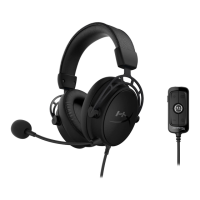
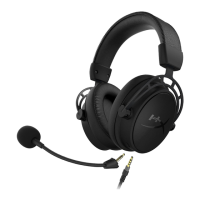
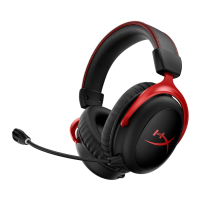
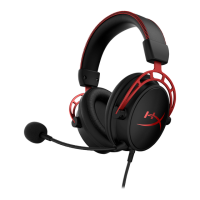
The HyperX Cloud Alpha Wireless is a high-performance gaming headset designed for an immersive audio experience across various platforms, including PC, PlayStation 4, and PlayStation 5. It features a robust wireless connection, ensuring freedom of movement and a clutter-free gaming setup. The headset is built with comfort in mind, incorporating memory foam ear cushions and a durable aluminum frame, making it suitable for extended gaming sessions.
The primary function of the HyperX Cloud Alpha Wireless is to provide high-quality audio for gaming and communication. It delivers clear, detailed sound, allowing users to pinpoint in-game audio cues and enjoy rich, immersive soundscapes. The detachable, noise-cancelling microphone ensures crisp voice communication with teammates, minimizing background distractions.
The headset operates wirelessly via a 2.4 GHz USB adapter, offering a stable and low-latency connection. This wireless capability is a key feature, eliminating the need for cumbersome cables and providing a seamless gaming experience. The headset is equipped with onboard audio controls, allowing users to adjust volume, mute the microphone, and manage other settings directly from the earcups.
A significant feature of the HyperX Cloud Alpha Wireless is its integration with DTS Headphone:X virtual surround sound. This technology enhances spatial awareness, providing a more realistic and engaging audio environment, which can be particularly advantageous in competitive gaming. The DTS Headphone:X feature is managed through the HyperX NGENUITY software, offering a customizable audio experience.
The headset is powered by a rechargeable lithium-polymer battery, designed for exceptional longevity, allowing for many hours of continuous use on a single charge. This extended battery life is a crucial aspect for gamers who engage in long play sessions without interruption.
Setting up the HyperX Cloud Alpha Wireless is straightforward across different platforms. For PC users, the process involves connecting the wireless USB adapter, powering on the headset, and then configuring the sound settings in Windows to select the headset as the default playback and recording device. The HyperX NGENUITY software further enhances the PC experience by providing access to advanced audio customization, including EQ settings, DTS Headphone:X activation, and adjustable auto shut-off behavior.
For PlayStation 4 and PlayStation 5 users, the setup is equally simple. After connecting the USB adapter to the console, users navigate to the console's audio settings to select the HyperX Cloud Alpha Wireless as both the input and output device. This ensures that both game audio and microphone input are routed correctly through the headset. Volume control and other basic settings can be adjusted directly from the console's interface.
The headset's controls are intuitively placed for easy access during gameplay. The power button allows users to turn the headset on or off and also provides a voice prompt for battery level status. The mic mute/mic monitoring button enables users to quickly toggle the microphone on or off, with an LED indicator on the microphone itself to show its status. Holding this button also activates or deactivates mic monitoring, allowing users to hear their own voice in the headset. The volume wheel provides a convenient way to adjust audio levels on the fly.
Voice prompt notifications are a helpful feature, providing audible cues for various headset statuses, such as power on/off, connection status, battery level, and volume limits. These prompts can be replaced with simple tone notifications if preferred, configurable through the NGENUITY software.
The wireless range of up to 20 meters offers considerable flexibility, allowing users to move around their gaming space without losing connection. This is particularly useful for taking short breaks or performing other tasks while staying connected to the game audio or chat.
Charging the HyperX Cloud Alpha Wireless is a simple process. The headset is charged via a USB-C cable, which can be connected to any standard USB port. The headset's status LED provides clear indications of the charging status: a solid green light signifies a full charge, a breathing green light indicates a charge level between 10% and 99%, and a breathing red light warns of a charge level below 10%. It is recommended to fully charge the headset before its first use to ensure optimal battery performance.
The NGENUITY software plays a role in maintenance by providing a battery level indicator, allowing users to monitor the remaining charge and plan their charging cycles accordingly. The adjustable auto shut-off behavior feature in the software helps conserve battery life by automatically powering down the headset after a period of inactivity, preventing unnecessary power drain.
The detachable microphone is a practical design choice, allowing users to remove it when not needed, which can protect it from damage and make the headset more comfortable for listening to music or watching videos. The overall durable construction, with an aluminum frame and premium leatherette ear cushions, contributes to the headset's longevity, reducing the need for frequent replacements. Regular cleaning of the ear cushions and microphone can help maintain hygiene and extend the life of these components.
In case of pairing issues, the headset and USB adapter can be manually re-paired. This involves putting both the headset and the adapter into pairing mode, indicated by rapidly blinking LEDs, until they establish a solid connection. This troubleshooting step ensures that users can resolve connectivity problems independently.
For any questions or setup issues, HyperX provides support through their website, offering resources and assistance to ensure a smooth user experience.
 General
| Type | Over-ear |
|---|---|
| Driver | 50mm |
| Battery Life | Up to 300 hours |
| Wireless Range | Up to 20 meters |
| Compatibility | PC, PS4, PS5 |
| Impedance | 62 Ω |
| Sound Pressure Level | 103 dBSPL/mW at 1kHz |
| T.H.D. | < 2% |
| Weight | 322g |
| Frequency Response | 15Hz - 21kHz |
| Microphone | Detachable noise-cancelling |

 To Next Page
