EasyManua.ls Logo

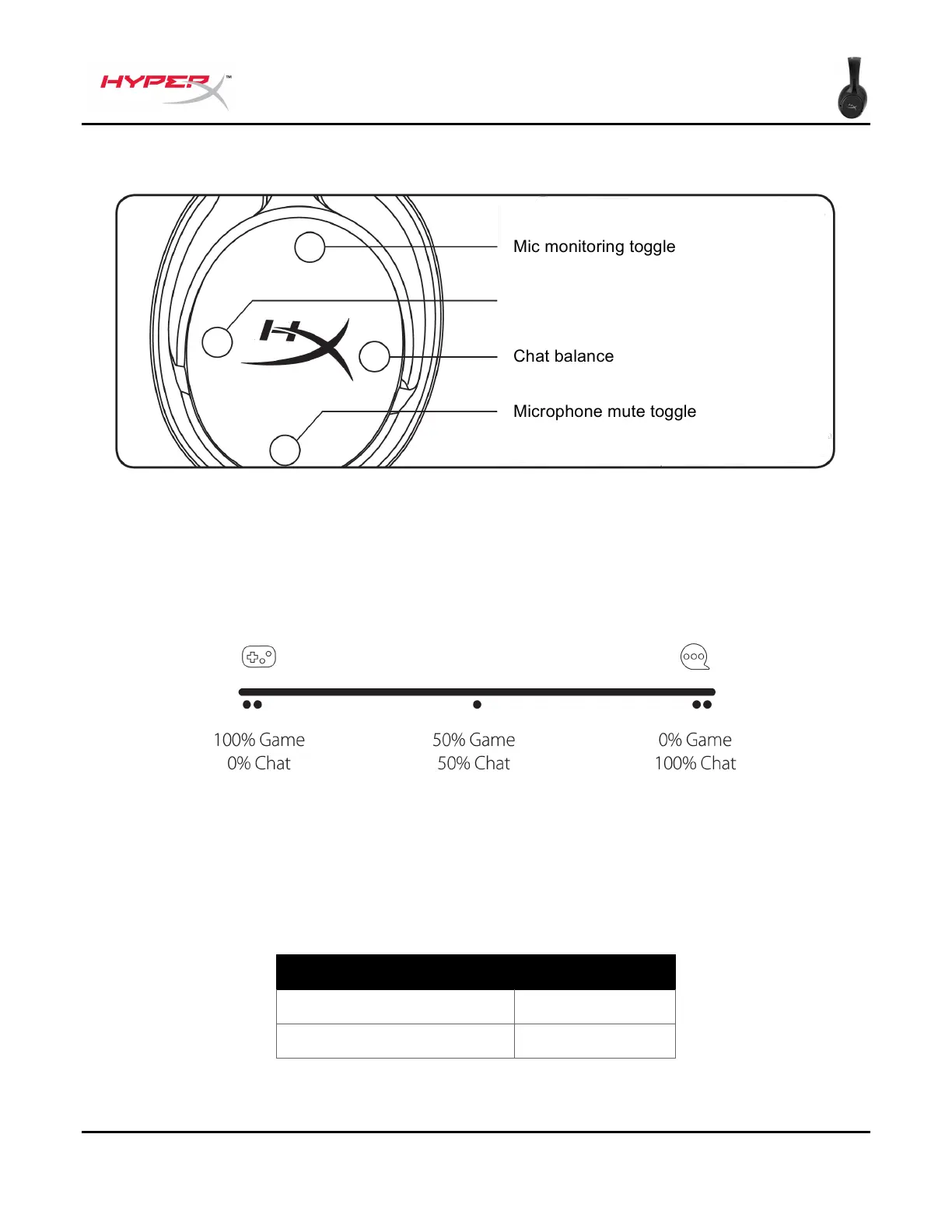
HyperX Cloud Flight S - Controls; Mic Monitoring Toggle; Game;Chat Balance; Microphone Mute Toggle

HyperX Cloud Flight S
241 pages
Print Icon
To Next Page IconTo Next Page
To Previous Page IconTo Previous Page
Loading...
Document No. 480HX-HSCFS.A01
HyperX Cloud Flight
TM
S
Page 11 of 15
Controls
Mic monitoring toggle
Press to toggle mic monitoring on/off.
Game/Chat balance
Press to adjust mix between game audio and chat audio.
1
The game/chat balance functionality operates independently from the overall headset audio volume.
1
Game/chat balance function is unavailable when using headset on PlayStation 4.
Microphone mute toggle
Press to toggle microphone mute on/off. The microphone mute LED will indicate the current mute
status.
Microphone Mute LED
Mute Status
Red
Mute on
Off
Mute off

Table of Contents

Other manuals for HyperX Cloud Flight S

Related product manuals