12
5. Status Indications
5.1 LCD Icons
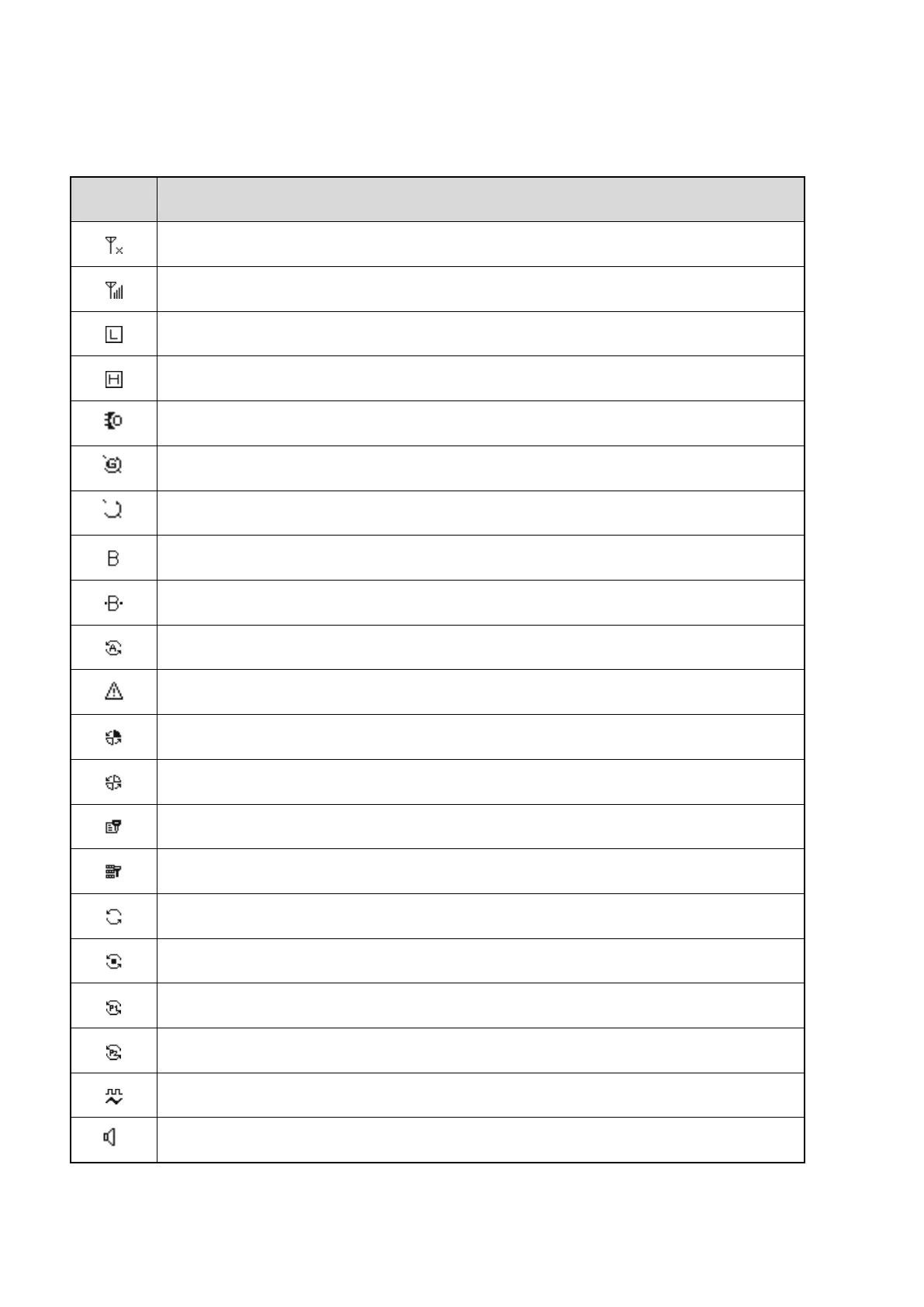
The radio detects no signal.
More bars indicate stronger signal.
The radio works in low power mode.
The radio works in high power mode.
An accessory is connected.
The GPS feature is enabled, and valid positioning data has been received.
The GPS feature is enabled, but no valid positioning data has been received.
The BT feature is enabled.
A BT device is connected.
The Mode Automatic Switch feature is enabled.
The radio is in emergency mode.
The radio stays on a site.
The Scrambler or Encrypt feature is enabled.
The Over the Air Encrypt feature is enabled.
The radio stays on an active channel.
The radio stays on Priority Channel 1.
The radio stays on Priority Channel 2.
The radio has switched to the mixed channel.
The Monitor feature is enabled.



 To Next Page