5
Before Use
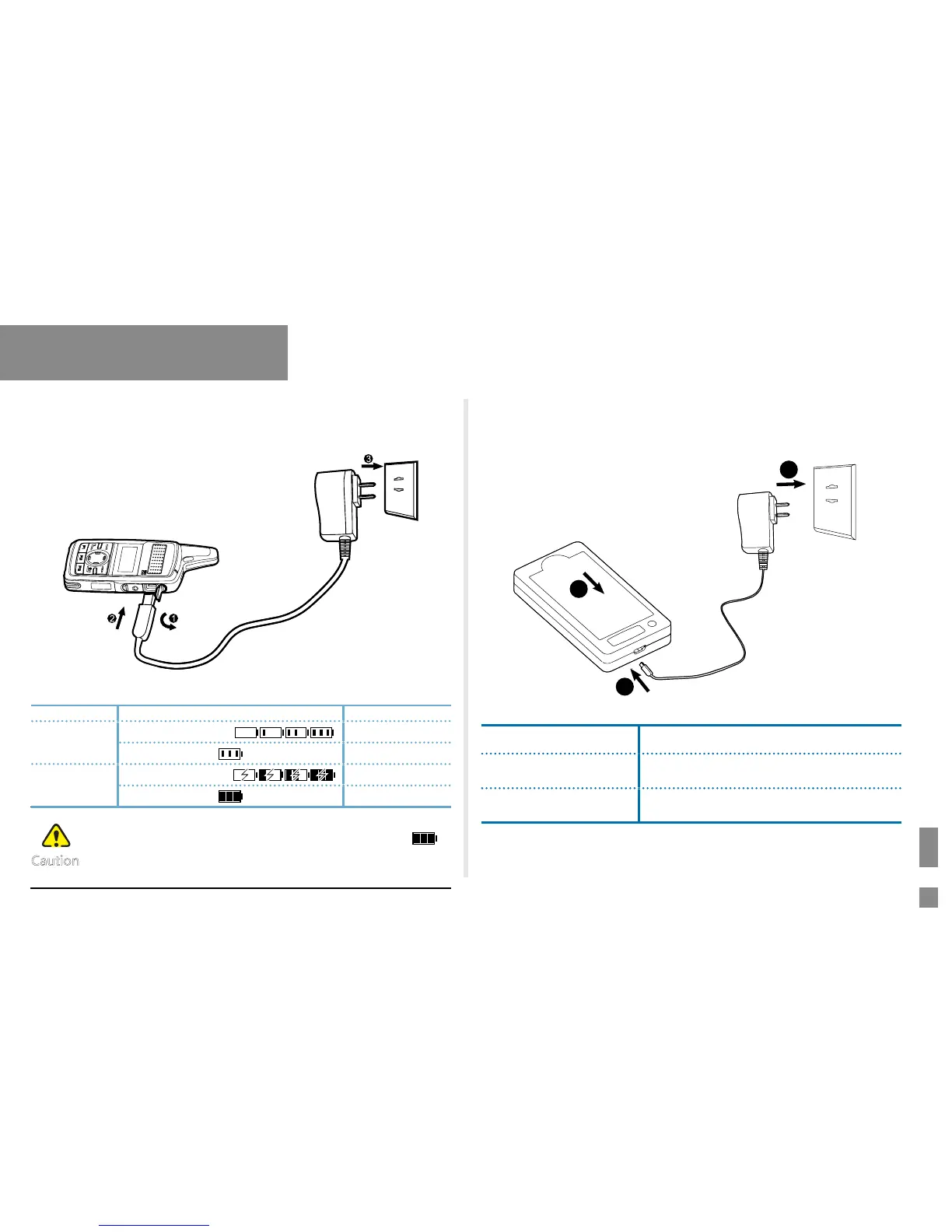
Charging Status Indication on the radio
Radio Status Icon Charging Status
Power On
Display in a cycle:
Charging
Fully charged
Power Off
Display in a cycle:
Charging
Fully charged
●
Do not detach the battery during charging, otherwise,
the radio will display an invalid Fully Charged icon
.
●
Upon being charged after the radio is powered off due
to low battery voltage, the radio displays a black screen.
Using the Power Adapter (Standard)
Please use the power adapter specied by the Company to charge the
radio (with battery attached). Charging Diagram is listed below.
Charging Indication:
Caution
Using the Rapid-rate Charger (Optional)
Please use the rapid-rate charger specied by the Company to charge
the battery. Charging Diagram is listed below.
Charging Status Indication on the charger:
LED Indication Charging Status
The LED Indicator
glows green
Standby (no load) or fully charged
The LED indicator
glows red
Charging
1
2
3



 To Next Page