EasyManua.ls Logo

Hytera PD985i - User Manual

Hytera PD985i
24 pages
Print Icon
To Next Page IconTo Next Page
Loading...
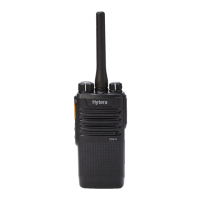
PD98Xi Digital Portable Radio
Preface
Thanks for your favor in our product. This manual provides guidance for you to quickly know how to use
the product. For detailed features and operations, see the DMR Conventional Radio Feature Description
and Operation Manual along with the product.
To avoid bodily injury or property loss caused by misoperations, please carefully read the Safety
Information Booklet before using the product.
This manual is applicable to the following product:
(X may represent 2, 5, 6 or 8)

Questions and Answers

Hytera PD985i Specifications

General IconGeneral
Channel Capacity1024
Zone Capacity64
Channel Spacing12.5/20/25 kHz
Operating Voltage7.4 V
BatteryLi-Ion
Operating Temperature-30°C to +60°C
Storage Temperature-40°C to +85°C
IP RatingIP68
GPSYes
BluetoothYes
Audio Power1 W
TypeDigital Portable Radio
Frequency Range136-174 MHz
Battery Capacity3000 mAh
Display2.4" color LCD
Output Power5 W

Summary

Product Overview

Product Controls

Details the physical controls of the radio.

Before Use

Attaching the Antenna

Instructions for connecting the radio's antenna.

Installing the TF Card

Steps to install a TF card into the radio.

Basic Operations

Turning On;Off the Radio

Steps to power the radio on and off.

Checking the Battery

How to verify the battery status and approval.

Checking the Battery Power

Methods to check the current battery charge level.

Call Services

Private Call

Instructions for making and receiving private calls between users.

Group Call

How to initiate and respond to calls with a group of users.

Call on Analog Channel without Signaling

Procedure for transmitting and receiving on analog channels.

Emergency Call

Using the emergency feature for assistance.

Message Services

New Message

Creating and sending new messages to contacts or saving drafts.

Quick Text

Sending pre-defined text messages.

Inbox

Managing received messages.

Outbox

Managing sent messages.

Drafts

Managing saved un-sent messages.

Troubleshooting

Radio Cannot Be Turned On

Diagnosing and resolving issues with powering on the radio.

Weak, Discontinuous, or Inactive Voice

Troubleshooting audio quality problems.

Cannot Communicate with Other Members

Resolving issues with group or member communication.

Irrelevant Voices or Noise

Addressing unwanted noise or interference on channels.

Noise is Too Loud

Troubleshooting excessive audio volume.

GPS Cannot Locate Position

Resolving problems with GPS signal reception.

Cannot Use Keys

Troubleshooting non-responsive keypad buttons.

LCD Does Not Display Information

Resolving issues with the display screen.

Care and Cleaning

Product Care

Guidelines for maintaining the product's performance and lifespan.

Product Cleaning

Instructions for safely cleaning the radio.

Optional Accessories

Related product manuals