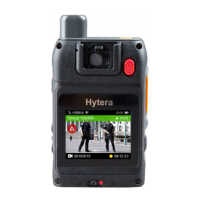
I
n power-on mode, press the
Emergency
key to start recording videos and tag the videos as critical
ev
idence; press and hold the
Emergency
key or press the
Video Recording
key to exit recording
.
You can modify the method to tag and untag recordings through the RVM Manager.
4.9 Taking Photos during Video Recording
During video recording, press the
Photo Taking
key to take photos.
4.10 Making Calls
When the product is connected to a portable radio through BT, you can use the product to make calls,
answer calls, speak or terminate calls. You can program keys to make or answer a call through the RVM
Manager.
Making a call: Press the
PTT
key to start a call in the current channel or with the current contac
t.
A
nswering a call: Press and hold the
P2
key (default) to answer a ca
ll.
S
peaking: Press and hold the
PTT
key to speak through the
Speaking Microphone
.
Terminating a call: During an ongoing call, press and hold the
P2
key (default) to terminal the ca
ll.
4.11 Video Transmission
When the product is connected to a portable radio through BT, you can accept, refuse or terminate video
transmission from other devices. The video transmitting features can be programmed through the RVM
Manager.
Accepting video transmission: Press and hold the
P1
key (default).
R
efusing video transmission: Press or press and hold the
P1
/
P2
key
.
T
erminating video transmission: During the transmission, press and hold the
P1
key (default) to
terminat
e.
4.12 Sending an Emergency Alarm
When the product is connected to a portable radio through BT, you can press the
Emergency
key to
make an emergency alarm in case of emergencies. At this time, the product enters important video
recording automatically. The emergency alarm has the highest priority. You can send an emergency
alarm no matter whether the portable radio is transmitting or receiving. To cancel the emergency alarm,


 To Next Page