6
EN
Quick Start / C31SMARTDOCKPD/ English
CONTENTS OF THE PACKAGE
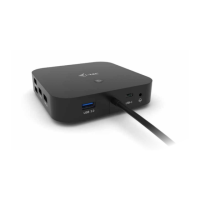
• i-tec USB-C docking station
• USB-C cable (length 100 cm)
• Power adapter (DC output: 20V / 6.75A)
• Quick Start
SPECIFICATIONS
• 1x USB-C port for connecting to a device with a free USB4, Thunderbolt or USB-C port
with DisplayPort Alternate Mode technology (100 cm USB-C cable included)
• Power Delivery: 65W
• Video Ports: 2x DisplayPort, 1x HDMI
• Resolution:
USB-C/Thunderbolt™ 3 with DisplayPort 1.4 support without DSC support
1 monitor - 1x DP or 1x HDMI - up to 4K/60Hz
2 monitors - 1x HDMI + 1 DP or 1x DP + 1x DP - up to 2x 2560x1440/60Hz
3 monitors - 1x HDMI + 1x DP + 1x DP - up to 3x 1920x1080/60Hz
USB-C/Thunderbolt™ 3 with DisplayPort 1.2 support
1 monitor - 1x DP or 1x HDMI - up to 4K/30Hz
2 monitors - 1x HDMI + 1 DP or 1x DP + 1x DP - up to 2x 1920x1080/60Hz
3 monitors - 1x HDMI + 1x DP + 1x DP - up to 3x 1920x1080/30Hz
• 2x USB-A 3.2 Gen 2 (10Gbps)
• 1x USB-A 3.2 Gen 2 (10Gbps) with fast charging support (BC 1.2)
• 1x USB-C 3.2 Gen 2 (10Gbps)
• 1x Ethernet GLAN RJ-45 port (Realtek RTL8153)
• 1x 3.5mm Audio combo jack
• 1x power input (20V/6.75A)
• ON/OFF switch to turn the docking station on and off
• LED indication
• Support for Kensington lock
• USB-C 3.1 cable (100 cm)
• OS: Windows 10/11, macOS, Android, Chrome OS and Linux with latest updates
• Product dimensions: 185 x 79 x 28 mm
• Product weight: 265g
Note: for macOS: macOS does not support MST technology (2 or more monitors in extend-
ed mode). No dock using USB-C DisplayPort Alt Mode supports connecting two or more
monitors on macOS, only Thunderbolt docks and DisplayLink docks do.



 To Next Page