IACER Srl 17 MNPG117-02
• connect the power supply plug to the wall socket.
Press on ON/OFF button to switch on the device.
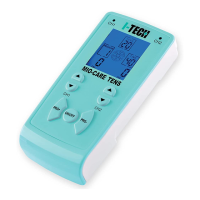
If it is connected correctly, display will show the picture below:
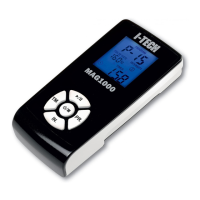
If it is connected in wrong way, display will show the picture below:
Patient preparation
Immediately after switching on, the device carries out a self-test. At the end of
the self-test a beep is heard and display shows the picture as described in
previous paragraph. When an error is found an error code will appear on the
display: please read the paragraph Troubleshooting to get more details.
Before starting the ultrasound treatment, please, check the following
indications:
• make sure that the patient is in a comfortable position. The treatment
area should be completely exposed and relaxed.
• Inform the patient about the objective of the treatment and the
sensation he/she should feel during therapy.
• Make sure that there are no contraindications to therapy.
• Inspect accurately the treatment area for abrasion, irritation, surface
veins, etc.
• Clean the treatment area with a soap or alcohol at 70%. In case of
excessive hairy skin, it is suggested to shave the zone to get optimal
treatment.
During treatment:
1. The ultrasound head has to be moved constantly when intensity is
higher than 0.5W/cm².


 To Next Page