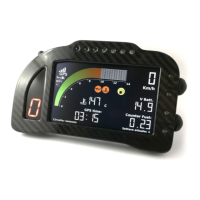
!
!
Features
• 800x480 color display
• High visibility even under direct sunlight
• 400 MHz processor with 1GB of internal memory
• Aluminum case
• Fully configurable in two operating modes (STREET/RACE)
• Path and speed detection through 10Hz GPS receiver with 66 parallel channels
• Chronometer function with 20 pre-stored circuit (up to 500 laps can be stored for each
circuit)
• Automatic circuit detection, with three splits
• Best lap and ideal lap calculations, all time best and daily lap times
• Easy-to-use and intuitive interface
• 12 fully-configurable high-brightness LED alarms
• 8 10-bit analog inputs
• 2 independent speed inputs
• 1 RPM input
• Separated inputs for water, fuel and oil, each one with a dedicated alarm
• Gear calculation with automatic-learning function
• Data download through a USB flash drive
• Possible connection to a two-button remote control
• CAN BUS compatible
• 1GB internal memory
• 3 different covered-distance counters, 2 engine-time counters and 1 total-performed-lap
counter
• Compact design and small dimensions (172mm x 106mm x 22mm)
• Waterproof
BEFORE YOU START
• Read carefully the instructions before starting to use the system. A copy of this user manual
can be downloaded from the download area of the www.i2m.it website.
• Install Chrome on your bike following the directions reported in the dedicated area.
ATTENTION:
Chrome has been designed only motorsport racetracks use, and it is not homologated for
street use.
ATTENTION:
Since Chrome is based on the GPS technology, it needs an adequate GPS signal to work properly
as chronometer and data acquisition device. For this reason, it is suggested to turn on the GPS
receiver some minutes before starting to race, in order to properly receive the signal of the GPS
satellites. If the circuit is one of those stored in memory, Chrome will automatically find the position,
so it will not be necessary to manually set it.


 To Next Page