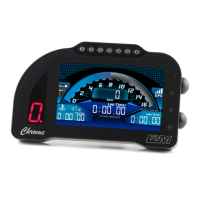
Need help?
Do you have a question about the I2M Chrome Lite and is the answer not in the manual?
Read the manual carefully prior starting any installation activities of the Chrome unit.
Lists the standard items included when unboxing the Chrome unit.
Details the installation of the Chrome unit with generic wiring harness and GPS sensor.
Describes the use of P&P kits for easier installation and mounting.
Explains the connection of sensor wiring harnesses and associated sensors.
Details the 4-pin screwed connector for video input and compatible webcam.
Explains the function of UP and DN buttons for navigation and parameter modification.
Describes how to edit parameter, values, and names using UP and DN buttons.
Details the initial display upon powering up, including GPS connectivity status.
Covers selecting the correct motorcycle make and model for preconfigured settings.
Explains how to personalize settings like BOX/RACE modes, inputs, and alarms.
Provides instructions for configuring the gear indicator on motorcycles without CANBUS.
Details options for updating the circuit library or modifying existing circuit data.
Explains how to properly shut down the unit or exit standby mode.
Describes accessing the main menu from the startup screen via the DN button.
Explains how to display stored lap times, divided by sessions and split sectors.
Details options for deleting specific lap time data, such as best time or all times.
Describes how to view, select, or change the currently stored race circuits.
Provides information on stored laps, best/ideal times, and map generation for circuits.
Summarizes current day's performance, including laps, speed, and best/ideal times.
Explains managing data by downloading/uploading circuits and lap times via USB.
Details how to change circuits stored in memory and extend the library via USB.
Describes connecting to the website for online lap time tracking and data visibility.
Allows selection between BOX and RACE configurations for display parameters.
Covers settings like Long UP, Short UP, Long DN, Auto Page Change, and Decimal Number.
Enables data sampling and sets parameters like sampling frequency and autostart channel.
Explains how to save data to a USB drive or erase memory, and manage downloaded files.
Details settings for WiFi connection and controlling GoPro cameras for synchronized recording.
Allows manual setup of analog and digital inputs, including sensor types and values.
Facilitates easy configuration of common sensors using step-by-step calibration.
Guides manual configuration of gear selection for non-CANBUS motorcycles.
Details Bluetooth connection settings for heart rate monitors, including PIN and device search.
Explains how to configure TPMS sensors by entering ID codes and displaying sensor status.
Details setting up inputs for CANBUS communication, including CAN values and factors.
Allows setting parameters for sensors like TPS, Lambda, and others via specific configurations.
Enables carburation tracing by selecting TPS and Lambda channels for analysis.
Describes the DDS system for dynamic parameter changes based on track position.
Presents tables assigning channels to different motorcycle models and their configurations.
Provides tables showing alarm assignments for various motorcycle models and their configurations.
 General
| Brand | I2M |
|---|---|
| Model | Chrome Lite |
| Category | Motorcycle Accessories |
| Language | English |

 To Next Page