INSTALLATION AND OPERATION INSTRUCTIONS
2-10
SL 80-399 MODULATING GAS BOILER
SET UP & LOAD DEFINITION
After the boiler is powered up, the installer can use the keypad and display to
characterize the application, as follows:
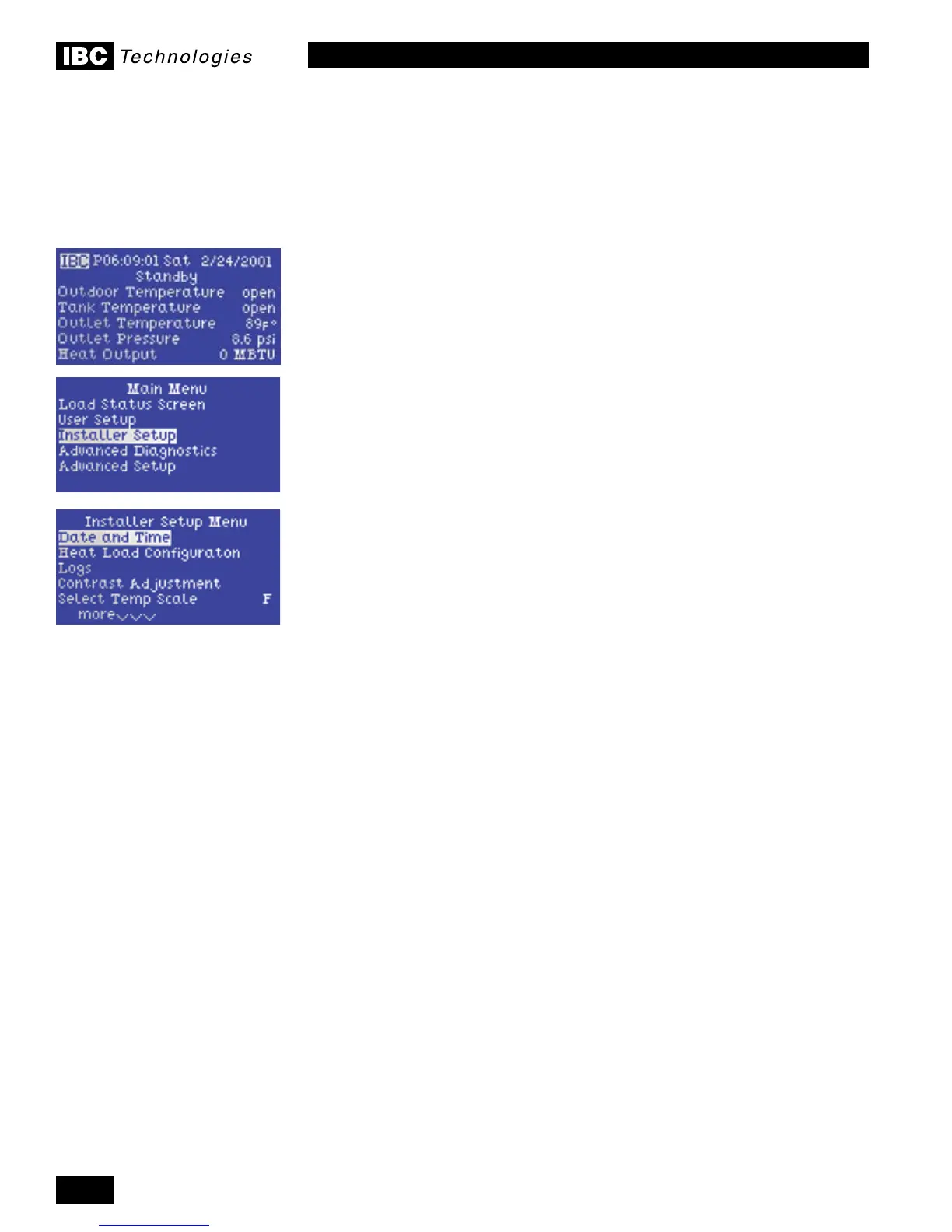
1. In the Standby mode, start by pressing any key to call up the Main Menu.
2. Using the directional keys, move the cursor to Installer Setup, then depress
the centre (Enter) key. See Section 2.4.5. Passwords if these are in use or
desired.
3. Select Date & Time (and Enter), then move the cursor about to adjust time
(on a 24:00 hour basis), date and invoke Daylight Savings if appropriate. Use
the upper key to increase a value (e.g. date, time, temperature), the bottom
key to reduce. Note that it is often possible to move in steps of 10 or 100 by
movingthecursorrightorleftonceaeldhasbeenselectedforadjustment.
Hit the Enter key to record the desired / amended information after each
value has been selected.
4. Use the left-most key to step back to the Installer Setup screen, and select
Heat Load Conguration for input of the load characteristics.
5. Eachoftheboiler’s3Loadpositionscanbeconguredforanytypeof
heating. VFC boilers are factory shipped with default settings as follows:
Load 1 set as Space Heating or Reset Heating, with High Mass Radiant
Floor set as the terminal type; Load 2 as Set Point; and Load 3 as DHW. The
factory defaults can be changed using the Dene Load 1-2-3 lines to reverse
the order, turn off a Load or do whatever the installer desires.
6.
Once the appropriate Loads are set, use the left-hand key to move back to the
Setup Heating Loads screen, then move down to Congure Load 1 (and hit enter).
7. Thescreenwilldisplaytheinputeldsappropriatetothenatureoftheload
selected, e.g. Design Outdoor Temp. for a Space Heating (or Reset Heating)
load.Note:theseeldsarepre-loadedwithdefaultvaluesthataretobe
alteredtoreectthedesiredparameters.
8. For reset loads, the initial selection to be made addresses the “emitter” type
– choices include H(high) Mass Radiant, L(ow) Mass Radiant, Baseboard, Air
Handler etc. An appropriate reset curve is called up through this procedure.
Reset loads carry a default value for Design Outdoor Temp. of -10°F (-23°C).
Raise or lower this as appropriate – e.g. for Vancouver or Seattle, use 19°
to 25°F, while for Edmonton or Fargo -30°F would be more appropriate.
Note: - for some users, this adjustment may seem counter-intuitive. Moving
the setting toward a colder design value will have the effect of reducing the
boiler’s target temperature for any given weather, because a given current
condition is relatively warmer than the designated “coldest” day.
Moving down the screen, set the Design Supply Temperature – the targeted
temp.forcirculatingwateronthecoldestday.Foranin-slabradiantoor
thiswouldtypicallybe125°F(50°C).Fornnedtubebaseboardstypically
drivenat180°F,try160°Fmax.instead,topromotecombustionefciency.
For air handlers, try running 20°F lower than typically used. Of course, the
appropriate setting will depend on the characteristics of the emitter and the
building but in general the SL modulating boiler’s large throttle turndown will
allow better average temp. control, permitting lower maximums.
9. For Reset Loads, move down the screen again to display more lines;
2.7


 To Next Page