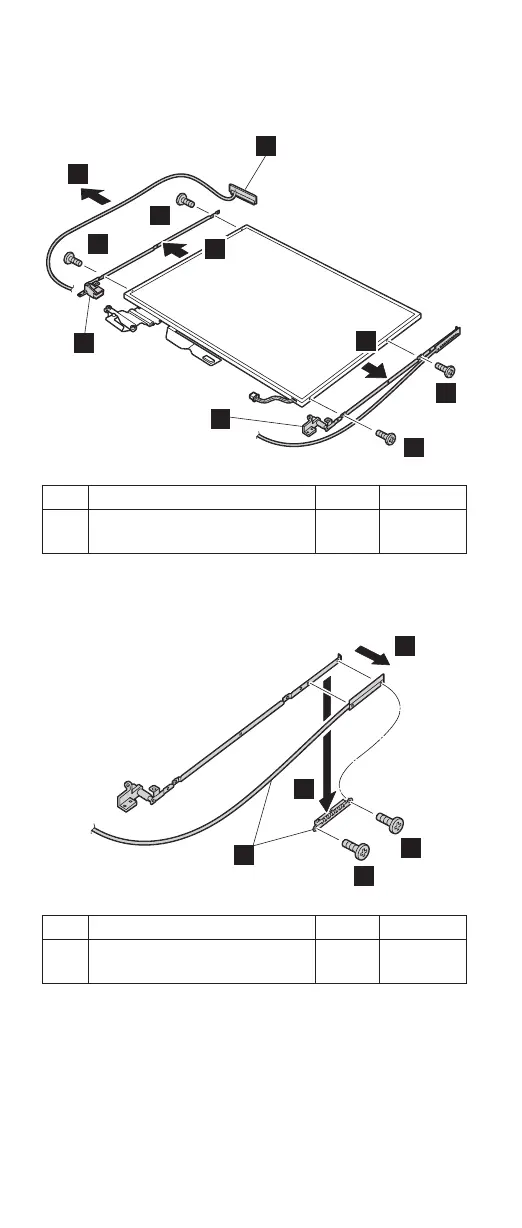
Remove the antenna assembly a and hinges b from
the LCD assembly.
15
a
16
b
16
17
17
b
16
16
Step Screw (quantity) Color Torque
16 M2 × 3 mm, small-head,
nylon-coated (4)
Silver 0.245 Nm
(2.5
kgfcm)
Remove two screws c, and detach the wireless AUX
antenna cable (c) from the right hinge.
18
18
19
20
c
Step Screw (quantity) Color Torque
18 M2 × 3 mm, small-head,
nylon-coated (2)
Silver 0.245 Nm
(2.5
kgfcm)
(continued)
Removing and replacing a FRU
160 MT 1871/1872/1875/1876



 To Next Page