15
ISM-3i
Since the ISM-3i has no LED and Buzzer, one of the following messages is displayed on the LCD of the
measuring instrument if an error occurs :
Faulty radio transmission
Timeout Error on reading the measurement value from the gauge
5. Signal strength measurement
The ISM-usb radio receiver can do an RSSI measurement ( Received Signal Strength Indicator ).
By this the signal strength of radio or interference signals can be measured which might exist in the
frequency range of the ISM or IBRit-rf1 radio modules.
Please use the latest versions of our USB driver and the IBR_SimKey software for the test
( see chapter 2.3 and 2.4 ).
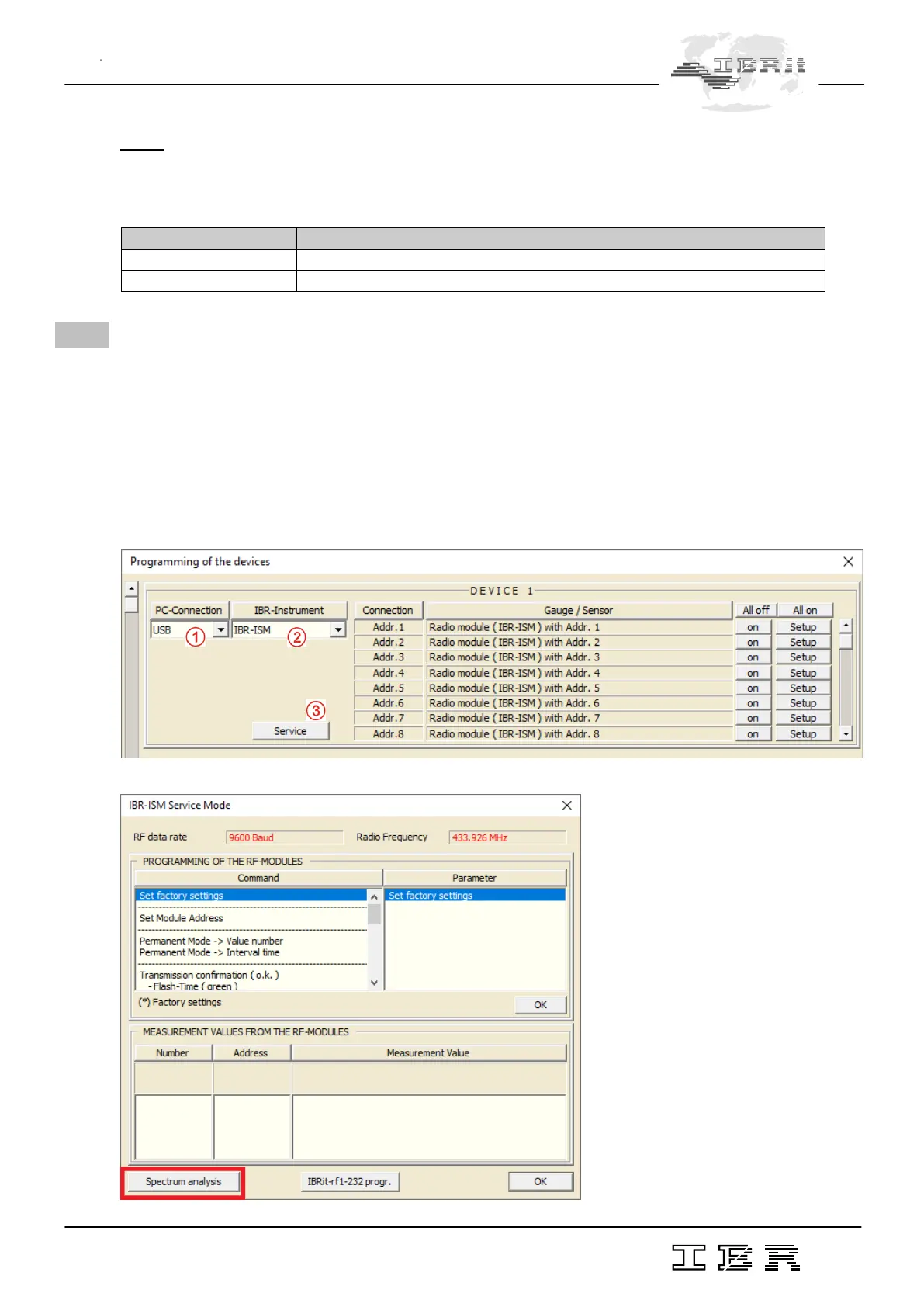
Start the IBR_SimKey software and open the dialogue to configure the connected IBR hardware.
Please select USB as PC-Connection and IBR-ISM as IBR-Instrument. Then click the Service button to
enter the service dialogue of the IBR-ISM module :
The service dialogue of the IBR-ISM radio receiver opens :



 To Next Page