EasyManua.ls Logo

Icom IC-775 - CR-282 High-Stability Crystal Unit Installation

Icom IC-775
6 pages
Print Icon
To Next Page IconTo Next Page
To Previous Page IconTo Previous Page
Loading...
CR-282
HIGH-STABILITY
CRYSTAL
UNIT
INSTALLATION
By
replacing
the
original
crystal
unit
with
this
unit,
the
total
frequency
stability
of
the
trans-
ceiver
will
be
improved.
CR-282
frequency
stability:
+
0.5
ppm
(—30°C
to
+60
°C;
—22°F
to
+140°F)
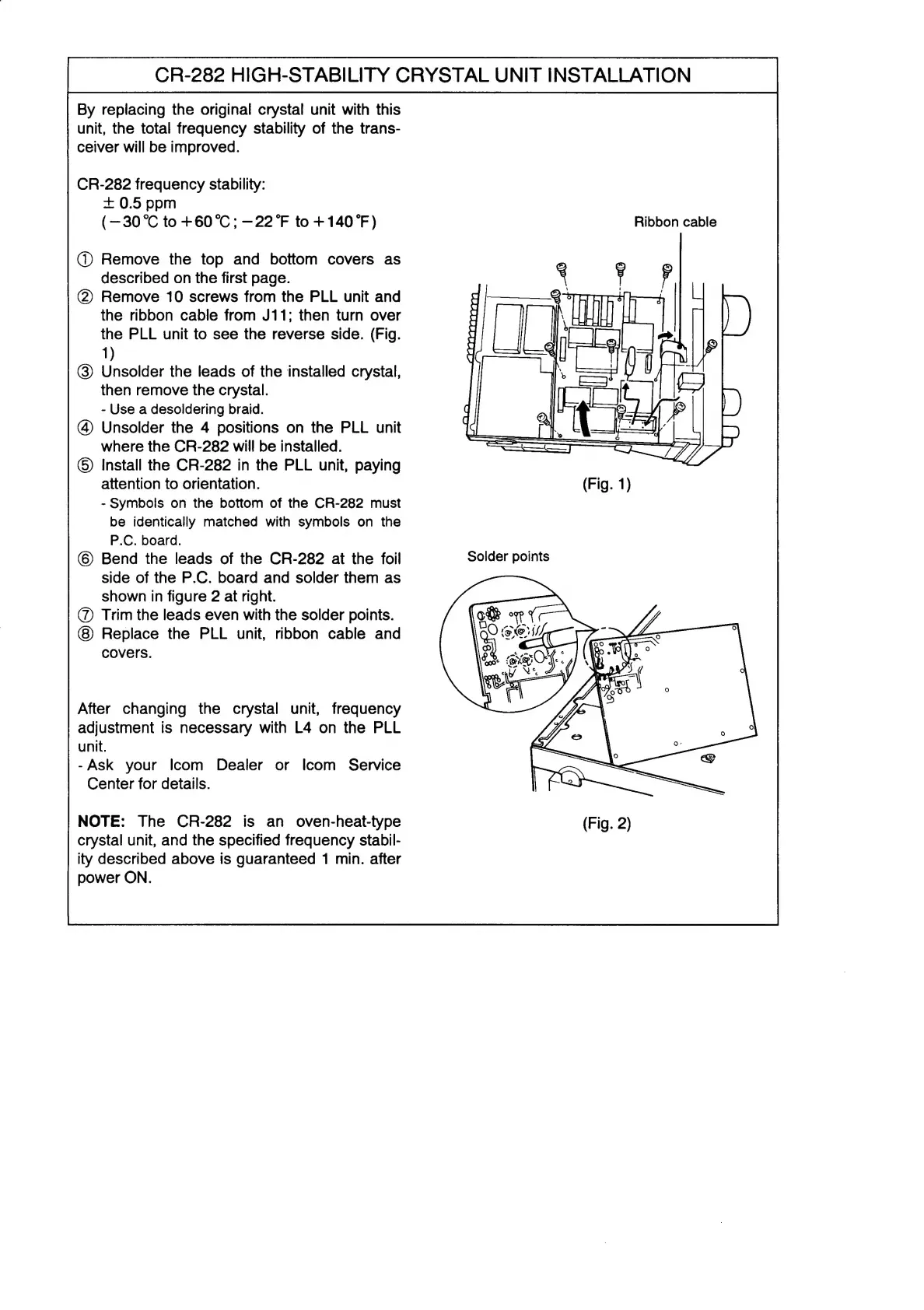
Ribbon
cable
@
Remove
the
top
and
bottom
covers
as
described
on
the
first
page.
(2)
Remove
10
screws
from
the
PLL
unit
and
the
ribbon
cable
from
J11;
then
turn
over
the
PLL
unit
to
see
the
reverse
side.
(Fig.
1)
@)
Unsolder
the
leads
of
the
installed
crystal,
then
remove
the
crystal.
-
Use
a
desoldering
braid.
(4)
Unsolder
the
4
positions
on
the
PLL
unit
where
the
CR-282
will
be
installed.
©)
Install
the
CR-282
in
the
PLL
unit,
paying
attention
to
orientation.
-
Symbols
on
the
bottom
of
the
CR-282
must
be
identically
matched
with
symbols
on
the
P.C.
board.
6)
Bend
the
leads
of
the
CR-282
at
the
foil
side
of
the
P.C.
board
and
solder
them
as
shown
in
figure
2
at
right.
(7)
Trim
the
leads
even
with
the
solder
points.
Replace
the
PLL
unit,
ribbon
cable
and
covers.
After
changing
the
crystal
unit,
frequency
adjustment
is
necessary
with
L4
on
the
PLL
unit.
-Ask
your
Icom
Dealer
or
Icom
Service
Center
for
details.
NOTE:
The
CR-282
is
an
oven-heat-type
crystal
unit,
and
the
specified
frequency
stabil-
ity
described
above
is
guaranteed
1
min.
after
power
ON.

Other manuals for Icom IC-775

Related product manuals