EasyManua.ls Logo

Icom IC-775 - Optional Filter Installation; Filter Selection; UT-66 Voice Synthesizer Unit Installation

Icom IC-775
6 pages
Print Icon
To Next Page IconTo Next Page
To Previous Page IconTo Previous Page
Loading...
OPTIONAL
FILTER
INSTALLATION
After
installing
optional
filters,
the
transceiver
has
3*
kinds
of
selectivity
for
2nd
and
3rd
IF
filters
to
provide
better
S/N
(signal-to-noise
ratio),
or
to
reject
nearby
interference.
*
FM
mode:
2
kinds
of
selectivity
Following
optional
filters
are
available.
passband
|
width|
Used.
selectivity»
FL-101|250Hz/—-6dB|CWnar.
FL-102|
6.0
kHz/—6
dB|
S~8
wide.
AM
med.,
FM
nar.
FL-223
|
1.9
kHz/—6
dB
FL-53A|
250
Hz/—6
dB
FL-222
|
1.9
kHz/—6
dB
When
only
1
filter
is
installed
for
selectivity,
such
as
a
FL-101
installed
but
no
FL-53A
installed,
optimum
performance
cannot
be
obtained
for
the
selectivity
and
the
twin
PBT
function
does
not
operate
correctly.
Both
filters,
such
as
FL-101
and
FL-53A,
should
be
installed.
4
FILTER
SELECTION
After
the
filter(s)
are
installed,
activate
the
op-
ional
filter(s)
in
H-set
mode.
(p.
47)
If
this
is
not
correctly
set,
the
installed
filter(s)
cannot
be
selected.
QA
A
AG
@
Remove
the
top
and
bottom
covers
as
described
on
the
first
page.
@)
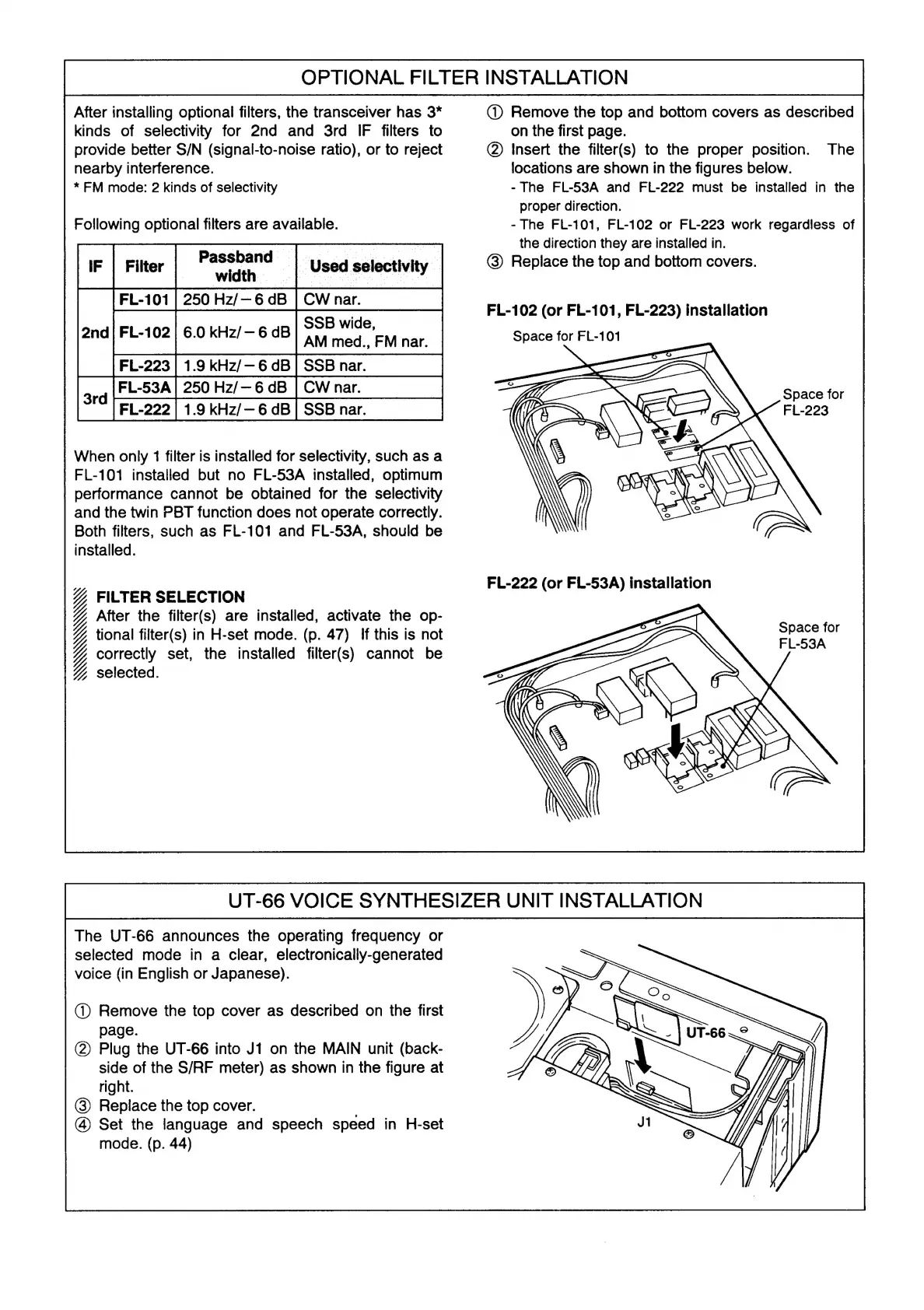
Insert
the
filter(s)
to
the
proper
position.
The
locations
are
shown
in
the
figures
below.
-
The
FL-53A
and
FL-222
must
be
installed
in
the
proper
direction.
-
The
FL-101,
FL-102
or
FL-223
work
regardless
of
the
direction
they
are
installed
in.
@)
Replace
the
top
and
bottom
covers.
FL-102
(or
FL-101,
FL-223)
installation
Space
for
FL-101
Ky
AE
eh
ope
Space
for
FL-223
FL-222
(or
FL-53A)
installation
Space
for
FL-53A
UT-66
VOICE
SYNTHESIZER
UNIT
INSTALLATION
The
UT-66
announces
the
operating
frequency
or
selected
mode
in
a
clear,
electronically-generated
voice
(in
English
or
Japanese).
@)
Remove
the
top
cover
as
described
on
the
first
page.
(2)
Plug
the
UT-66
into
J1
on
the
MAIN
unit
(back-
side
of
the
S/RF
meter)
as
shown
in
the
figure
at
right.
@)
Replace
the
top
cover.
@
Set
the
language
and
speech
speed
in
H-set
mode.
(p.
44)

Other manuals for Icom IC-775

Related product manuals