MAINTENANCE
24
9
CLONING
23
8
‘‘
Optional UT-96/ UT-105/ UT-108/ UT-109/
UT-110/ UT-111 and UT-113 installation
You can install one of the following optional signaling units in the
transceiver. UT-96
2TONE/5TONE UNIT, UT-105 SmarTrunk
(TM)
Logic
Board, UT-108 DTMF DECODER UNIT, UT-109/ UT-110 SCRAM-
BLER UNIT, UT-111 TRUNKING BOARD or UT-113 MAN DOWN
UNIT.
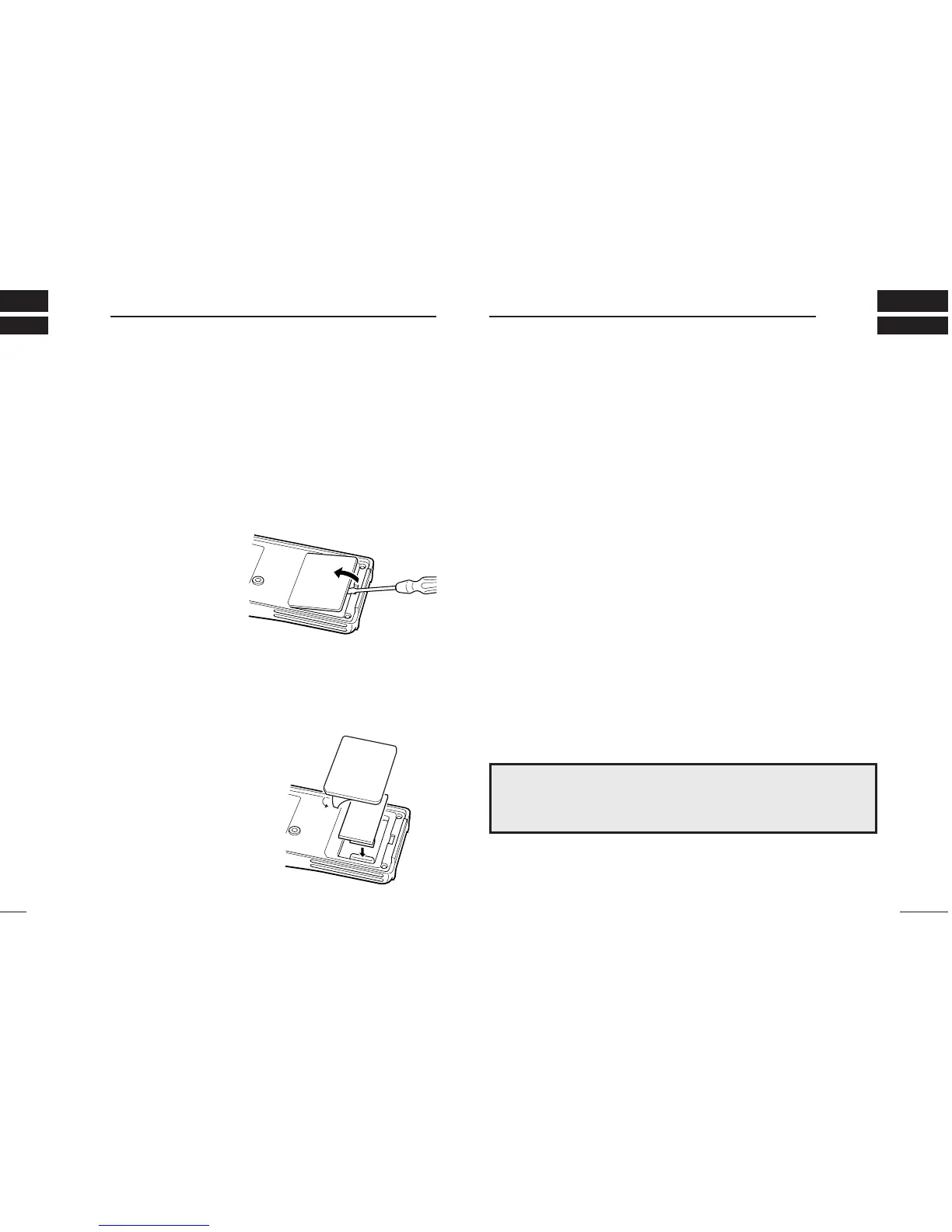
q Remove the optional connecter access cover (named 2251 OPT
sheet).
•
Insert a screwdriver into the
hollow of the chassis, then lift
and take away the cover.
(The cover can not be used
again.)
w Attach the desired optional unit. Insert the connector tightly to
avoid a bad contact.
e Remove the paper backing of 2251 OPT sheet supplied as an
accessory.
r Attach the new 2251 OPT sheet to the service window.
t Program the necessary infor-
mation with the cloning soft-
ware before operation.
Please ask your dealer or
system operator for details.
‘‘
Cloning
Cloning allows you to quickly and easily transfer the programmed
contents from one transceiver to another transceiver; or data from
PC to a transceiver using the optional CS-F3G
CLONING SOFTWARE
.
DD
Transceiver-to-transceiver cloning
q Connect the optional OPC-474
CLONING CABLE
to the [SP] jack
of the master and slave transceivers.
• The master transceiver is used to send data to the slave trans-
ceiver.
w While pushing [P0] and [
YY
], turn the transceiver’s power on to
enter cloning mode (For both the master transceiver and slave
transceiver).
•
“CLONE” appears and the transceiver enters the clone standby
condition.
e Push [PTT] on the master transceiver.
•
“CLOUT” appears in the master transceiver’s display.
• “CL IN” appears automatically in the slave transceiver’s display.
• When cloning is finished, “CLONE” appears in the master trans-
ceiver’s display.
NOTE: DO NOT push the [PTT] on the slave transceiver during
cloning. This will cause a cloning error.
r When cloning is finished, turn power off, then on again to return
to normal operation.
NOTE: Transceiver-to-transceiver cloning can not be done
between 40CH version and 100CH version, or CPU Rev.1.
✻
and Rev.2.0.
• While pushing [P3] and [
YY
], turn the transceiver’s power on to enter
CPU version check mode. CPU revision is displayed (“100CH” display
for 100CH version only).


 To Next Page
 Loading...