[Line]
Selects the input signal level between mic ([Line] button is grayed out), and line level ([Line] button is
clicked and highlighted in yellow: .
For more information about choosing the right signal level for your input source, see this helpful
article from Sweetwater.
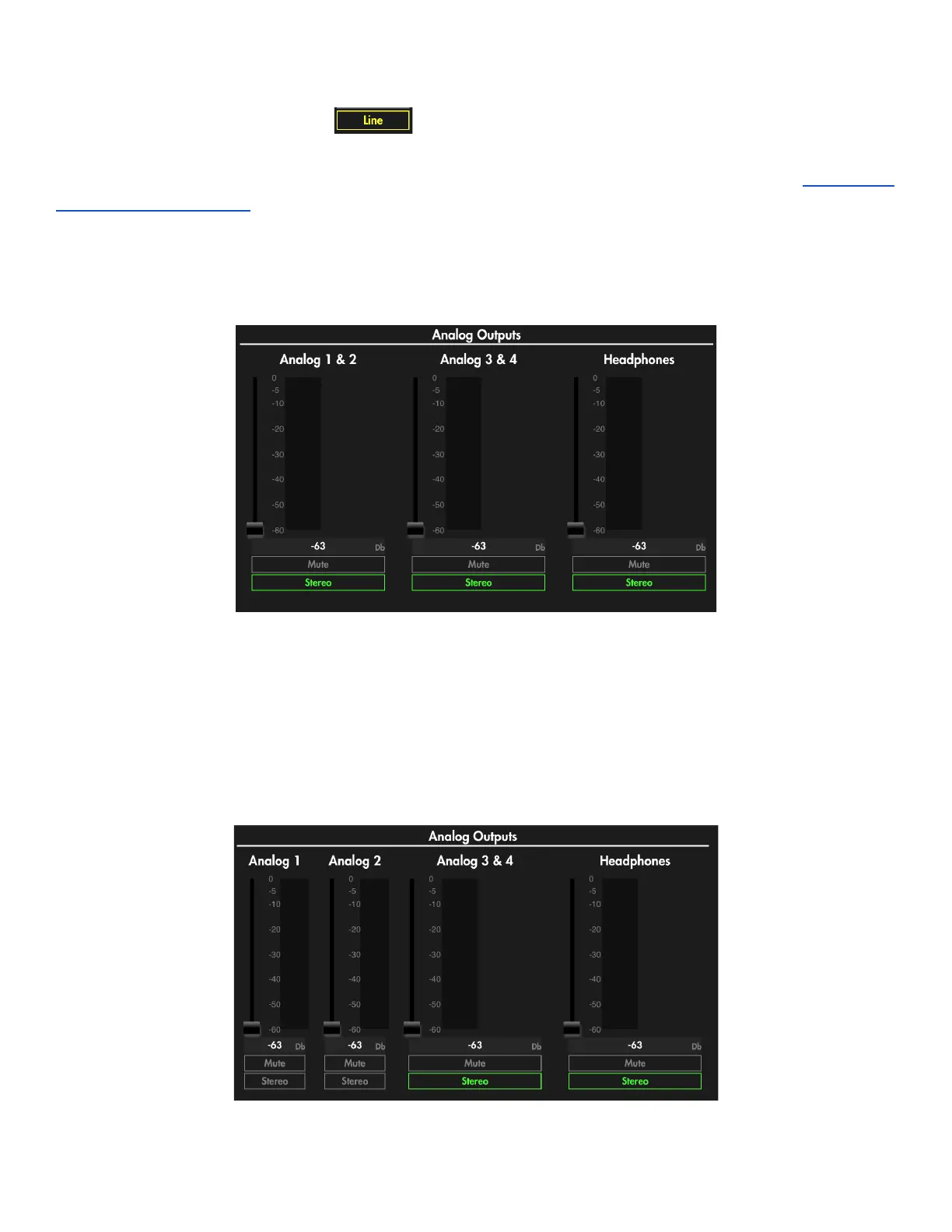
Analog Outputs
Pictured above are the LED meters and respective faders to control output level per output. Output
level can be adjusted by dragging the on-screen fader up or down, or by clicking the current Db value
in the gray box directly below the fader and volume meter output array and typing in the Db amount
you want for gain in the range -60 to 0 Db.
Buttons for [Mute] and [Stereo] select per channel are located below the LED meter and fader array.
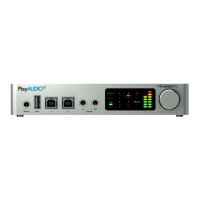
Stereo is selected by default; unselecting [Stereo] will produce two mono output controls in a 1:1
configuration to analog outputs as pictured below.
Analog outputs 1 & 2 set to mono by unselecting the [stereo] button
AUDIO4c User Guide v2021-0002 Page 12


 To Next Page