HARDWARE DESCRIPTION
Front Panel
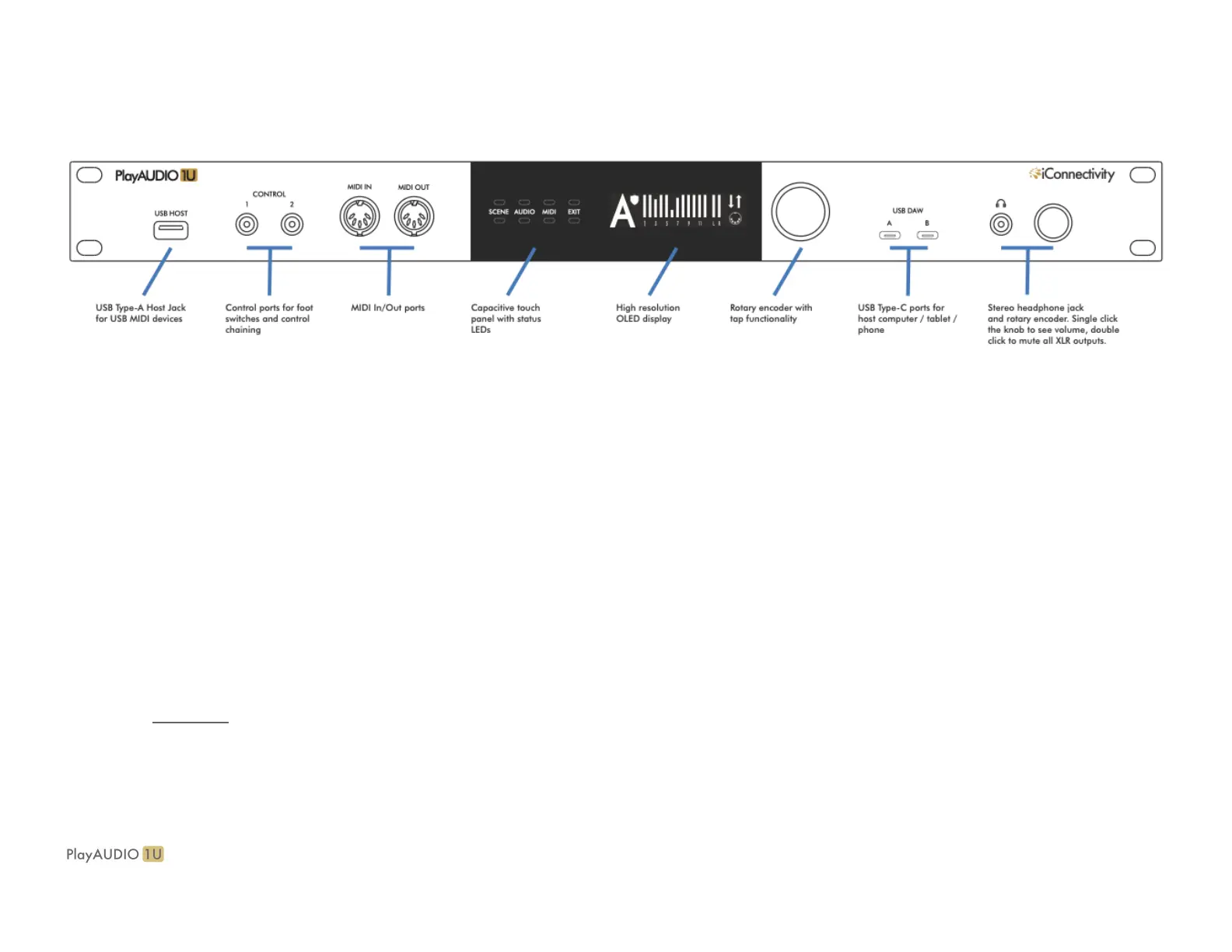
● USB HOST port. Directly plug in a class-compliant MIDI device, or plug in up to eight class-compliant MIDI devices via a powered USB hub
(not included).
● CONTROL ports. Plug in up to two foot switches
● MIDI DIN ports. 5 pin DIN connections for MIDI Controllers
● Capacitive(cap) touch buttons & OLED. Manually switch scenes or inspect real time MIDI and audio information
● Rotary Encoder. Multi-function encoder. Double press to save current settings or spin to cycle through pages in the currently selected page
● USB DAW ports. USB C ports for connecting computers or tablets.**
● 3.5mm Headphone port. Stereo mix
● Headphone Rotary Encoder. Multi-function encoder. Rotate to increase/decrease the headphone mix output volume; this also temporarily
calls up the headphone volume display. Additionally: Double press to mute all rear outputs; double press again to unmute; press once to call
the headphone volume display, and press again to return to the previous active menu.
** check out this article for more information on tablet connection


 To Next Page