Need help?
Do you have a question about the iConnectivity PlayAUDIO 1U and is the answer not in the manual?
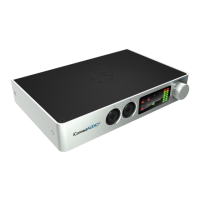
Describes the components and controls on the front panel of the PlayAUDIO1U, including USB ports, MIDI I/O, and display.
Details the connections on the rear panel, including AC power inlet, power switch, XLR balanced audio outputs, and Ethernet port.
Instructions for installing the iConnectivity audio drivers for Windows, enabling the interface as an audio output device.
Guide to downloading and installing the RTP MIDI Driver for Network MIDI on Windows computers.
Steps to download and install Auracle X software and perform a firmware upgrade for the PlayAUDIO1U unit.
Explains the two failover mechanisms: Automatic Failover (tone-based) and Manual Failover (footswitch-based).
Instructions on how to arm the PlayAUDIO1U for automatic failover, including connecting computers and using test tone plugins.
Steps to test the automatic failover by removing the primary audio cable and observing the switch to the backup device.
Details on manually engaging failover using touch panel buttons or footswitches, and indications for Scene A and Scene B.
Describes the touch panel features, including touch zones, OLED display, and status indicators like Shield Icon and Output Meter.
Explains how to use the rotary encoder for adjustments and its press functions like saving settings, restarting, and viewing interface information.
Details how to navigate the Audio menu using the rotary encoder to scroll, select, and adjust audio output levels.
Explains how to use the rotary encoder in the MIDI menu to cycle through port monitor pages like DAW A, DAW B, RTP, and USB.
Describes how to use the headphone rotary encoder to mute outputs, select headphone mix, and adjust volume in 0.5 dB increments.
Explains how to use CONTROL ports with footswitches for sending MIDI messages, managing failover, and toggling scenes.
Details digital performance, line output levels, SNR, THD+N, and headphone output power and load.
Covers 5-pin MIDI DIN I/O, channel count per computer, and USB Host port MIDI device support.
Details the power specifications for the USB Host port, including voltage and maximum current.
Specifies connectivity for Windows, macOS, Android, and iPadOS devices via USB-C ports.
Details the input voltage, frequency, and power consumption (24W) and fuse rating (1A Slow-Blow).
Provides the physical dimensions (Height, Width, Depth) and weight of the PlayAUDIO1U unit.
 General
| Type | Audio Interface |
|---|---|
| Sample Rates | 44.1kHz, 48kHz, 88.2kHz, 96kHz |
| Bit Depth | 24-bit |
| Form Factor | Rackmount |
| Rack Spaces | 1U |
| Channels | 12 |
| Analog Outputs | 8 |
| Digital Inputs | 2 (ADAT) |
| Digital Outputs | 2 (ADAT) |
| Dimensions | 19" x 1.75" |

 To Next Page