EN3
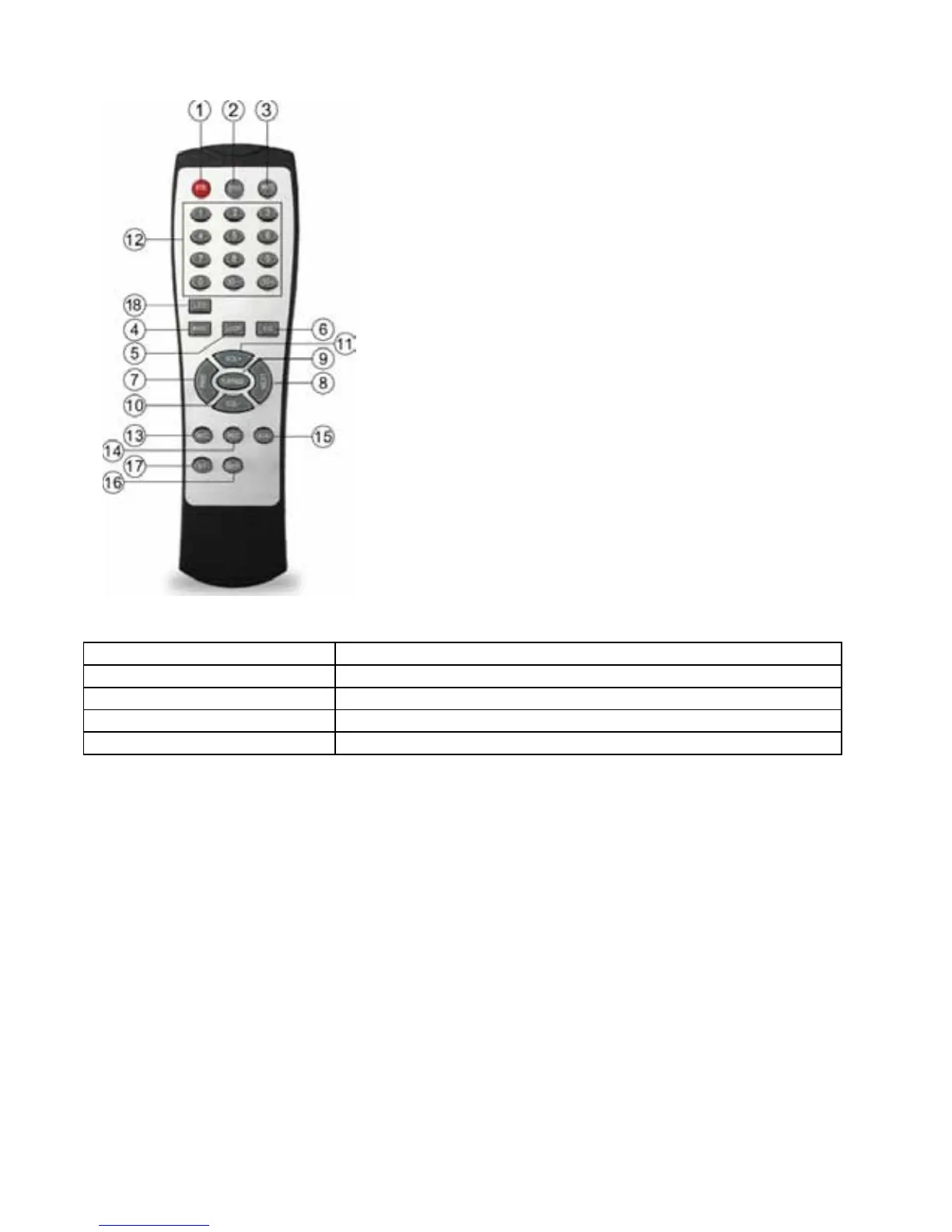
REMOTE CONTROL
SPECIFICATIONS
1. Stand-By
2. Stop
3. Mute
4. Mode shift
5. Recycle
6. EQ:select EQ modes to Normal/Bass/Pop/Jazz Etc.
7. Previous Song/Radio Channel
8. Next Song /Radio Channel
9. Pause/Play
10. Volume Decrease
11. Volume Decrease
12. Number Keys 0-9: press the number combination to quick
select the song number or radio channel number to play.
13. Karaoke priority: Press this button,the Mic LED will be
light,it marked enterimnto Micpriority closed.
14. Record/Playback:Press this button to enter the record
state,press again to play the recording .
15. AUX line Mode .
16. USB/TF shift
17. Bluetooth Mode
18. LED key for control led mode.
Power RMS 9.5W
Frequency Response 100Hz-20KHz
S/N Ratio <95dB
Output Impedance 4ohm
Input voltage DC9V/1A
Specications are typical, individual units might vary. They are subject to continuous improvement
without notice and without incurring any obligation.






 To Next Page