IDEMIA DOCUMENT – REPRODUCTION AND DISCLOSURE PROHIBITED
Installation recommendations / environment
6
Step one : overview
IDEMIA - 2019_2000045730 – V1
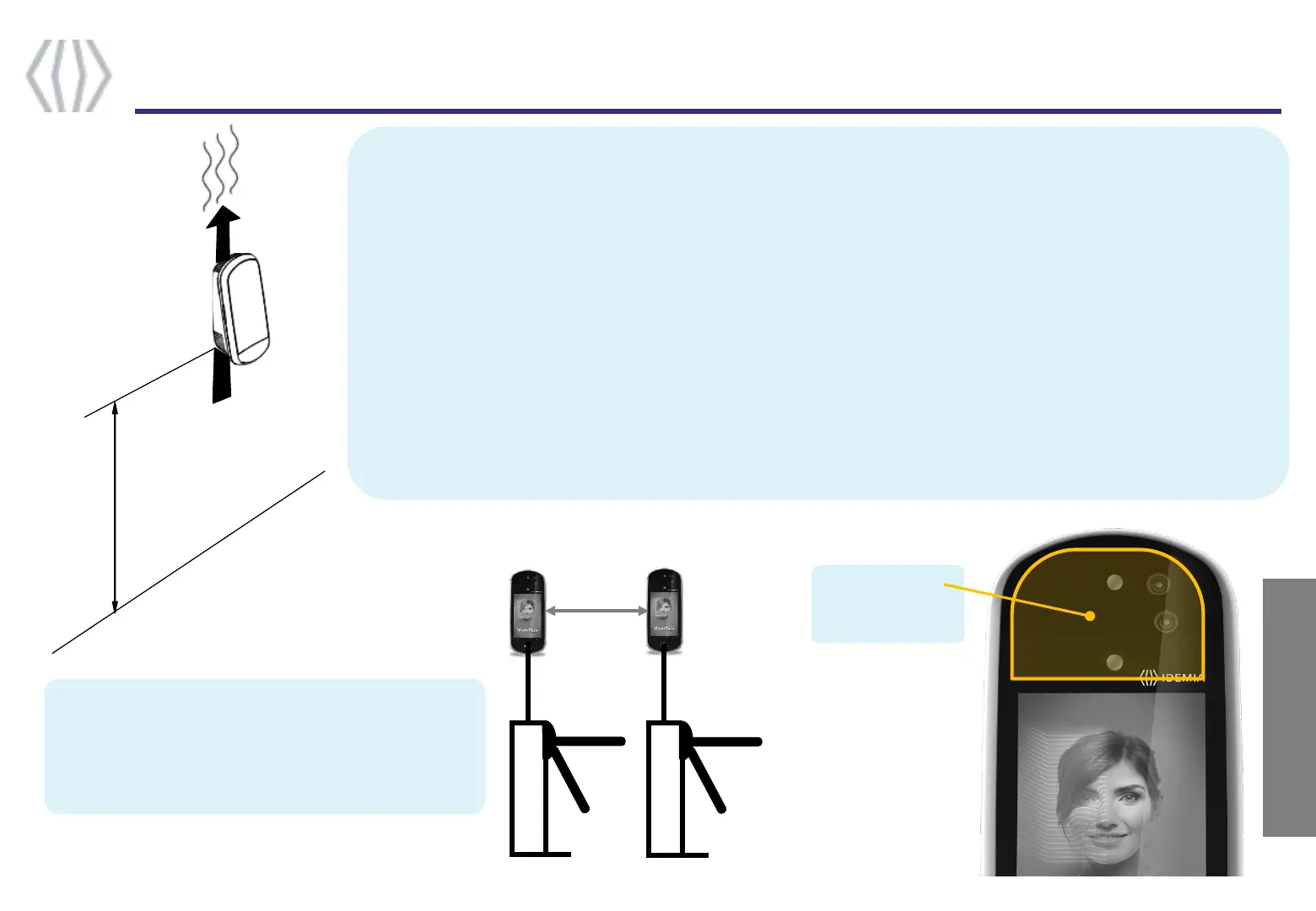
If several devices are installed in parallel lanes
(typically for gates or turnstiles), then a minimum
distance of 80cm must be kept between the devices.
Alternately, devices can be tilted so that one device
field of view does not interfere with the other one.
Please install Visionpass terminal vertically at the recommended height, and keep the openings clear to allow air flow.
VisionPass is designed to operate in most environmental conditions. Anyway, to optimize VisionPass performance, it is
better to follow the rules below :
• Avoid sunlight coming directly on the device (for instance, avoid installing the device facing a window).
• Avoid direct sunlight on the user’s face.
• Avoid strong left/right or top/bottom contrast, and shadows on the user’s face due to lighting configuration.
• Prefer a neutral color background in the field-of-view of the product
• Avoid any bright spot light very close to the device (closer than 1 meter)
• Protect the front glass from raindrops as it might affect the sensors
NB : Caution : when operating, the internal radiator may be hot.
80 cm
min.
Keep this area
clear and clean :
no sticker etc.



 To Next Page