4
Quanti-Tray Sealer PLUS User’s Manual
Setting up the sealer
• Unpack the contents and save packaging for future shipping.
• Position the sealer on a level surface with the display facing you and with adequate space for trays to be inserted and
ejected. Ensure the fan is not blocked to allow air flow around the unit.
• Ensure that the power switch is turned off.
• Plug the power cord into the sealer and then into a grounded outlet of proper voltage (see product label).
• To connect the optional input shelf, center the holes over the corresponding tabs and press down.
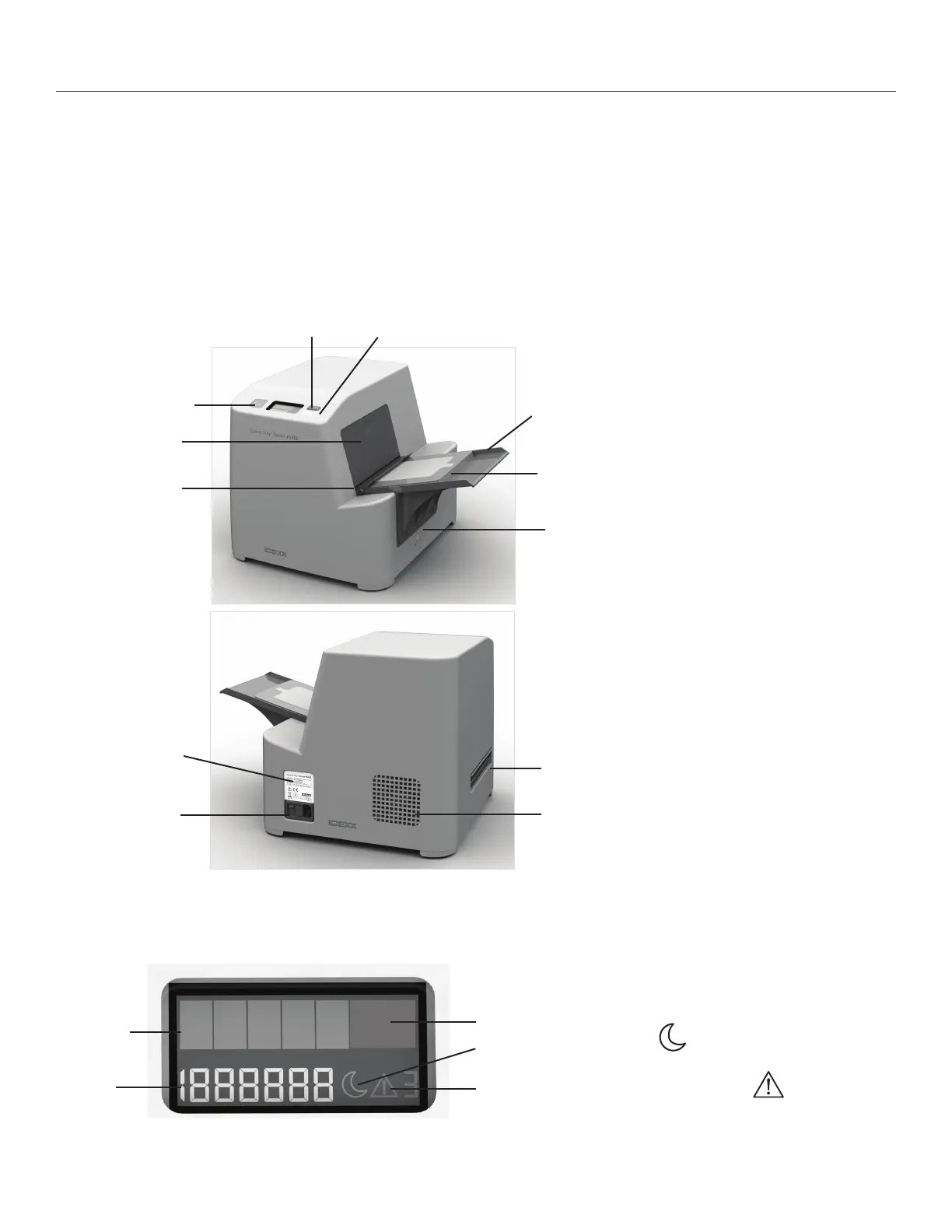
Understanding the sealer display
Power switch
Fan
Exit slot
Reverse button
Status light (not
a button)
Rubber insert with Quanti-Tray
Input slot
Upper access door
Sleep mode button
Lower access panel
Input shelf
Amber bars
Counter
Alert
Green bar
Moon (sleep)
Counter: Number of trays that have been run through the
sealer.
Amber bars: Sealer is warming up.
Green bar: Sealer has warmed to sealing temperature.
Moon icon
: Sleep mode is enabled. See the “Using
Sleep Mode” section of this manual.
Alert icon with error code
: See the “Trouble-
shooting” section of this manual.
Fuse box


 To Next Page
 Loading...