Need help?
Do you have a question about the IDTECK ipass IP10 and is the answer not in the manual?
Covers electrical shock risks, symbol meanings, and operational warnings for safe use.
Emphasizes reading, keeping, and following all instructions, plus rules for water, cleaning, ventilation, and heat sources.
Covers plug safety, using specified accessories/equipment, and precautions when moving the apparatus.
Instructs users to refer all servicing to qualified personnel for damaged equipment.
Lists reader type, read range, output formats, installation options, durability, and control features.
Details the included reader module, bezel, user manual, screws, and anchor bolts.
Recommends cable types (Belden #9512, #9514) and maximum distances for reader connections.
Explains voltage drop issues in long-distance GND wires and methods to reduce it.
Details drilling hole placement and securing the reader module and bezel for mounting.
Illustrates connections for Wiegand data, RS232, buzzer, and LED control to the controller.
Describes initial beeps, LED status (red-green-red), and standby mode indication.
Explains how to present a card, hear a beep, and observe LED color changes during reading.
Details how to control LED colors and generate multiple beeps using input wires.
Outlines FCC Part 15 rules, device compliance, and the two conditions for operation.
Provides contact details for IDTECK headquarters and production facility for RMA services.
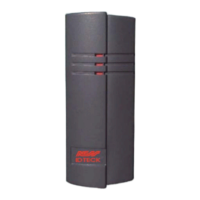
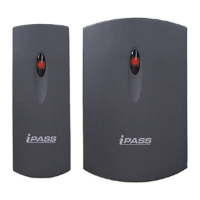
The IDTECK iPASS IP10/20 is an ASK[EM] format proximity card reader designed for access control applications. This device is engineered for ease of installation and robust performance in various environments, including outdoor settings, thanks to its epoxy potting.
The primary function of the iPASS IP10/20 is to read 125KHz proximity cards using the ASK[EM] format. Upon reading a card, it transmits the card data to a connected controller, typically in 26-bit Wiegand format (default) or RS232 (optional). The reader provides visual and auditory feedback to the user during operation. When power is applied, the reader undergoes an initialization and diagnostics sequence, indicated by three beeping sounds and an LED toggling red-green-red, after which it enters a standby mode with a green LED. When a proximity card is presented, the reader emits a beep sound, and the LED momentarily changes to red before returning to green, signifying a successful read and data transmission to the controller.
The iPASS IP10/20 is designed for versatile installation, suitable for mounting on metal door frames (mullions) or any flat wall surface. The IP10 model is specifically suited for mullion mounting, while the IP20 is designed for wall mounting. Its compact and elegant design allows for discreet integration into various architectural styles. The reader supports user-defined formats, offering flexibility for different access control system requirements.
The device incorporates external control inputs for both the LED and the buzzer, allowing for customized feedback. The LED Control Input (Yellow wire) can be connected to power ground to change the LED colors. In standby mode, the LED is green. When a card is presented, the LED changes to red and then back to green after reading. This external control enables the system to provide specific visual cues based on access events. Similarly, the Buzzer Control Input (Blue wire) allows for external control of the beeper. While the reader generates a single beep for a successful card read in normal operation, connecting the Buzzer Control Input to power ground enables the generation of multiple beeps. This feature can be utilized by the access control system to provide distinct auditory feedback, such as different beep patterns for granted or denied access, enhancing the user experience and system communication.
The reader is built with solid epoxy potting, which contributes to its durability and makes it suitable for outdoor use, offering protection against environmental elements. It also features reverse polarity protection, safeguarding the device from damage due to incorrect power connections.
The iPASS IP10/20 is designed for minimal maintenance due to its robust construction and epoxy potting, which protects internal components from dust and moisture. However, proper installation is crucial for long-term reliability. When installing the reader, it is important to use the recommended cable types and lengths to ensure stable power and data transmission. For installations involving long cable runs between the reader and the Access Control Unit (ACU), attention must be paid to potential voltage drops, especially on the GND wire. Significant voltage drops can impair the ACU's ability to correctly interpret data signals. To mitigate this, thicker cables or multiple wires in parallel for the GND connection can be used to reduce DC resistance. Alternatively, providing a separate external power supply to the reader can eliminate current flow through the GND wire from the ACU, thereby preventing voltage drops.
The device is designed to operate within a wide temperature range and moderate humidity, but it should not be exposed to extreme temperatures or high humidity outside its specified operating conditions. Regular cleaning with a dry cloth is recommended to maintain its appearance. In case of any operational issues, users are advised not to attempt disassembly or modification, but rather to contact the service center, as unauthorized alterations can void warranties and potentially damage the product. The device's design prioritizes user safety, with warnings against improper power connections, exposure to moisture, and installation in unsuitable environments. The use of specified adapters and secure power connections are emphasized to prevent fire, electric shock, or damage.
 General
| Type | Proximity Card Reader |
|---|---|
| Technology | RFID |
| Power Supply | 12V DC |
| Ingress Protection | IP65 |
| Frequency | 125 kHz |
| Card type | 125kHz EM |
| Communication Interface | Wiegand |
| Operating Humidity | 10% to 90% (non-condensing) |
| Read Range | Up to 10 cm |

 To Next Page