Need help?
Do you have a question about the IEC E055-71520305 and is the answer not in the manual?
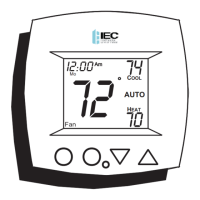
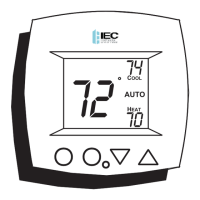
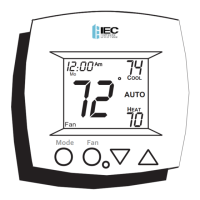
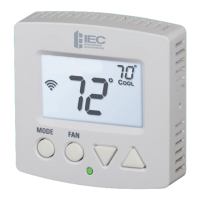
The main screen displaying temperature, time, and status.
Buttons used to adjust setpoints and navigate menus.
Button to cycle through operating modes (Heat, Cool, Auto).
Button to control fan and temporary schedule overrides.
Visual indicator for heating (red) or cooling (green) operation.
Icons representing operational modes like HEAT, COOL, AUTO, PROGRAM.
Shows current time and day, used for programming.
Shows the ambient temperature sensed by the thermostat.
Indicates the target temperature for heating or cooling.
Indicates a temporary manual adjustment of the schedule.
Shows the current program status (occupied or unoccupied).
Shows when the thermostat is in advanced setup mode.
Displays fan operation status (Auto, low, medium, high).
Icons used during programming occupied periods.
Shows when the keypad is locked to prevent changes.
Shows if temperature data is from an external sensor.
Instructions for setting the current time accurately.
Instructions for setting the current day of the week.
Sets the system to provide heat only.
Sets the system to provide cool only.
System automatically switches between heat and cool.
Activates programmed heating/cooling schedules.
Turns off both heating and cooling functions.
Sets the system for heating only in 2-pipe configurations.
Activates programmed schedules for 2-pipe systems.
Disables both heating and cooling for 2-pipe systems.
Sets the system for cooling only in 2-pipe configurations.
Auto switching for 2-pipe systems with sensor.
Activates programmed schedules for 2-pipe systems.
Turns off heating and cooling for 2-pipe systems.
How to set target temperatures for comfort.
Managing fan speeds (low, med, high) and Auto mode.
Temporarily changing the current schedule settings.
Initiating Occupied 1 comfort during unoccupied periods.
Accessing the programming interface.
Setting temperature for Occupied 1 period.
Setting temperature for Unoccupied periods.
Setting target heat temp for unoccupied times.
Assigning specific days to Occupied 1 schedule.
Defining the active hours for Occupied 1.
Activating or deactivating Occupied 1 for a given day.
Replicating schedules across the week.
Specifying target days for schedule copying.
Transferring start times during copy process.
Transferring stop times during copy process.
Activating/deactivating copied schedules.
Important considerations for programming.
Method to enter the advanced configuration menu.
Setting or correcting the thermostat's internal clock.
Selecting the correct day for accurate scheduling.
Setting display to full or minimal view.
Choosing between single or dual setpoint display.
Specifying if the system is 2-pipe or 4-pipe.
Defining specific modes for 2-pipe systems.
Controlling fan behavior when in Auto mode.
Adjusting temperature swing for the first stage.
Defining the minimum temperature gap between modes.
Adjusting backlight behavior for energy saving.
Selecting Fahrenheit or Celsius for temperature display.
Configuring how the duct sensor influences operation.
Adjusting how long overrides remain active.
Setting Normally Open/Closed for dry contact input.
Linking dry contact to Occupied or Unoccupied modes.
Controlling unoccupied setpoints using dry contact.
Steps for calibrating the internal temperature sensor.
How the clock maintains time during power outages.
How deadbands control fan speed stages.
Using external devices to control modes.
Visual guide to wiring terminals on the thermostat.
Procedure to reset all settings to original defaults.
In-depth look at fan modes (Auto, Continuous).
Setting the display for reduced information.
Fan behavior for energy efficiency in unoccupied periods.
Setting the minimum temperature difference between modes.
How to disable or enable front panel buttons.
Information regarding the tamper-proof cover.
Viewing external temperature readings.
Details on connecting and using the duct sensor.
How the thermostat operates with a single setpoint.
Binding terms for orders and product conformity.
Conditions for quoting, payment, and delivery.
When ownership and responsibility for goods pass.
Procedures for managing order fulfillment delays.
Duration of warranty and items not covered.
Legal aspects of warranty and damages.
Situations that invalidate the warranty.
IEC's limited role in system design and maintenance.
Allocation of taxes, duties, and data usage limitations.
Circumstances beyond IEC's control affecting performance.
Charges for overdue accounts and collection expenses.
Terms and conditions for cancelling an order.
Limitations on transferring agreement rights.
Conditions for providing lien waivers upon payment.
Final terms and conditions for order acceptance.
 General
| Brand | IEC |
|---|---|
| Model | E055-71520305 |
| Category | Thermostat |
| Language | English |


 To Next Page