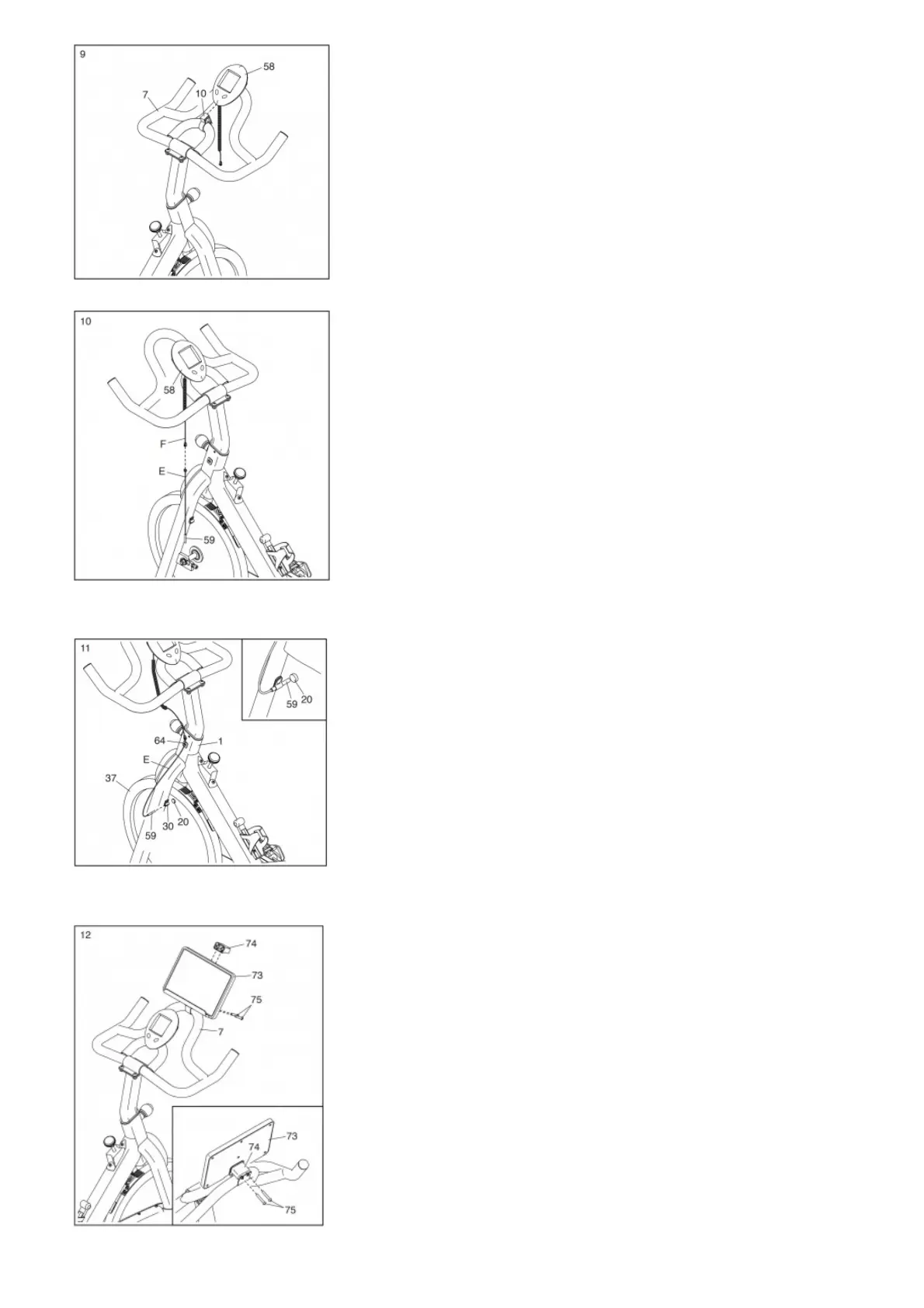
10. Hold the wire (E) on the Reed Switch (59) on the left side of the exercise bike as shown.
Connect the wire (E) on the Reed Switch (59) to the wire (F) on the Console (58).
11. Insert the wire (E) on the Reed Switch (59) into the Clip (64) on the left side of the Frame (1).
Next, insert the Reed Switch (59) into the Clamp (30) on the Frame (1).
Then, rotate the Flywheel (37) so that the Magnet (20) is facing the Reed Switch (59).
See the inset drawing. Move the Reed Switch (59) so that it is 1/2″ (1–2 cm) away from the Magnet (20).
12. Orient the Tablet Holder (73) as shown, and press it onto the Handlebar (7) in the location shown. Center the Tablet Holder on the Handlebar and rotate it forward or backward
to the desired position.
While a second person holds the Tablet Holder (73) in place, attach the Tablet Holder with the Clamp Bracket (74) and two M6 x 40mm Screws (75) as shown in the inset
drawing.
13. After the exercise bike is assembled, inspect it to make sure that it is assembled correctly and that it functions properly. Make sure that all parts are properly
tightened before you use the exercise bike.



 To Next Page