12
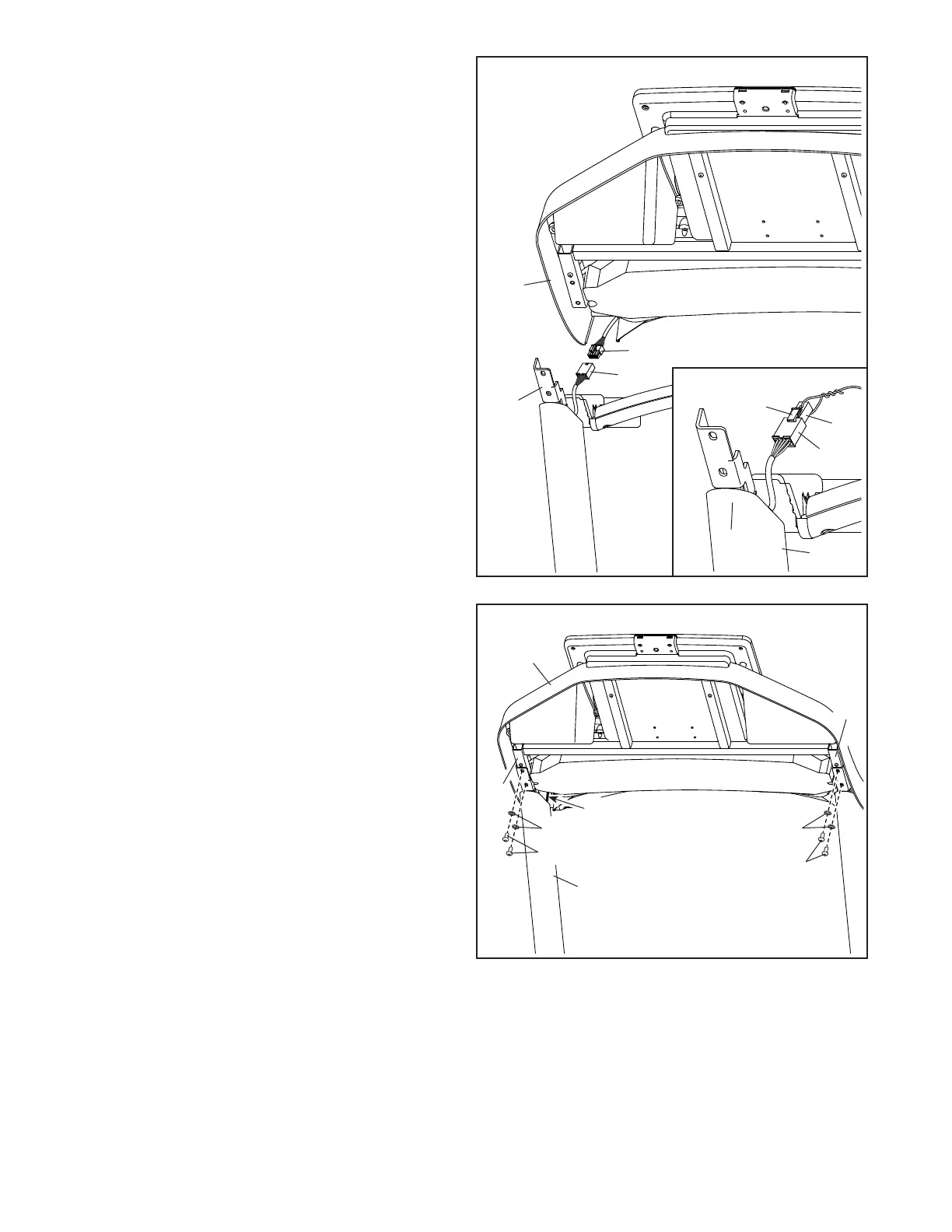
10. Do not pinch the wires (90, G) during this
step. Attach the console assembly (E) to the
Handrails (83, 84) with the four 5/16" x 3/4"
Screws (20) that you removed in step 7 and four
5/16" Star Washers (10); start all four Screws,
and then tighten them.
Insert any excess wire (G) into the top of the
Right Upright (92).
10
20
10
E
10
20
84
83
92
90, G
9. See the inset drawing. Grip the connector on
the end of the Upright Wire (90). Then, press the
small latch (F) on the wire pull (D), and remove
and discard the wire pull.
Next, with the help of a second person, hold the
console assembly (E) near the Right Handrail
(84).
Connect the Upright Wire (90) to the console
wire (G).
IMPORTANT: The wire connectors should
slide together easily and snap into place
with an audible click. You must connect the
wires properly for your treadmill to function
properly.
90
E
G
9
84
92
90
F
D


 To Next Page