5
UK
4 Installation
You need administrator rights for installation�
► Connect the interface to the PC via a USB port�
► Connect the USB stick LINERECORDER DEVICE to the PC or use the
download version LINERECORDER DEVICE�
► Execute the installation file "ifm Software�exe"�
> The Microsoft Windows® hardware wizard is started�
► Follow the instructions in the program�
Select the following options:
- Find locally available drivers�
- Select the driver from the connected USB stick or the download version:
Current drivers can be found on the manufacturer's website�
5 Electrical connection
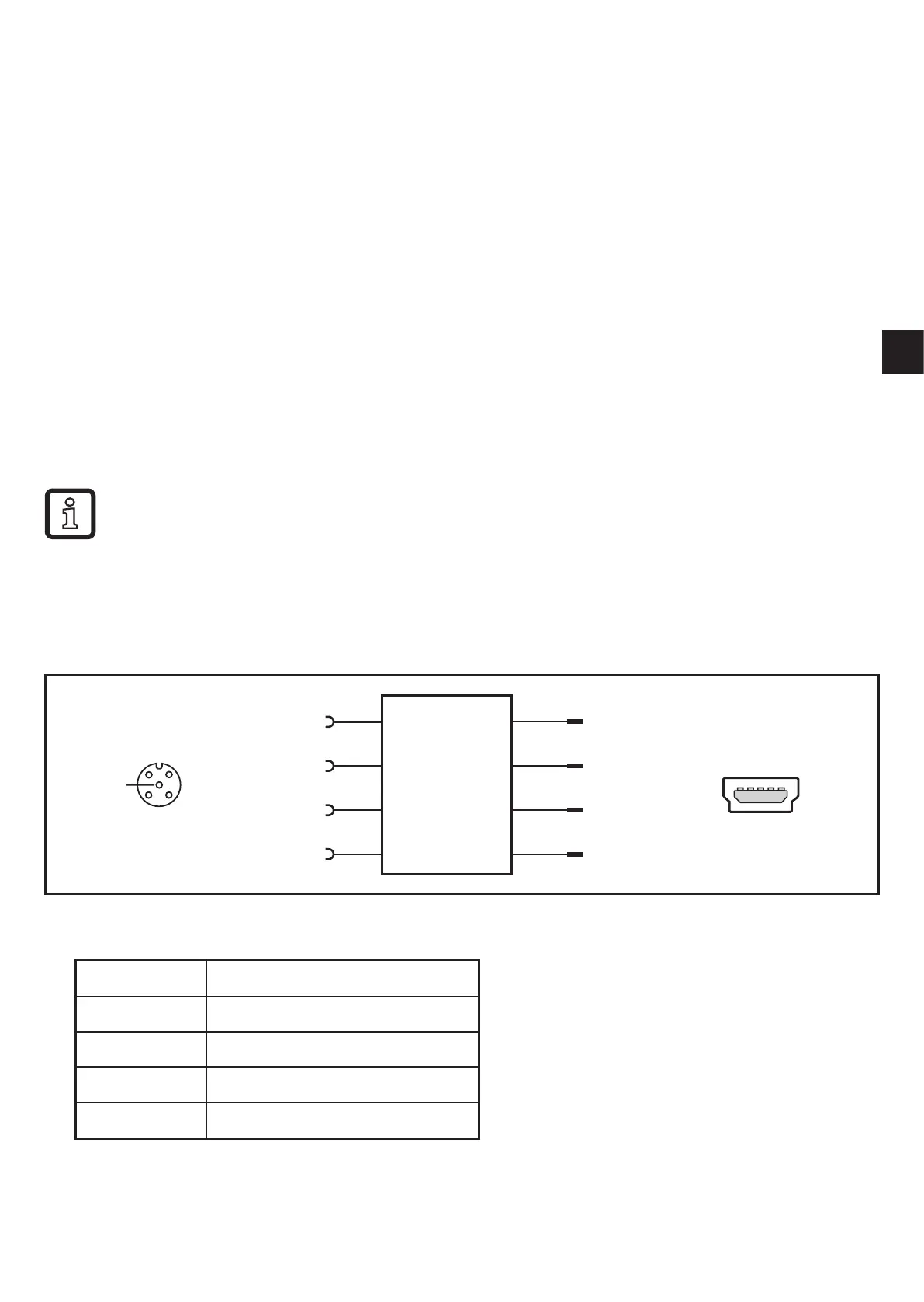
5.1 Connect sensor to a PC via the interface
3
1 2
4
5
USB
Interface
1
2
3
5
1
2
3
4
4 5321
► Connect the sensor to the interface using the M12 cable�
Socket 1 + 24 V
Socket 2 CH2 (DI/DO)
Socket 3 GND
Socket 4 IO-Link: CH1 (C/Q)
Socket 5 not connected
► Connect the interface to a PC using the USB cable�


 To Next Page