10
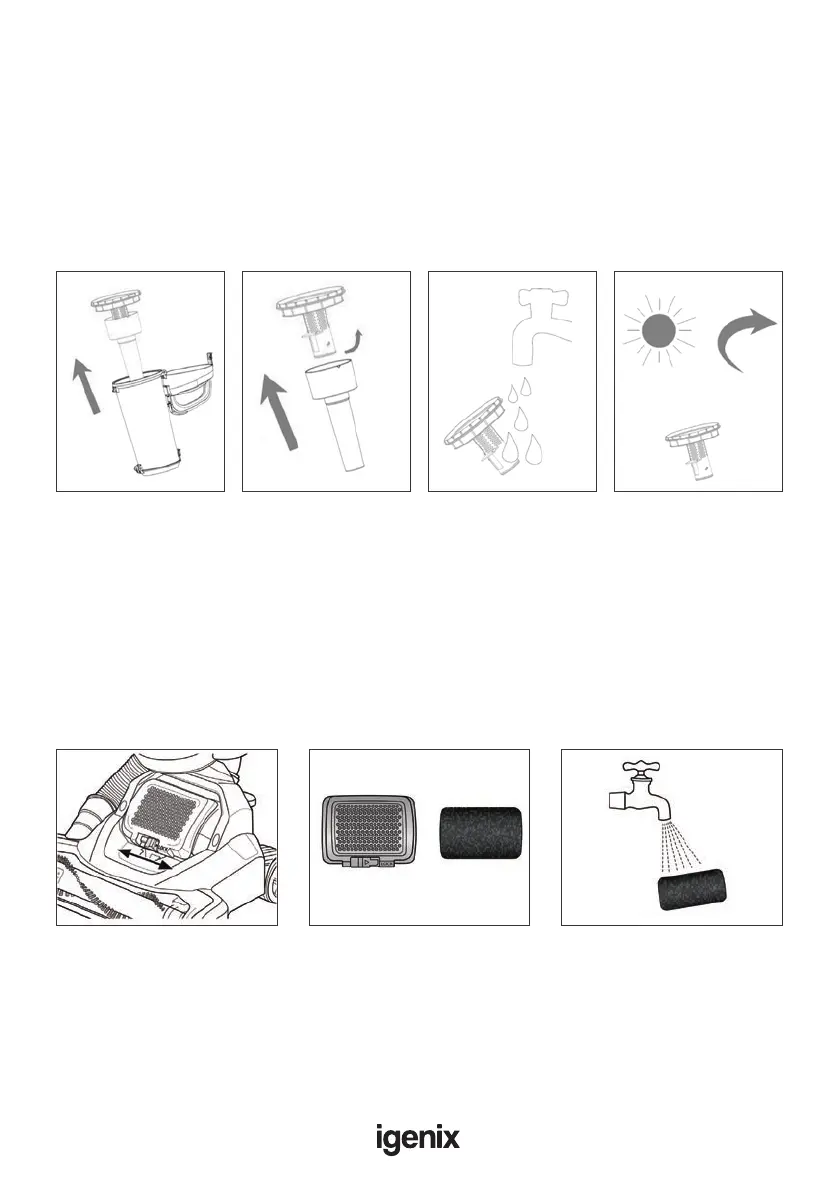
Cleaning the Dust Filter
Step 1: Remove the centre of the dust container.
Step 2: Turn the dust lter, and remove.
Step 3: Wash the dust lter under running water.
Step 4: Leave to fully dry for at least 24 hours before placing back in the machine.
WARNING: Do not use detergent to clean the dust lter. The
dust lter must be air dried – never use external heat sources.
Cleaning the Exhaust Filter
Step 1: Locate and unlock the lter cover as shown. Slide left to unlock, right to
lock.
Step 2: Remove the lter cover and lter. Wipe with a cloth over a bin, removing
dirt and debris.
Step 3: Wash with water every 3 months and allow at least 24 hours to dry
making sure it is completely dry before placing back into the machine.
24hr
Filter Cover Filter


 To Next Page