12
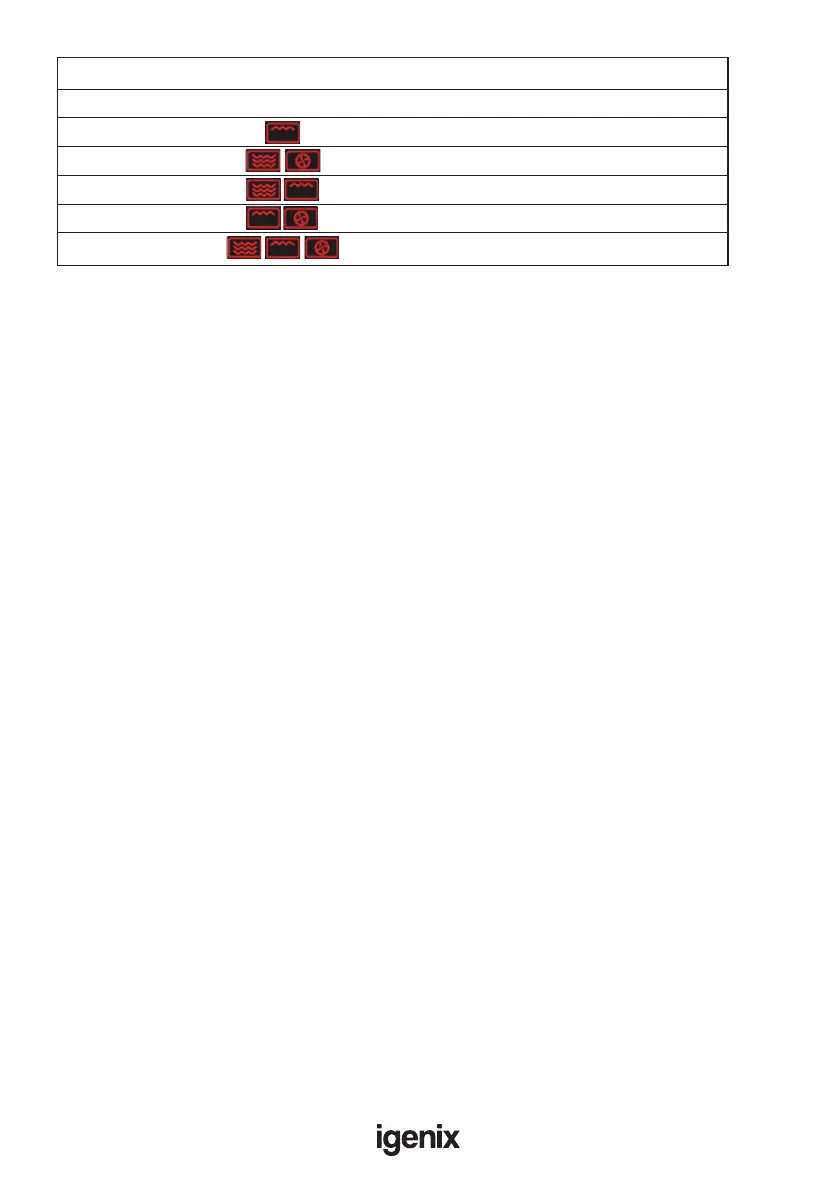
Combination Function Guide
Function Codes Symbol Microwave Grill Convection
G-1 •
C-1 • •
C-2 • •
C-3 • •
C-4 • • •
NOTE: In cooking state press “MICROWAVE”, the current power will be displayed for 2-3 seconds.
Grill or Combi Cooking
1) Press “GRILL/COMBI” button, the LED display will ash “G-1”, select required setting by pressing
“GRILL/COMBI” button up to 4 times or use the dial to choose the power required. Refer to
“COMBINATION FUNCTION GUIDE” above, which details each setting.
2) Press “START/+30SEC./CONFIRM” button to conrm setting.
3) Turn the dial to set cooking time from 0:05 to 95:00.
4) Press “START/+30SEC./CONFIRM” again to start cooking
Note: To check the selected function whist in cooking mode press “GRILL/COMBI” button, then the
current function code will be displayed for 2-3 seconds.
Example: If you want to use grill power to cook for 10 minutes, you can operate the appliance as
follows:
Press “GRILL/COMBI” once, the screen will ash “G-1”.
Press “START/+30SEC./CONFIRM” button to select.
Turn the dial to adjust the cooking time until it displays “10:00”.
Press “START/+30SEC./CONFIRM” button to start cooking.
Note: Half way through grill time the appliance will beep twice to indicate that food should be turned
over, grilling will continue if not interrupted.
Convection cooking (with preheating function)
Convection cooking will let you cook food like a traditional oven.
The microwave function is not used. It is recommended that you should preheat the oven to the
appropriate temperature before placing the food in the oven.
1) Press the “CONVECTION” button once, “150°C” ashes
2) To increase the temperature, continue to press the “CONVECTION” button or turn dial until
desired temperature displayed.
Note: Please refer to cookware guideline table for suitable containers.
3) Press the “START/+30SEC./CONFIRM” button to conrm the temperature.
4) Press the “START/+30SEC./CONFIRM” button to start preheating. When the temperature is reached
the appliance will beep twice to remind you to put the food into the oven. The temperature will ash
on the display.
5) Put the food into oven and close the door. Turn the dial to adjust the cooking time (maximum
95 minutes)
6) Press the “START/+30SEC./CONFIRM” button to start cooking.
Note: a) Cooking time cannot be input until the preheated temperature is reached. The door must be
opened and closed to enable the cooking time to be entered


 To Next Page