2221
Place or mount your cameras
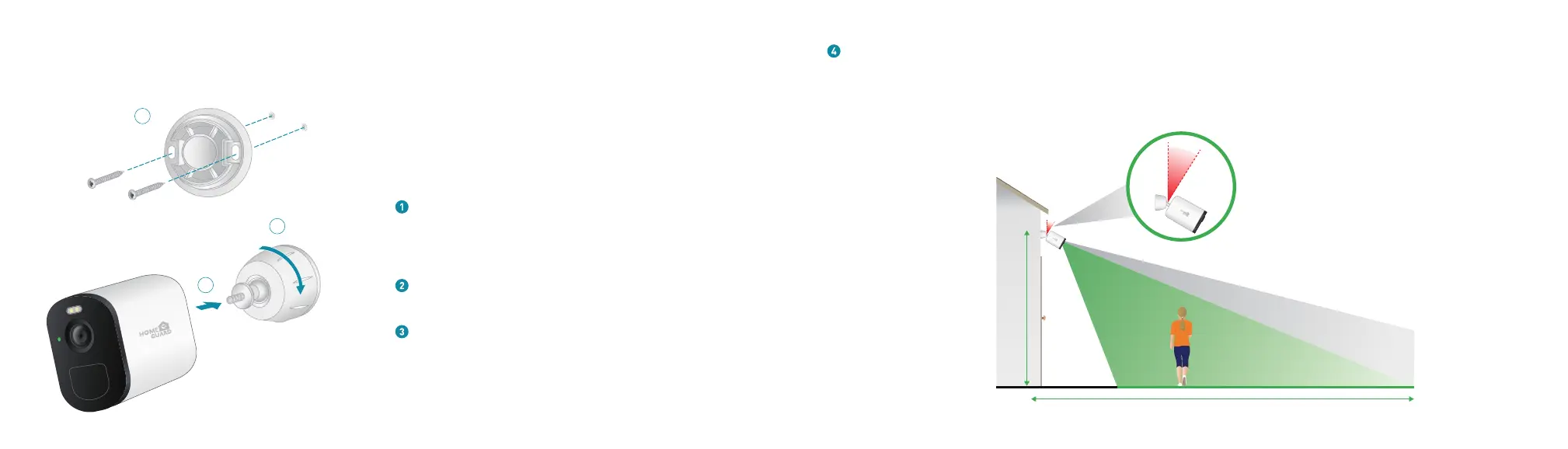
Place the wall mount against the wall, with the arrow pointing
up, and secure it with screws.
Note: If you are mounting the camera on drywall, we recommend using
the included wall anchors.
Insert the mount housing to the wall plate. Turn the
mount housing clockwise, until it clicks in place.
You can place your camera on a flat surface or you can mount on
a wall. Place your camera in a location with a clear, unblocked
field of view and with a good Wi-Fi signal.
Attach the camera to the mount.
1
2
3
Mount your camera at least 7 feet (2 meters) above the floor or the ground and aim it slightly downward for the best sensor
performance. The best angle is about 15 degrees downward. Place your camera so that side-to-side traffic crosses its field
of view.The motion sensor is most sensitive to side-to-side motion that’s 5 to 20 feet (1.5 to 6 meters) from the camera
25ft
7ft
15
°


 To Next Page