11 12
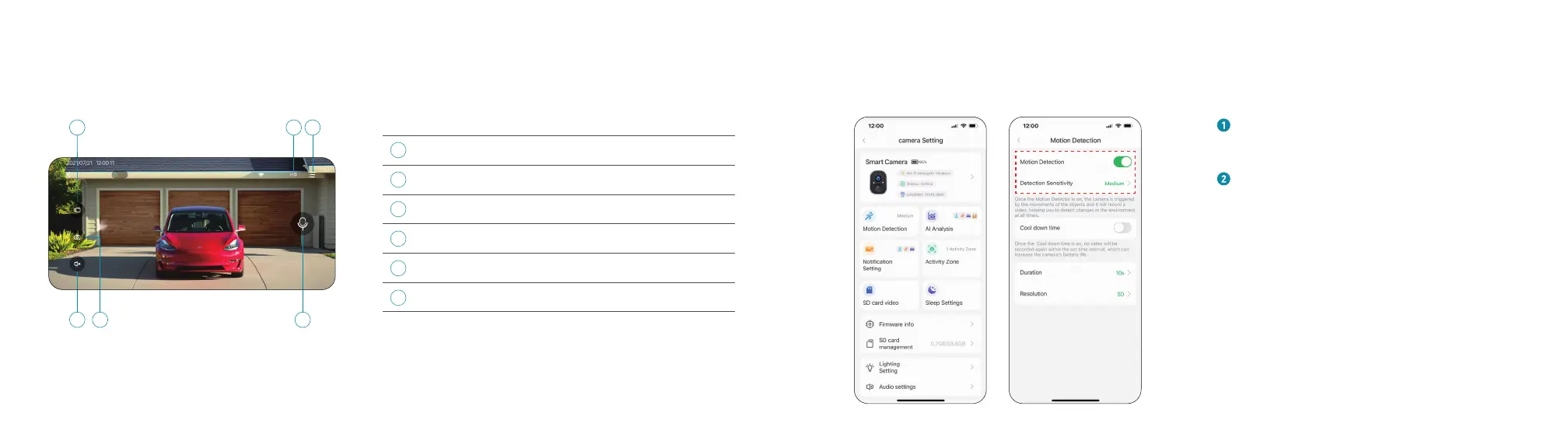
Live View
54
1
6
2 3
1
5
6
2
3
4
Saves video clip from a live video
Tap to change between video quality levels: SD, FHD
Tap to access camera setting, alarm & light setting
Tap to hear the camera or unmute
Saves images captured from a live video
Activate the microphone to enable 2-way talk
Record
Resolution
Setting
Mute / Unmute
Capture
2-way talk
Live
60KB/s
PIR Motion Detection
Turn on 'Motion Detection' and adjust
sensitivity.
When you turn on 'Alarm Siren' (In Sound
Setting) or 'Alarm Flash' (In Lighting
Setting), the camera will sound an alarm
or keep flashing when motion detected.


 To Next Page