EasyManua.ls Logo

iHealth BP5 - User Manual

iHealth BP5
25 pages
Print Icon
To Next Page IconTo Next Page
Loading...
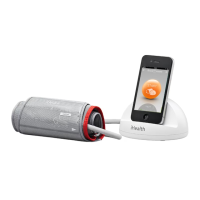
Wireless Blood Pressure Monitor (BP5)
OWNER’S MANUAL
EN
Table of Contents
INTRODUCTION
PACKAGE CONTENTS
INTENDED USE
BLOOD PRESSURE CLASSIFICATION FOR ADULTS
CONTRAINDICATION
PARTS AND DISPLAY INDICATORS
SET UP REQUIREMENTS
SET UP PROCEDURES
MEASUREMENT PROCEDURES
SPECIFICATIONS
GENERAL SAFETY AND PRECAUTIONS
BATTERY HANDLING AND USAGE
TROUBLESHOOTING
CARE AND MAINTENANCE
WARRANTY INFORMATION
EXPLANATION OF SYMBOLS
IMPORTANT INFORMATION REQUIRED BY THE FCC
OTHER STANDARDS AND COMPLIANCES
ELECTROMAGNETIC COMPATIBILITY INFORMATION
1
1
1
2
2
2
3
4
5
8
9
11
13
14
15
15
17
18
19
2

Other manuals for iHealth BP5

Questions and Answers

  • G
    Gabriel WilliamsAug 19, 2025
    What to do if iHealth BP5 displays 'ERROR'?
    • M
      Mark MendezAug 19, 2025
      If your iHealth Blood Pressure Monitor displays an 'ERROR' message or shows an abnormal result, it could be due to several reasons. Your blood pressure might be outside the measurement range, or you may have moved your arm or the monitor during the test. The cuff might not be inflating correctly, or the pressure could be falling too quickly. Other potential causes include an irregular heartbeat, incorrect cuff application, improper cuff position or tightness, incorrect body posture, or speaking, moving, or being agitated during the test. To resolve this, retest ensuring your blood pressure is within range, remain still, and follow cuff application and body posture instructions. If you have a serious arrhythmia, consult your doctor.
  • S
    Sheila WatersAug 23, 2025
    Why iHealth BP5 has no response?
    • T
      Taylor LewisAug 23, 2025
      If your iHealth Blood Pressure Monitor is not responding, it may be due to incorrect operation or strong electromagnetic interference. To fix this, press and hold the START/STOP button for about 10 seconds to reset the device. Then, relaunch the app and reconnect your iOS device to the monitor.
  • J
    James KingAug 26, 2025
    How to fix unstable Bluetooth connection on iHealth BP5?
    • L
      Laura MartinezAug 26, 2025
      If the Bluetooth connection of your iHealth Blood Pressure Monitor is unstable, it could be due to an unsuccessful Bluetooth connection, an abnormal monitor, or strong electromagnetic interference. Try resetting your iOS device and the monitor (by pressing the START/STOP button for about 10 seconds). Also, ensure that the monitor and iOS device are away from other electrical equipment. For more information, please see GENERAL SAFETY AND PRECAUTIONS.
  • J
    Jessica ClineAug 28, 2025
    Why is my iHealth BP5 Blood Pressure Monitor Bluetooth connection unstable?
    • D
      David CollinsAug 28, 2025
      An unstable Bluetooth connection on your iHealth Blood Pressure Monitor may be due to: a failed Bluetooth connection, an abnormal monitor state, or strong electromagnetic interference. To resolve this: * Restart your iOS/Android device. * Reset the monitor by pressing and holding the START/STOP button for about 10 seconds. * Ensure the monitor and your device are away from other electrical equipment.
  • R
    Rebecca DodsonAug 30, 2025
    What to do if iHealth BP5 shows no response?
    • Z
      Zachary Mcmillan MDAug 30, 2025
      If your iHealth Blood Pressure Monitor is not responding, it could be due to incorrect operation or strong electromagnetic interference. Try the following: * Reset the monitor by pressing and holding the START/STOP button for about 10 seconds. * Re-launch the app and reconnect your iOS/Android device to the monitor.
  • A
    Abigail WhiteSep 1, 2025
    What to do if iHealth BP5 Blood Pressure Monitor has no response?
    • C
      Catherine KingSep 1, 2025
      If your iHealth Blood Pressure Monitor is not responding, it might be due to incorrect operation or strong electromagnetic interference. To resolve this, try to reset the device, relaunch the app, and reconnect the iOS device to the monitor.
  • J
    Joshua ChristensenSep 3, 2025
    Why does iHealth BP5 display abnormal result?
    • R
      Ryan JarvisSep 3, 2025
      An abnormal result on your iHealth Blood Pressure Monitor can occur if the cuff position was incorrect or not properly tightened; in this case, review the cuff application instructions and retest. Also, check your body posture and retest following the posture instructions. Avoid speaking, moving your arm or body, or being angry, excited, or nervous during the test. Retest when calm, avoiding any movement or talking.
  • S
    sburgessSep 5, 2025
    How to fix low battery on iHealth BP5 Blood Pressure Monitor?
    • K
      Kelly BlackSep 5, 2025
      If your iHealth Blood Pressure Monitor shows a low battery, it means the battery level is less than 25%. You should charge the battery.
  • N
    Nancy ParrishSep 7, 2025
    Why does my iHealth BP5 display an abnormal result?
    • H
      Heather JonesSep 7, 2025
      If your iHealth Blood Pressure Monitor displays an abnormal result, it might be due to incorrect cuff placement or tightness. Review the cuff application instructions and retest. Alternatively, your body posture may have been incorrect during testing, so review posture instructions and retest. It could also be due to speaking, moving your arm or body, or being angry, excited, or nervous during the test. In this case, retest when calm, and avoid speaking or movement during the test.
  • K
    Kayla MoranSep 9, 2025
    What to do if iHealth BP5 display reads “ERROR”?
    • K
      Kristin PalmerSep 9, 2025
      If your iHealth Blood Pressure Monitor shows 'ERROR', it could be because your blood pressure is outside the measurement range. Retest, ensuring your blood pressure is within the specified range. Another reason could be that your arm or the monitor moved during the test. To resolve this, retest and ensure you hold still.

Summary

INTRODUCTION

PACKAGE CONTENTS

Lists all items included in the product package for the user.

INTENDED USE

Specifies the intended purpose and application of the blood pressure monitor.

BLOOD PRESSURE CLASSIFICATION FOR ADULTS

CONTRAINDICATION

Advises against using the monitor for individuals with serious arrhythmia.

PARTS AND DISPLAY INDICATORS

SET UP REQUIREMENTS

SET UP PROCEDURES

Connect to iOS Device via Bluetooth

Connects the monitor to an iOS device via Bluetooth for data transfer and operation.

MEASUREMENT PROCEDURES

Body Posture

Details proper body posture for accurate blood pressure measurements.

Apply the Cuff

Instructions on how to correctly apply the blood pressure cuff to the arm.

Auto Connect Option

Enables automatic reconnection to the last used iOS device.

Taking Measurements with Multiple iOS Devices

Instructions for using the monitor with multiple iOS devices.

Measuring without an iOS Device

Enables offline measurement mode for use without an iOS device.

SPECIFICATIONS

GENERAL SAFETY AND PRECAUTIONS

BATTERY HANDLING AND USAGE

TROUBLESHOOTING

CARE AND MAINTENANCE

WARRANTY INFORMATION

EXPLANATION OF SYMBOLS

IMPORTANT INFORMATION REQUIRED BY THE FCC

OTHER STANDARDS AND COMPLIANCES

ELECTROMAGNETIC COMPATIBILITY INFORMATION

iHealth BP5 Specifications

General IconGeneral
BrandiHealth
ModelBP5
CategoryBlood Pressure Monitor
LanguageEnglish

Related product manuals