FRONT
9
» Connect the built-in Aux-in cable on the back of the iAV2v2 to the Aux jack of your
Echo device.
» You can now ask Alexa to access all the functions of your Echo device and hear the
audio through the iAV2v2.
VOLUME CONTROL
» For Echo Dot: Adjust the volume on the Dot to your desired level.
» For Echo Input: Ask Alexa to adjust the volume to your desired level.
“Alexa, stop” “Alexa, set volume to 5”
“Alexa, mute” or “Alexa, unmute” “Alexa, turn up/down the volume”
» TIP: You can also use the Alexa app to adjust the volume on your Amazon Echo devices.
Troubleshooting for Low Audio:
» Make sure that the 3.5mm audio cable is fully inserted into the Echo Dot.
» Make sure that you raise the volume on your Echo Dot.
» Make sure that you raise the volume on your phone.
Low Battery
Indicator
When lit, backup
battery needs
replacing
PM
Indicator
When lit,
time is PM
Contact Us: 1•800•288•2792
For full warranty and full instructions
visit: www.ihome.com/support
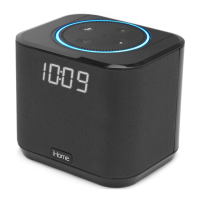
THE DISPLAY
Amazon, Alexa, Echo Dot and all
related logos are trademarks of
Amazon.com, Inc. or its aliates.
Playing Audio On Your Echo Device
» NOTE: Backup battery only maintains clock settings
during a power interruption. Unit does NOT operate on battery.
DC 12V, 1.5A
OR
9
DC 12V, 1.5A
Bedside Speaker System
Model: iAV2v2
for Amazon Echo Devices
QUICK START GUIDE
» iAV2v2 » USB cable » Universal voltage adapter
» TIP: Press the + and – Buttons on iAV2v2 together during clock setting to switch
display from standard 12 hour to 24 hour display.
1 Clock Setting Button
Press and hold for 2 seconds
until clock starts flashing
to start clock setting. Adjust
with +/– Buttons. Press again
to complete clock setting.
NOTE: Alexa cannot set clock
2/3 +/– Setting Buttons
Press and release to adjust
clock during setting
(hold for rapid adjust)
4 Dimmer Button
Press and release to adjust
display brightness from high
to o.
5 Backup Battery Compartment
Unscrew door with Phillips
screwdriver. Insert 1 CR2450
battery as shown to maintain
clock setting during power
interruption.
6/7 AC adapter/DC Jack
Connect the included
AC adapter to the DC jack
located on the back of the
unit and connect the other
end to a working wall outlet.
8/10 USB Charging Ports
Connect a standard USB
cable (not included) to
charge mobile devices.
9 Hardwired AUX cable
BOTTOM
TOP
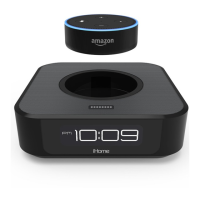
Amazon Echo Device Dock
»
Docking adapter
www.ihome.com Toll Free: 1-800-288-2792
Made in China Patents: www.ihome.com/patents
iAV2v2
MODEL
iAV2v2-A-A
Service Number:
DC 3V, CR2450 x 1Clock Backup:
DC 12V, 1.5AAC Adaptor:
Designed and Engineered in the USA
Made for the Amazon Dot (2nd Gen)
Manufactured & Serviced by SDI Technologies Inc.
RESET
RESET
TEST
TEST
iAV2v2-180719-A
ehicle
IMPORTANT SAFETY INSTRUCTIONS
When used in the directed manner, this unit has been designed and manufactured to ensure
your personal safety. However, improper use can result in potential electrical shock or fire
hazards. Please read and follow all safety and operating instructions carefully before installa-
tion and use, and keep these instructions handy for future reference. Take special note of all
warnings listed in these instructions and on the unit.
1. Water and Moisture – The unit should not be used near water. For example: near a bathtub,
washbowl, kitchen sink, laundry tub, swimming pool or in a wet basement.”
2. Cleaning – The unit should be cleaned only with dry cloth. Do not use solvents, etc”
3. Ventilation – The unit should be situated so that its location or position does not interfere
with its proper ventilation. For example, it should not be situated on a bed, sofa, rug or
similar surface that may block ventilation openings. Also, it should not be placed in a
built-in installation, such as a bookcase or cabinet, which may impede the flow of air
through the ventilation openings.”
4. Heat – The unit should be situated away from heat sources such as radiators, heat registers,
stoves or other appliances (including amplifiers) that produce heat.”
5. Only use attachments/accessories specified by the manufacturer.”
6. Lightning and Power Surge Protection – Unplug the unit from the wall socket and discon-
nect the antenna or cable system during a lightning storm or when it is left unattended and
unused for long periods of time. This will prevent damage to the product due to lightning
and power-line surges.”
7. Damage Requiring Service – The unit should be serviced by qualified service personnel
when:
A. the power supply cable or plug has been damaged.
B. objects have fallen into or liquid has been spilled into the enclosure.
C. the unit has been exposed to rain.
D. the unit has been dropped or the enclosure damaged.
E. the unit exhibits a marked change in performance or does not operate normally”
8. No naked flame sources, such as lighted candles, should be placed on the apparatus”
9. Attention should be drawn to the environmental aspects of battery disposal.”
10. CAUTION – Danger of explosion if battery is incorrectly replaced. Replace only with the
same or equivalent type.”
11. The power adapter, used as the disconnected device, It is always best to have a clear area
from where the cable exits the unit to where it is plugged into an AC socket.”
WARNING
Do not ingest the battery, Chemical Burn Hazard. This product contains a coin/button
cell battery. If the coin/button cell battery is swallowed, it can cause severe internal
burns in just 2 hours and can lead to death.
Keep new and used batteries away from children. If the battery compartment does not
close securely, stop using the product and keep it away from children. If you think
batteries might have been swallowed or placed inside any part of the body, seek
immediate medical attention.
DC 12V, 1.5A
WHICH AMAZON ECHO DEVICE DO YOU HAVE?
Docking Your Amazon Echo Dot
» Remove the included Echo Input adapter. Align the rear of the Echo Dot (the side with
the USB port and Aux Jack) with the opening in the iAV2v2 dock well and place with
the ports facing the back.
Powering Your Amazon Echo Device
Docking Your Amazon Echo Input
» Separate the two-piece Echo Input adapter, then place the Echo Input between the top
and bottom adapters, leaving the connector ports accessible on the back. Close the
adapter by lining up the printed arrows. Insert into the iAV2v2 dock as shown above, and
gently push into place.
8
10
108
BACK
FRONT
DC 12V, 1.5A
RESET
RESET
TEST
TEST
OR
6
7
6
1
2
3
4
5
10
9
8
7
» For Echo Dot: Connect the included USB cable to USB Charge Port on the iAV2v2.
» For Echo Input: Connect the USB cable to USB Charge Port on the iAV2v2.
» Connect the other end of the cable to the USB port on your Echo device.
» Connect the AC power adapter to the DC jack.


 To Next Page
 Loading...