RESET
RESET
TEST
TEST
1
Quick Start
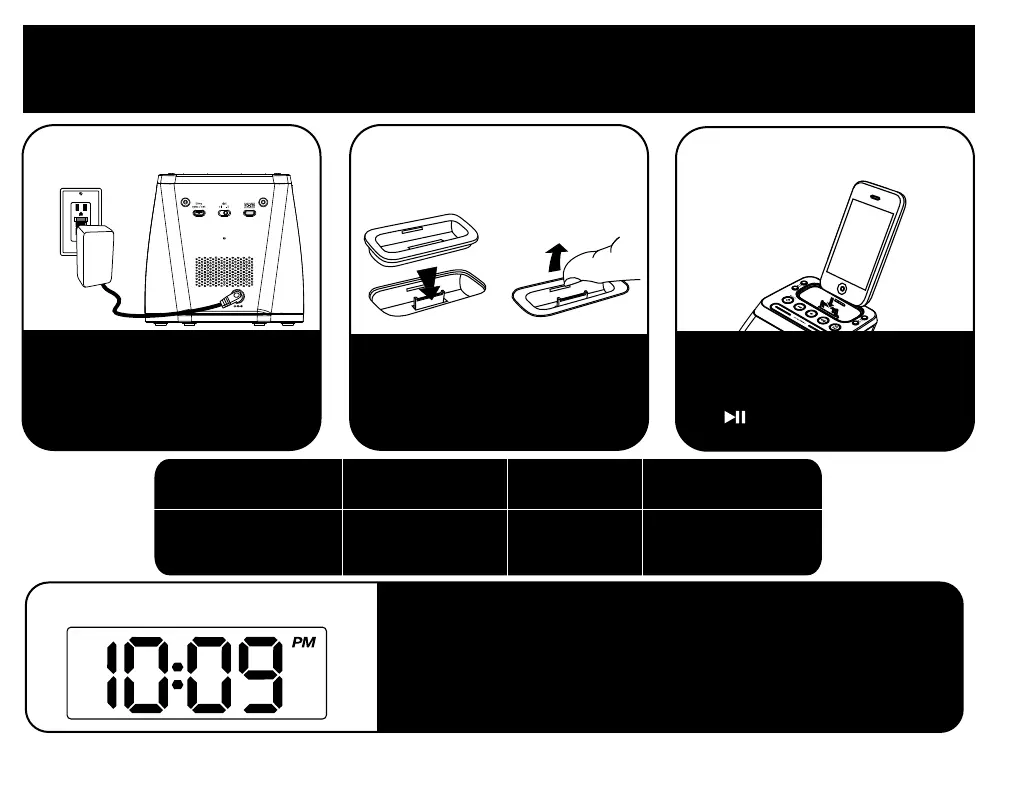
3:iPhone/iPod
4:time sync
• Make sure your iPhone or iPod is properly docked
• Press the Time Sync/Set button on the back of the unit
• “SYNC” will appear on the display
• If “FAIL” appears, try again with a different iPhone or iPod,
or see Setting Time Manually (page 4).
1:power
Attach AC adaptor cable to jack on
back of the iP21 and plug the other
end into a wall socket.
Insert iPhone/iPod into dock with proper insert
(iPhone/iPod must not be in a skin or case).
iPhone/iPod will charge while docked.
Press Button on iP21 to play iPhone/iPod.
2:inserts
Select the dock insert for your
iPhone/iPod model from the table
below and place insert in dock.
To remove insert, place thumbnail in
slot and gently pull upwards.
For this iPhone / iPod
iPod touch 2G
insert 16
iPod touch 2G/3G
nano 6G
iPod touch 4G
iPhone 4
insert 19
nano 6G/touch 4G
insert 20
iPhone 4
Use this insert



 To Next Page