PLE1700S Service Manual
-31-
05/12/2006
F. Adjust Color Temperature:
(1) EEPROM INIT(5BLOCKS):
Press “▼” key move cursor to EEPROM INIT, Press key then monitor will
INIT ADC value
(2) Press “▲” key move cursor to “White Balance”, Press key do white balance
adjustment.
(3) Press “▼” key move cursor to “Color Temerature Adjust”, Press key, Then
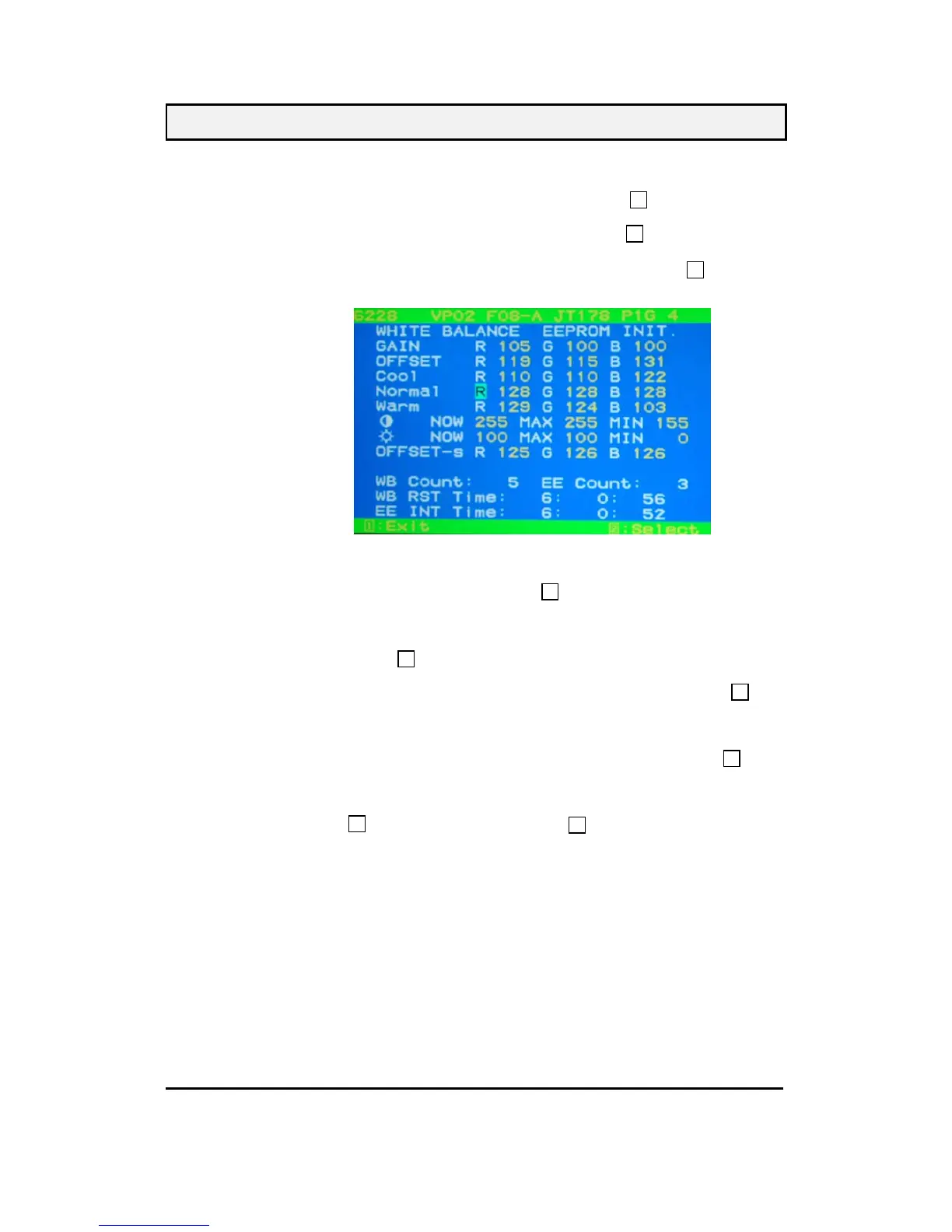
OSD will display Fig.2
(The data on this picture is a example only,the real one,please refer to your monitor.)
(4) Cool verify: move cursor to Cool Press key,
Press “▼” ,“▲” key adjust R.G.B value
x=0.283 ±0.03
y=0.298 ±0.03
Press key return to Fig.2
(5) Normal verify: Repeat (4) press “▼” ,“▲” move cursor to Normal press key
x=0.313 ±0.03
y=0.329 ±0.03
Y≥250 cd/m
2
(6) Warm verify: Repeat (4) press “▼” ,“▲” move cursor to Warm press key
x=0.332 ±0.03
y=0.348 ±0.03
(7) Press key go back to Fig.2, Then press key return to Fig.1, Power key
OFF/ON quit factory mode.
G. Color Temperature & Luminance Verify:
BRIGHTNESS MAX, CONTRAST MAX
Cool: x=0.283 ±0.03 y=0.298 ±0.03
Normal: x=0.313 ±0.03 y=0.329 ±0.03 Y≥250 cd/m
2
Warm: x=0.332 ±0.03 y=0.348 ±0.03
2. Geometry:
(a). Set cross-hatch pattern and preset timing as timing table listed.
(b). Change to each mode in turn and wait for the monitor finish auto-alignment and save
process before change to next mode.
(c).
Until all of modes are agjusted, exit OSD menu and press PWR OFF to exit factory
mode.
2
2
2
(Fig.2)
1
2
1
2
2
1



 To Next Page