ENGLISH
Menu:2
1680 × 1050
H:65.4KHz V:60.1Hz
DCR
OFF
Menu : 2
(Analog)
On
Problem / Option Button to Press
Adjustment Item
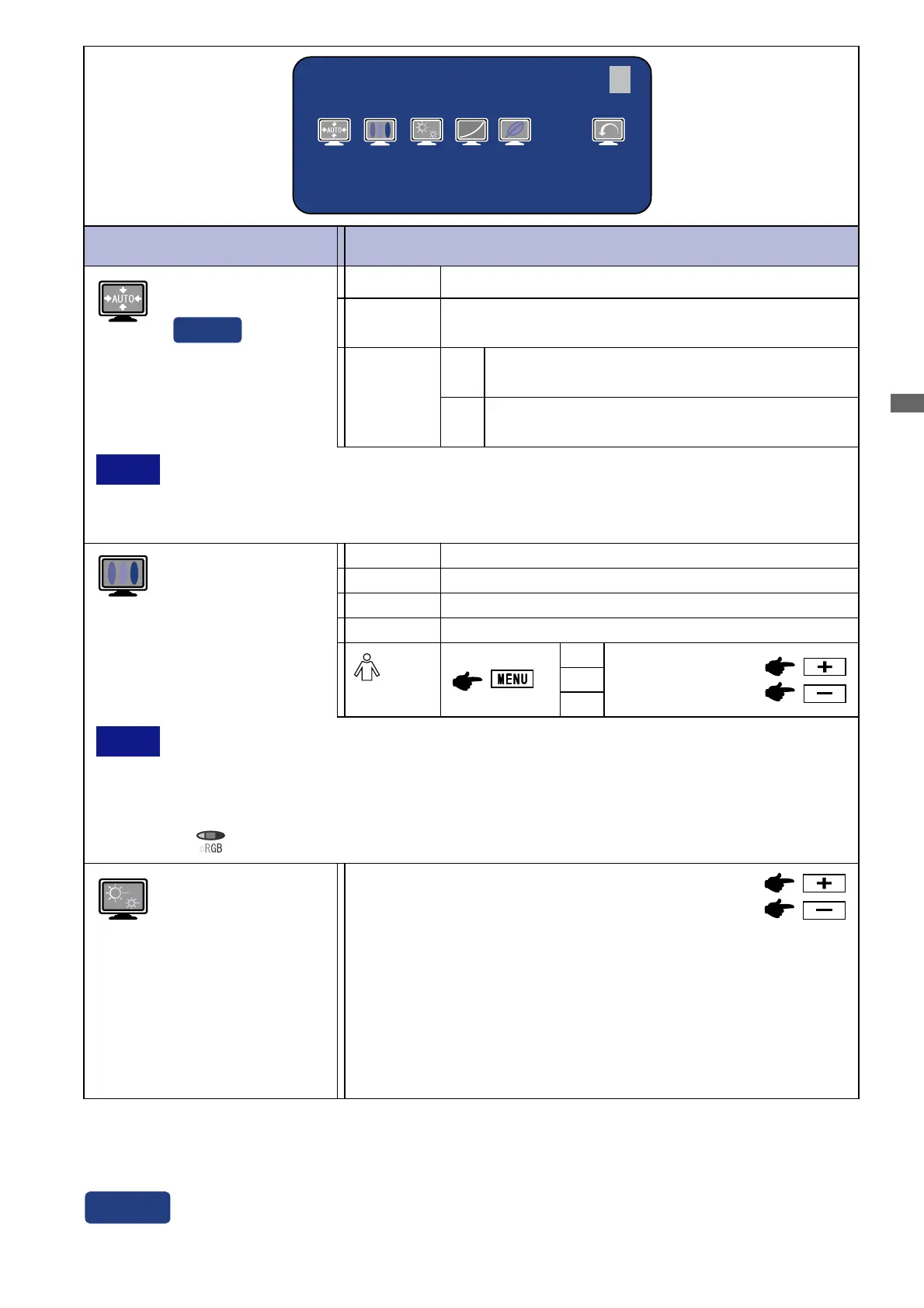
Color Temp.
Color 1: 9300K
Sharpness
1 2 3 4 5
Adjust the picture quality at resolutions of less than 1680 ×
1050.
You can change the picture quality from 1 to 5 (sharp to soft).
Press the + Button to change the picture quality in numerical
order. Press the – Button to change the picture quality in reverse
numerical order.
Auto Set-up *
3
NO
YES
Return to Menu.
Adjust Clock, Phase, V-Position and H-Position
automatically.
Direct
*
3
For best results, use the Auto Set-up in conjunction with the adjustment pattern. See page 21 for
SCREEN ADJUSTMENTS.
1
NOTE sRGB is an international standard which defines and unifies the difference of color
appearance between equipment.
You can not adjust the Brightness, Contrast, Gamma and Economy Mode during sRGB
mode because those settings are locked.
is displayed while sRGB is active.
3
Color 3: 6500K
Color 2: 7500K
sRGB
Setting
The Auto Set-up is not performed when the
signal input is changed.
Off
Adjust Clock, Phase, V-Position and H-Position
automatically when the signal input is changed.
G
R
B
Too weak
Too strong
s
NOTE The brightness of screen varies for several seconds during the adjustment.
This function is not performed automatically when changing the signal input because
the factory-preset of “Setting” in Auto Set-up is set to Off.
(User)
2
See page 13 for Direct adjustment.
Direct
OPERATING THE MONITOR 15






 To Next Page