EasyManua.ls Logo

IKA MS 3 control - Page 4

IKA MS 3 control
10 pages
Print Icon
To Next Page IconTo Next Page
To Previous Page IconTo Previous Page
Loading...
17
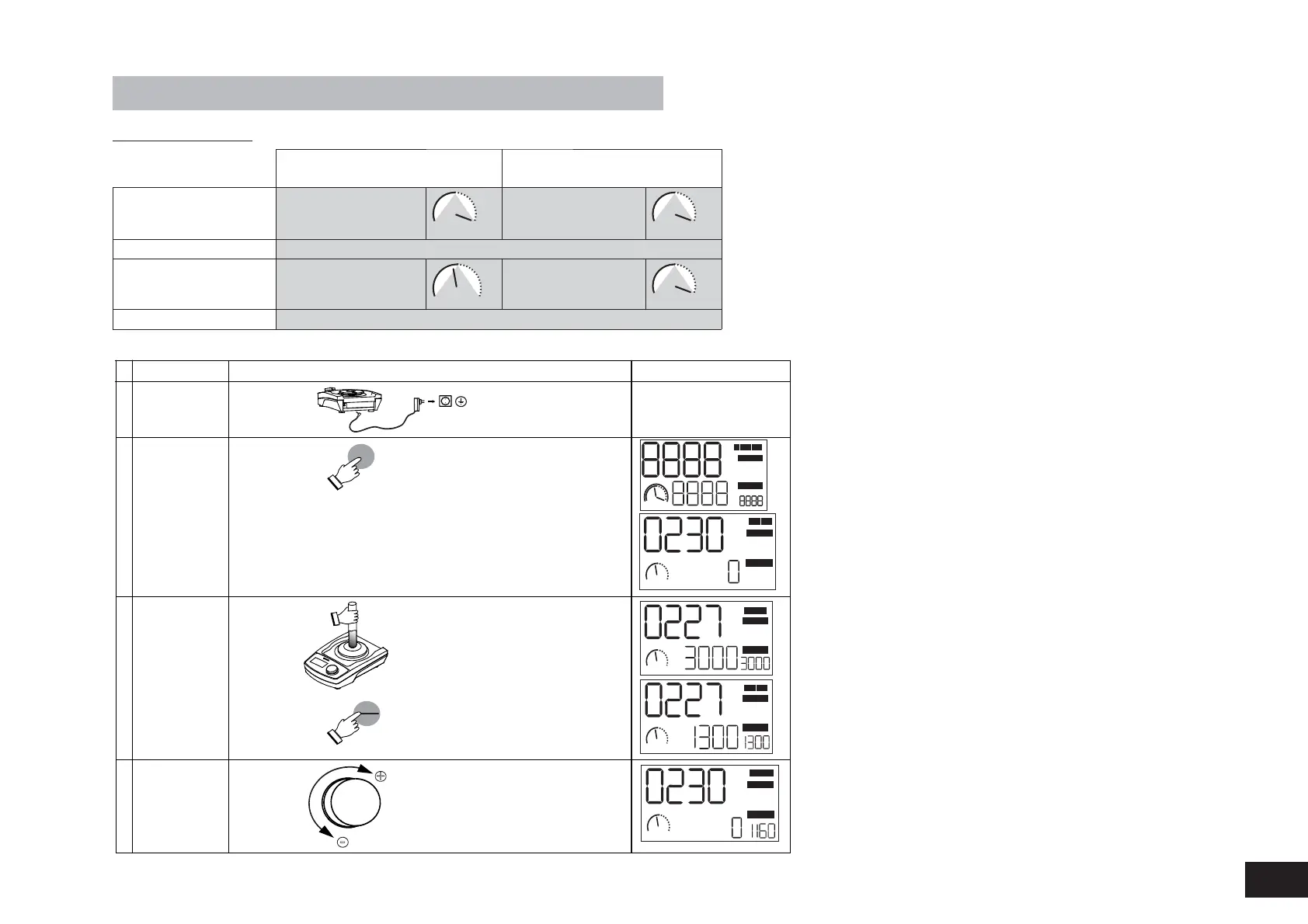
Commissioning
Power
Switching on
einschalten
Start
Stop
Change to
continuous mode
Mode A
Operating mode
"Continuous" operation
Speed upto 1300 1/min
2
The unit is ready for service
when the mains plug has been
plugged in
Introductory screen
Mode A
Operating mode "Touch"
Speed upto 3000 1/min
Touch mode
Setting the
operating modes
3
Plugging in the
mains plug
1
The values which were previously
set (speed and timer) are stored.
The mode will always be set to A
when the device is powered on
.
Speed
adjustment
4
-
+
SET 1/min
SET TIME
h:
min
:sec
REMOTE
A
1300
B
:
:
A
1300
:
min :sec
SET TIME
SET 1/min
SET 1/min
SET TIME
A
1300
SET 1/min
SET TIME
A
1300
min
:sec
min
:sec
:
:
A
1300
:
min :sec
SET TIME
SET 1/min
Operating modes
Mode A
(with speed limiter)
Mode B
(without speed limiter)
Touch mode
(
with standard attachment
MS 3.1)
max. 3000 1/min
3000
B
max. 3000 1/min
3000
B
with/without timer
Continuous mode
(with all attachments)
max. 1300 1/min
A
1300
max. 3000 1/min
3000
B
with/without timer
Setting
Display
Action

Other manuals for IKA MS 3 control

Related product manuals