How to clean: Cavity embossment
Clean the cavity embossment to remove
limestone residue after cooking with steam.
Step 1 Step 2 Step 3
Pour: 250 ml of white vinegar
into the cavity embossment.
Use maximum 6% vinegar
without any additives.
Let the vinegar dissolve the
limestone residue at the am‐
bient temperature for 30 mi‐
nutes.
Clean the cavity with warm
water and a soft cloth.
For the function: SteamBake clean the oven for every 5 - 10 cooking cycles.
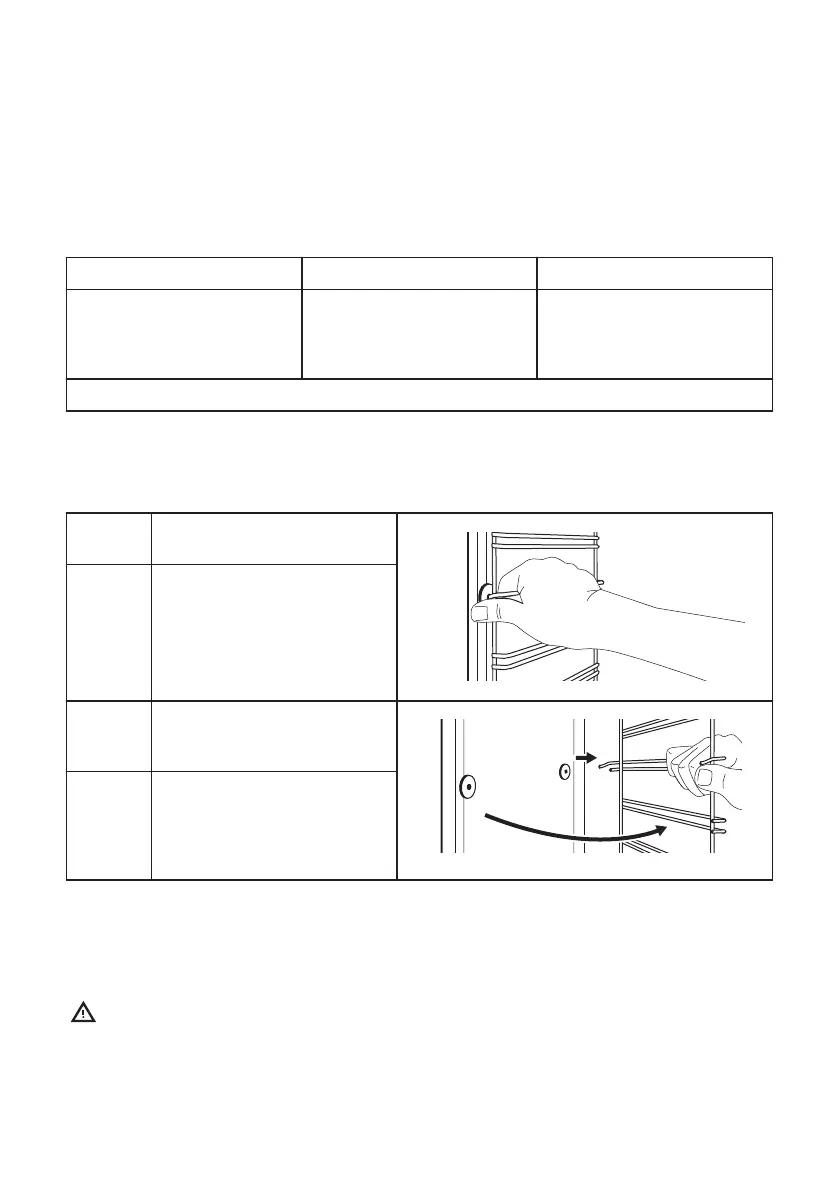
How to remove: Shelf supports
Remove the shelf supports to clean the oven.
Step 1 Turn o the oven and wait un‐
til it is cold.
Step 2 Pull the front of the shelf sup‐
port away from the side wall.
Step 3 Pull the rear end of the shelf
support away from the side
wall and remove it.
Step 4 Install the shelf supports in the
opposite sequence.
The retaining pins on the tele‐
scopic runners must point to
the front.
How to remove and install: Door
The oven door has three glass panels. You can remove the oven door and the internal glass
panels to clean them. Read the whole "Removing and installing door" instruction before you
remove the glass panels.
Caution! Do not use the oven without the glass panels.
ENGLISH 26



 To Next Page