14
BEFORE SETTING OVEN CONTROLS
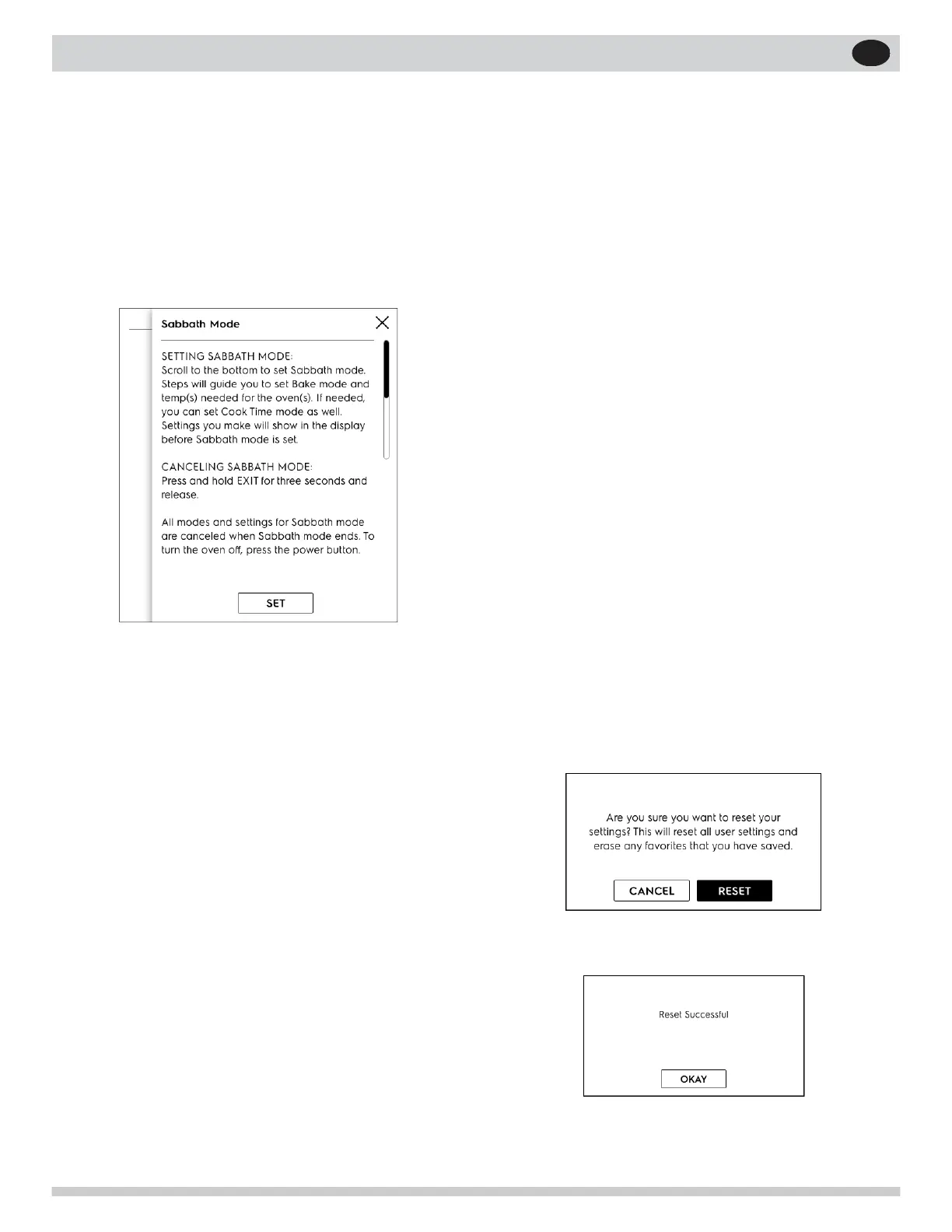
Sabbath Mode
1. Scroll to Sabbath Mode.
2. Read and follow all instructions to set and when
nished cancel. See “Setting the Sabbath Fea-
ture for the Jewish Sabbath and Holidays (some
models)” on page 27 for complete details on
how Sabbath mode works with your oven con-
trols.
Factory Reset
1. Scroll to Factory Reset and touch.
2. Follow screen prompts
Note: Your appliance was set with predetermined
(default) oven control settings. Over time, users
may have made changes to these settings. The fol-
lowing options may have been modied since the
appliance was new:
• 12 or 24 hr display mode
• Screen Brightness
• Language
• Favorites
• Show Clock
• All Food Probe settings
• Continuous bake or 12 hour energy savings
mode
• Silent or audible control
• Oven temperature display (Fahrenheit or Cel-
sius)
• Oven temperature adjustments (UPO)
If Reset is touched all the settings will return to
default.
3. Are you sure?
4. Reset.
5. OKAY


 To Next Page