TM60Pi (06/00) PAG. 7
3.3.- Starting-up
Proceed with caution; the equipment may not be connected correctly
which may lead to unforeseeable movements on starting-up.
Once the receiver has been connected, disconnect the power supply to the motors(for
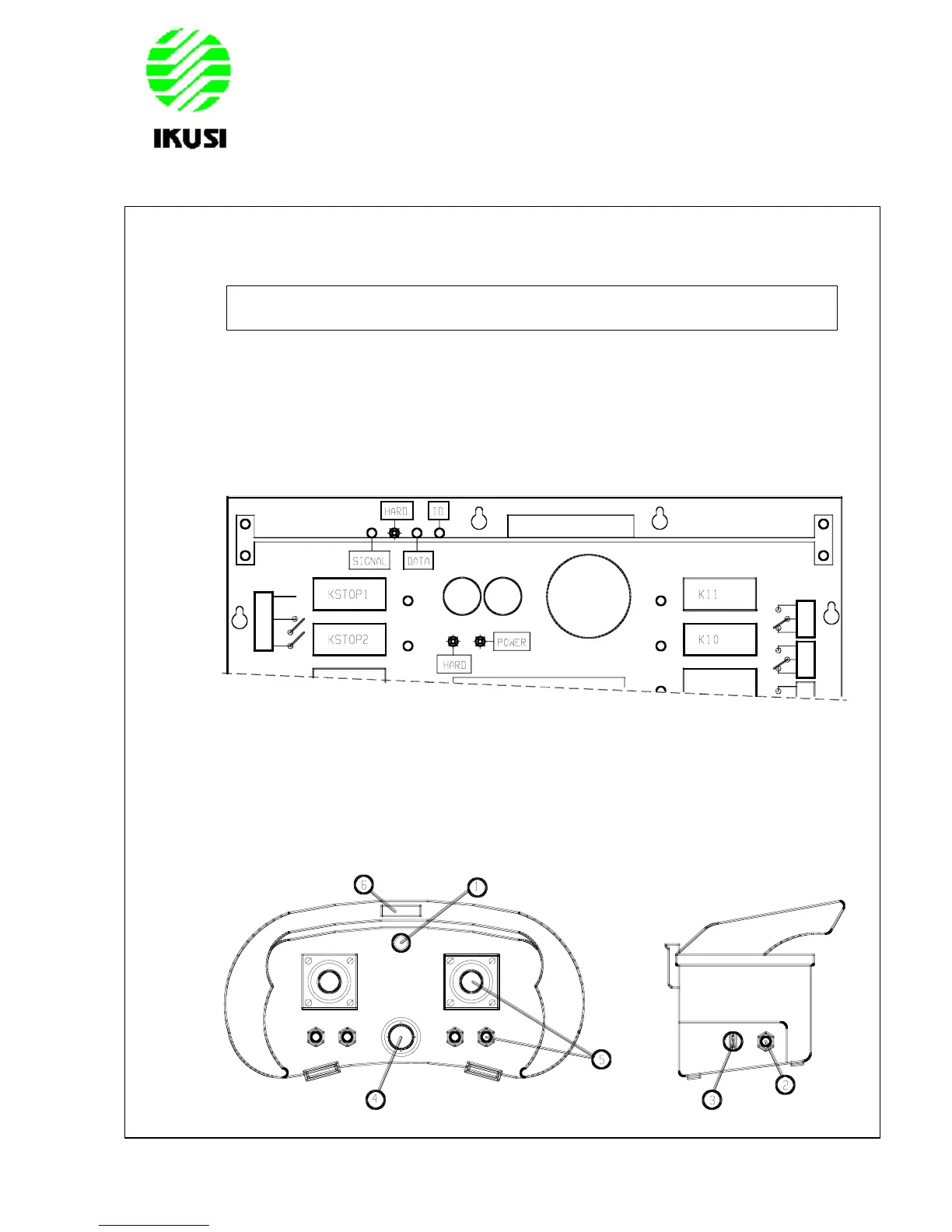
example, by removing the fuses) and power on the receiver. The following receiver
LEDs should now light up.
POWER: indicates that the power supply is correct.
HARD: two LEDs on the relay board and on the logic board indicate the absence
of defects on the boards.
Next, place a charged battery in the transmitter and turn it ON. To do this, turn the
contact key, push and pull out the STOP button and press the start button. The green
LED should light up, indicating that the transmitter is transmitting.
1.- LED 4.- STOP button
2.- Start button 5.- Command elements
3.- Contact key 6.- Label for crane identification



 To Next Page